The Ultimate Guide to Enterprise Software Testing
August 19, 2026



Web application security testing is the process of finding, evaluating, prioritizing, and fixing vulnerabilities in a web application before an attacker finds them first. Left unaddressed, a vulnerability can expose customer data, cost real money to clean up, and damage a company’s name in a way that outlasts the incident itself.
No single method catches every kind of vulnerability. A tool that scans source code won’t catch a flaw that only shows up while the application is running. A tool that scans a running application won’t catch a vulnerability sitting inside a third-party library nobody’s actively testing. Some methods, like penetration testing, work by simulating a real attack against the live application, while others check the code itself before it ever runs. An effective security program combines several of these approaches, and each one covers a gap the others leave open.
This guide covers the major approaches in use today: static application security testing (SAST), dynamic application security testing (DAST), interactive application security testing (IAST), software composition analysis (SCA), API security testing, penetration testing, threat modeling, secure coding, vulnerability management, runtime protection, and continuous security testing.
Security works best woven into every stage of the SDLC, from the first design decision through the application’s life in production. A team that saves it for a final check before release ends up finding problems at the most expensive point to fix them.
TL;DR
Web application security testing identifies vulnerabilities in web applications before attackers can exploit them. Effective testing combines techniques such as SAST, DAST, IAST, SCA, API security testing, penetration testing, and threat modeling throughout the software development lifecycle.
In the dynamic landscape of cyber threats, vulnerabilities within web programs are prime targets for exploitation.
Failing to mitigate these vulnerabilities could lead to catastrophic consequences, from data breaches that undermine customer trust to financial losses that hamper business continuity.
Web application security testing is a systematic check of everything an application touches, not just the code a developer wrote. It covers the source code itself, the third-party dependencies it pulls in, the APIs it exposes, and how it handles authentication, authorization, input validation, session management, configuration, runtime behavior, business logic, and data handling.
Testing can run manually, with a person probing the application by hand, or through automated tools scanning continuously. Most real programs use both. A person catches things a scanner misses, and a scanner covers far more ground than a person could alone.
This kind of testing surfaces problems like:
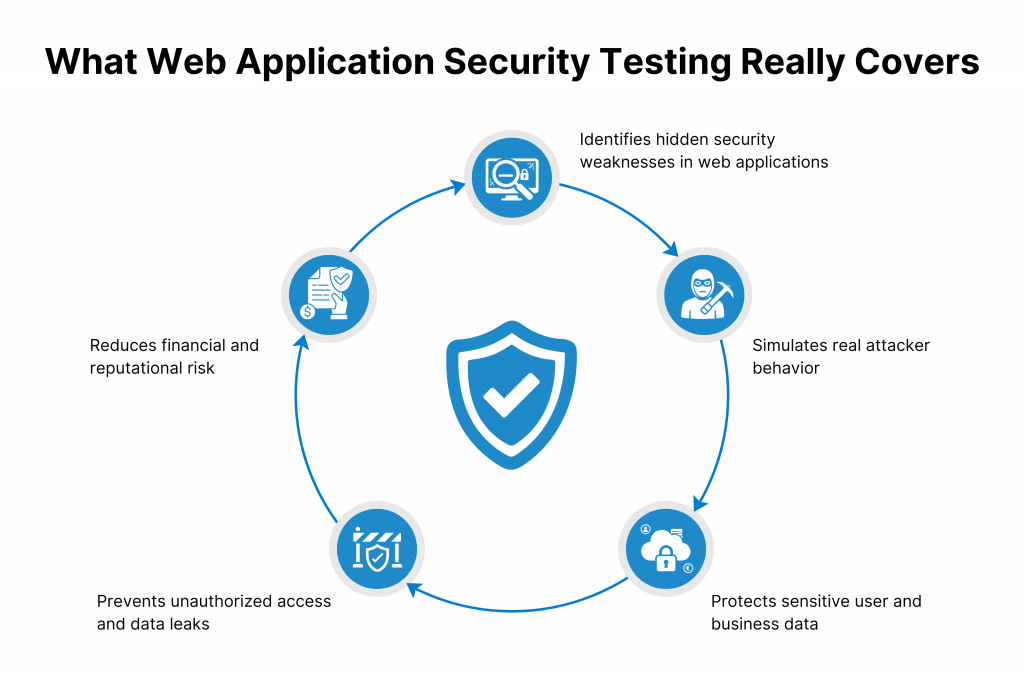
This list gives a sense of the range, not the full catalog. New vulnerability types keep surfacing as applications and attack techniques change, which is part of why testing needs to run continuously rather than as a one-time check before release.
These two get used interchangeably, and that’s part of why the wrong one gets budgeted for. Vulnerability scanning checks an application against a list of known or detectable weaknesses. It’s fast, and it’s automated, and it tells you if something on that list is present.
Security testing is the bigger category vulnerability scanning sits inside of. It includes automated scanning, but also source-code analysis, dependency analysis, runtime testing, API testing, manual testing, penetration testing, business logic testing, and threat modeling.
A scanner can tell you a library has a known flaw. It won’t catch a business logic gap, like a discount code that stacks in a way nobody intended, or a permission check that works everywhere except one edge case a human tester would think to try. That’s the kind of gap only a person, or a technique built to look for it, actually finds.
hile a broader security testing program can include:
Vulnerability scanning earns a real place in a security program. It just isn’t the whole program. Treating it as a replacement for broader testing leaves exactly the gaps above uncovered.
Here is a step by step detailed review of security testing types.
| Testing Type | What It Analyzes | Best Used For | Main Limitation |
|---|---|---|---|
| SAST | Source code | Early vulnerability detection | Limited runtime context |
| SCA | Third-party dependencies | Supply-chain risk | Doesn’t analyze custom logic |
| DAST | Running application | Runtime vulnerabilities | Limited source-code context |
| IAST | Running application plus code context | Runtime and code correlation | Requires instrumentation |
| API Security Testing | APIs | Authentication, authorization, data exposure | Requires API visibility |
| Penetration Testing | Real-world attack paths | Complex or chained vulnerabilities | Usually point-in-time |
| RASP | Runtime behavior | Runtime protection | Primarily a protection control |
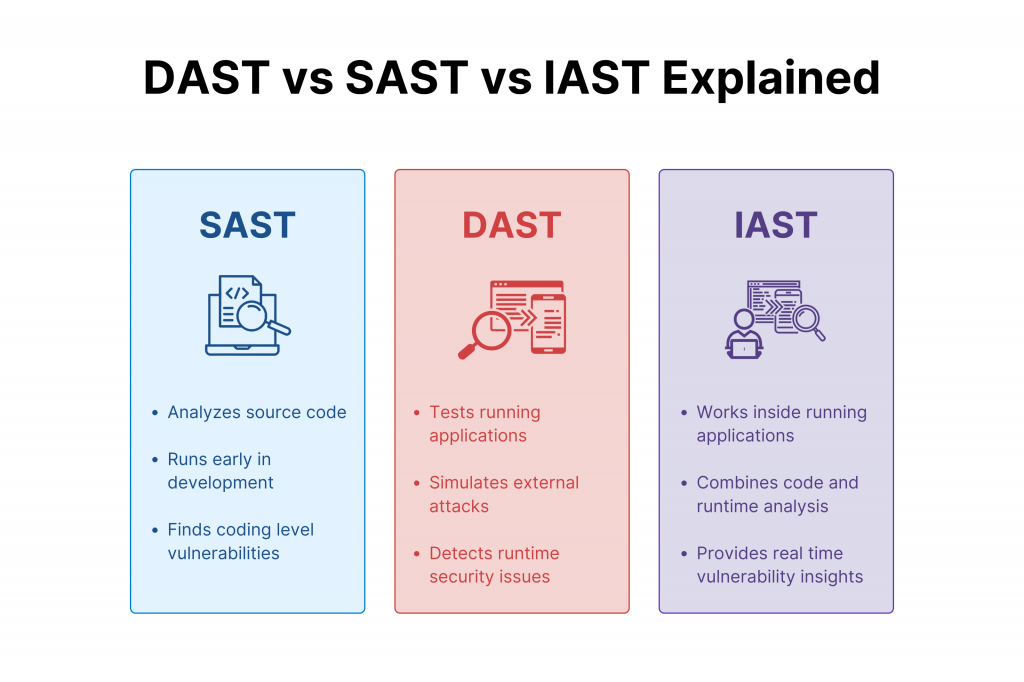
SAST analyzes source code, bytecode, or binaries without ever running the application. It reads the code the way a very fast, very thorough reviewer would, comparing it against a set of known vulnerability patterns.
How it works. A SAST tool builds a model of the code’s structure and traces how data moves through it, from where a value enters the program to where it gets used. If untrusted input flows into a database query or a command without getting checked along the way, the tool flags it.
When it’s used. SAST fits earliest in the process, since it only needs the code itself, not a running application. Teams run it inside the IDE as a developer writes, on every pull request before code merges, and again in the CI/CD pipeline as a gate before deployment. That’s the core of shift-left security: catching a flaw while it’s still a few lines in an editor, not a live vulnerability in production.
What it catches. Common findings include:
Limitations. SAST has real blind spots. It has no view of the application at runtime, so it misses anything that only shows up once the code is actually executing, like a flawed handoff between two services. It also produces false positives, flagging code that looks risky on paper but is safe in context. That means someone has to tune the rules for the codebase, and a developer still has to validate each finding before acting on it. Skip that validation step, and a team ends up ignoring the tool altogether.
SCA checks the third-party libraries and open-source packages an application depends on, and flags the ones carrying known vulnerabilities or outdated versions. Most applications lean heavily on external code, and one vulnerable dependency buried three layers deep can expose the whole thing. SCA doesn’t look at the custom code a team wrote itself, which is why it runs alongside SAST rather than in place of it.
DAST is a way to test a running application from the outside, the way an attacker is. There’s no access to the source code. This is black-box testing: the tool sends real requests at the application and judges it by how it responds, the same view an outsider has.
How it works:
A DAST tool is a crawler first. It moves through the application the way a user does, clicking through pages and forms. Then it uses malformed or malicious input on every input point it finds, and it watches for a response that reveals a weakness. It never opens the codebase. Everything it knows is what the application shows it.
When it’s used:
DAST is run against a live, deployed instance, usually in a staging or QA environment that is close enough to production for the results to mean something. It comes later than SAST, once there is an actual running application to attack, and it catches problems that are only present once the code is executing.
What it catches:
Common findings are:
Limitations:
DAST has no visibility into the source code, so a finding is often missing any clue about which line is responsible, and a developer is left to trace the issue back through the codebase by hand. It also only tests what it can reach. A page behind a login flow it never uses, or a feature it is not aware of, stays untested. The tool’s coverage is only as good as the crawl and the test scripts behind it.
Updated the style note to call out “is / are / use” specifically, so this carries into the rest of this article and future ones. Ready for IAST next, or wherever you want to go.
What Is Interactive Application Security Testing (IAST)?
IAST is a mix of SAST and DAST. It watches the application from the inside while it is actually running, so it has both the runtime view DAST has and the code-level view SAST has.
How it works. IAST is set up through instrumentation: an agent is placed inside the running application, usually the same test environment that already runs functional tests. As real traffic or test traffic moves through the application, the agent traces how data flows, from the point it enters to the point it is used, and it watches which line of code handles each step.
What it’s good at. Because IAST is watching the actual code path as it executes, a finding comes with the specific file and line responsible, not just a symptom on the outside. This is faster vulnerability triage: a developer isn’t left guessing where a runtime issue is coming from, the way they often are with DAST alone.
Limitations. IAST needs instrumentation before it can run at all, which is setup that SAST and DAST don’t require. Its results also depend on test coverage. It is only watching code paths that are actually exercised, so a feature nobody is testing is a feature IAST never sees. And because the agent is tied to a specific runtime environment, results from one setup don’t always carry over cleanly to another.
What Is API Security Testing?
API security testing checks the endpoints an application exposes, separate from the interface built on top of them. Most modern web applications are really a set of APIs underneath, connecting the front end, the back end, mobile apps, cloud services, and third-party systems to each other. An API is often reachable directly, without ever going through the interface a user sees, which is exactly what makes it a target.
What it looks for. API security testing is built around the specific ways an API can fail:
Where it fits:
APIs are usually the widest attack surface a modern application has, since they connect to so many other systems, and a lot of that surface is invisible from the interface alone. API security testing needs to be part of the broader security testing program, not a separate afterthought. A vulnerability sitting in an API is just as real, and often easier to reach, as one sitting in the interface a user actually sees.t.
Penetration testing is a person, acting as an attacker, working through the application to see what actually breaks. It’s different from every other type covered so far, because a tool is not driving it. A tool checks for known patterns. A person is chaining things together the way a real attacker is.
What it’s for. Penetration testing simulates a realistic attack from end to end, and it’s built to catch exactly what automated tools tend to miss. That includes:
Why it still matters, even with automation. SAST, DAST, IAST, and API testing are all pattern-matching against something known. A skilled tester is looking for what’s actually there, in this specific application, which is why penetration testing still finds things the automated layer is built to miss.
Limitation. Penetration testing is point-in-time. It’s a snapshot of the application as it was on the day the test ran, not an ongoing check. A release that ships the following week is untested by it. That’s why it works best as a complement to continuous automated testing, not a replacement for it, catching the deep, human-judgment issues while the automated tools handle everything that runs every day.
RASP is not a testing method. It’s a protection control that sits inside the running application and watches what happens in real time, ready to block an attack the moment it happens. Everything covered so far is a way to find a vulnerability. RASP is a way to stop one from being used, whether or not anyone found it first.
How it works:
RASP is built into the application itself, the same way IAST’s agent is. It watches real traffic and real behavior as they happen, and when it sees something that matches an attack pattern, like an injection attempt or a suspicious data access, it can block the request or shut down that part of the process before damage is done.
When it’s useful:
RASP is most useful in production, on the application version that’s actually live and reachable by real users. It’s a layer of defense for the time between when a vulnerability exists and when it’s actually found and fixed, which for any application is never zero.
How it complements testing:
RASP doesn’t replace SAST, DAST, IAST, SCA, API testing, or penetration testing. It’s what’s watching while those methods are still finding and fixing what they can. A vulnerability that testing hasn’t caught yet is still sitting in the application, and RASP is the thing standing between that gap and an actual breach.
Limitations:
RASP only reacts to what’s happening right now. It doesn’t fix the underlying vulnerability, it just blocks the attempt to use it, so the flaw is still there until someone addresses it directly. It’s also specific to the runtime environment it’s deployed in, and it can add performance overhead since it’s inspecting live traffic continuously. Treating RASP as a substitute for testing leaves the actual vulnerabilities in place, just quieter.
Threat modeling happens before a single line of code is written. It’s the process of looking at an application’s design and asking where an attacker would actually go, what they’d be after, and what stands in their way today. Everything covered so far tests code or a running application. Threat modeling tests a design, on paper, before either one exists.
How it works. Threat modeling is a sequence of questions, not a tool run:
Why it matters. Threat modeling is what makes secure-by-design development possible. A team that maps its threats before writing code is building around the risk from day one, instead of finding it in a test months later and reworking the architecture to fix it. It’s also not a replacement for the testing methods covered earlier in this guide. Threat modeling identifies the risks a design should account for. SAST, DAST, IAST, and the rest confirm whether the code that was actually built lives up to that design.
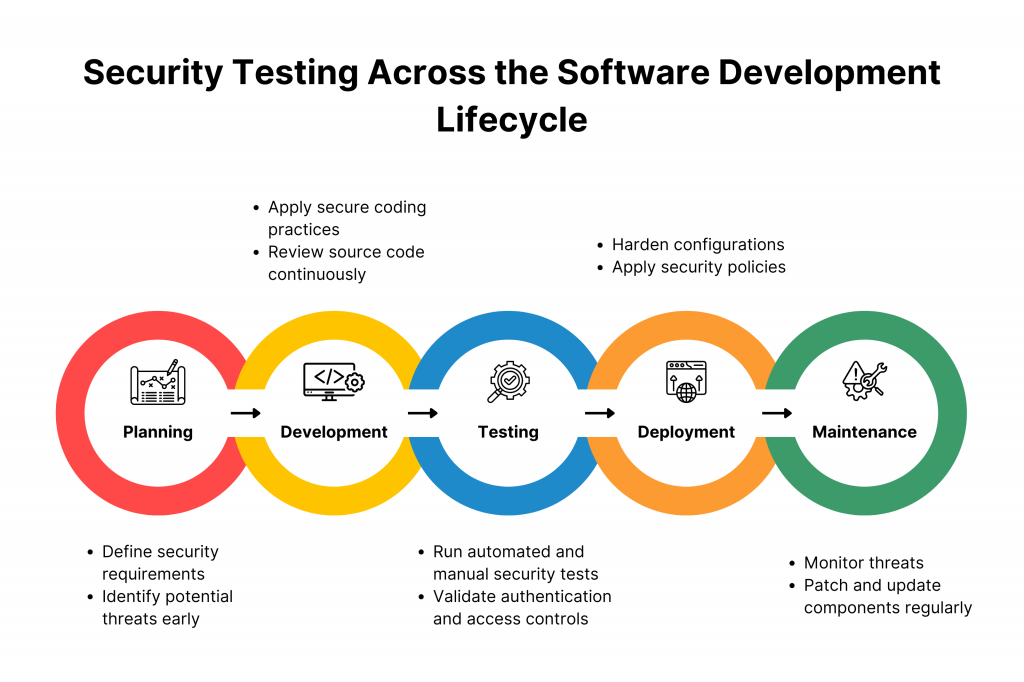
Security works best when it isn’t one phase. It’s every phase. A vulnerability caught during requirements costs a sentence in a document. The same vulnerability caught in production costs an incident, a fix made under pressure, and possibly a disclosure.
Here’s what that looks like in practice, phase by phase:
| SDLC Phase | What Happens |
|---|---|
| Requirements | Security requirements are defined alongside the functional ones, not added later. |
| Design | Threat modeling maps the attack surface before any code exists. |
| Development | Secure coding practices are followed, backed by SAST and SCA running on every commit. |
| Integration | Services and APIs are checked as they start talking to each other, catching authentication and data-handling issues early. |
| Testing | DAST, IAST, and API security testing run against a deployed test build. |
| Pre-release | Penetration testing acts as a release gate, catching what automated tools and earlier phases missed. |
| Production | Monitoring and runtime protection, like RASP, watch the live application for anything that still gets through. |
This is what shift-left actually is: not one tool moved earlier, but a security check attached to every stage that already exists in the SDLC. Each phase catches something the one before it couldn’t see yet. Threat modeling finds design flaws before code exists. SAST and SCA find code and dependency flaws before the application runs. DAST, IAST, and API testing find runtime flaws once it does. Penetration testing finds what all of that automation still missed. Production monitoring catches whatever gets through anyway.
Web programs often rely on third-party components and libraries.
Regularly updating these components with the latest security patches is essential to mitigate vulnerabilities that cybercriminals could exploit. A well-maintained application ecosystem is less susceptible to known exploits.
Educating developers about secure coding practices is vital in preventing vulnerabilities from emerging in the first place.
By imparting knowledge about common vulnerabilities and coding techniques, organizations empower developers to create more resilient code.
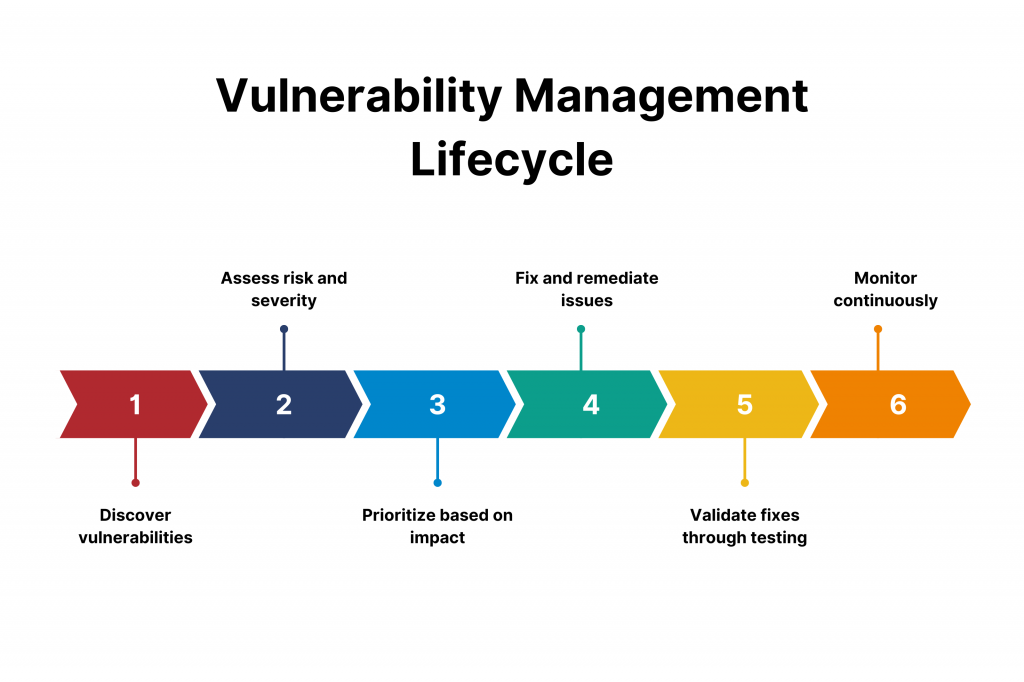
Identifying vulnerabilities is only part of the equation. An effective vulnerability management strategy involves prioritizing vulnerabilities based on their severity and potential impact.
This allows organizations to allocate resources for remediation effectively.
Penetration testing, also known as ethical hacking, involves simulating real-world attacks on an application.
This controlled testing environment helps identify vulnerabilities that automated tools might miss, offering insights into an application’s actual security posture.
Web Application Firewalls act as a protective barrier between web applications and potential threats.
By analyzing incoming traffic and filtering out malicious requests, WAFs reduce the likelihood of successful attacks, providing an additional layer of defense.
Web application security is an ongoing effort. Regularly monitoring programs for vulnerabilities and threats is crucial to maintaining a robust online presence.
By promptly addressing emerging vulnerabilities, organizations can thwart potential exploits before they escalate.
Retest after remediation:
A fix is verified against the specific vulnerability it was meant to close, not assumed to work just because the code changed.
Document and report findings:
A report is only useful if it’s actually usable by whoever has to act on it. That means it names:
This is a sequence, not a checklist to run once and file away. Each step here uses an online retailer building a new checkout and account system as the running example, since the stakes involved (payment data, customer accounts) make every decision concrete.
Security requirements are defined at the same time as functional ones, not bolted on after a feature is already built. This step covers:
With requirements set, the team maps the design itself, using the process covered earlier in this guide. For the retailer, the critical assets are customer accounts and payment flow. The likely attackers include a fraudster testing stolen card numbers and a scraper trying to pull pricing data at scale. The architecture gets mapped, from the checkout API to the account database, and each attack surface- the login form, the checkout endpoint, the admin panel, gets checked for what could go wrong and how bad it would be. This step exists to catch a design flaw while it’s still a diagram, not a deployed feature.
Security testing moves into development itself. SAST runs on every pull request, scanning the code the team is actually writing for the checkout and account features. SCA runs alongside it, checking every dependency the retailer’s stack pulls in, since a vulnerable payment library is just as dangerous as a vulnerability the team wrote itself. Both are set up as a gate in the CI/CD pipeline, not a separate report someone reviews weeks later. A developer sees a flagged issue while the code is still open in their editor, when it’s cheapest to fix.
Once there’s a deployed build in staging, DAST runs against it the way an outside attacker would, probing the login and checkout flow for runtime issues. IAST runs where the pipeline supports instrumentation, tying runtime findings back to specific lines of code. API testing checks the checkout and account APIs directly, since those are reachable independent of the interface, and a broken authorization check there could expose one customer’s order history to another.
Before a major release, like the checkout system going live, a human tester takes over. This step is built to catch what the automated layers in step 3 and step 4 aren’t built to see: whether a discount code can be applied twice, whether the account recovery flow and the checkout flow can be chained together into something neither one is vulnerable to on its own. This happens before launch and again on a regular cycle after that, since the automated tools run continuously but this step doesn’t.
Every method above produces findings, and not all of them get fixed today. Each one gets ranked by:
A critical, easily exploited flaw on the public checkout page with a fix ready to go gets fixed today. A low-severity issue on an internal admin tool with no fix available yet gets tracked and revisited, not ignored.
Finding a vulnerability is the middle of the process, not the end of it. Each one is assigned to a specific owner, tracked the same way a bug is tracked, so it doesn’t quietly disappear. Once it’s remediated, it’s retested, specifically confirming that exact vulnerability is closed, not just assumed fixed because the code changed. Status gets tracked on a dashboard, so an open, aging vulnerability is visible instead of forgotten. And the findings get reviewed as a set, not just one at a time. If the same class of vulnerability, like unvalidated input, keeps showing up across different features, that’s a signal pointing at development practices themselves, not just the individual bugs. That’s what feeds back into secure coding standards and the SAST rules from step 3, so the same issue is less likely to reappear in the next feature built.
SCA analyzes the open-source and third-party dependencies an application pulls in, rather than the code a team wrote itself. Most modern web applications are built on hundreds of external packages, and a team that wrote 20% of its own codebase can still inherit a vulnerability from the other 80% without ever touching that code directly.
What it checks. SCA scans an application’s dependency tree and flags:
Why it matters. A dependency rarely stands alone. It pulls in its own dependencies, which pull in more, and a vulnerability can sit three or four layers deep, invisible to a team that only ever looked at its direct imports. This is the core of software supply-chain security: an attacker doesn’t need to breach the application at all if a widely used package upstream already has a door left open.
Dependency visibility. SCA gives a team something most don’t have without it: a full, current list of every package in use, direct and inherited, along with the version and license for each one. Without that list, a new vulnerability announcement is just noise. With it, a team can check in seconds whether they’re exposed.
| Category | Example Tools | Purpose |
|---|---|---|
| SAST tools | SonarQube, Checkmarx, Veracode, Fortify Static Code Analyzer, Semgrep, Coverity | Analyze source code |
| SCA tools | Snyk, OWASP Dependency-Check, Mend (formerly WhiteSource), Black Duck, GitHub Dependabot | Analyze third-party dependencies |
| DAST tools | OWASP ZAP, Burp Suite, Acunetix, Invicti (formerly Netsparker), IBM AppScan | Test running applications |
| IAST tools | Contrast Security, Synopsys Seeker, Checkmarx IAST | Analyze runtime behavior with code context |
| API security tools | Postman, 42Crunch, Salt Security, Noname Security, APIsec | Test API endpoints and authorization |
| Penetration testing tools | Burp Suite, Metasploit, Nmap, Nessus, Kali Linux (toolkit) | Support ethical hacking |
| WAFs | Cloudflare WAF, AWS WAF, Imperva, F5 Advanced WAF, Akamai Kona Site Defender | Filter and block malicious traffic |
| Security reporting tools | DefectDojo, Jira, Kualitee, ThreadFix | Track findings and remediation |
Same point still holds even with the fuller list: the tool serves the strategy, not the other way around. A team doesn’t need every name on this table. It needs one solid option per category that fits its stack, and a reason for picking each one tied back to what the security program actually needs to cover.
A framework doesn’t do the testing itself. It gives a team a reference for what to test for and how to structure that work, instead of everyone working from memory. Here’s what the two most relevant ones actually are and how they get used, without turning this into a compliance rundown.
The OWASP Foundation is a nonprofit, and the OWASP Top 10 is its list of the most critical web application security risks, built from real vulnerability data rather than opinion. The current edition, OWASP Top 10:2025, is drawn from data across roughly 2.8 million applications, plus two categories added through community input to capture risks the data hasn’t caught up to yet. The 2025 list covers Broken Access Control, Security Misconfiguration, Software Supply Chain Failures, Cryptographic Failures, Injection, Insecure Design, Authentication Failures, Software or Data Integrity Failures, Security Logging and Alerting Failures, and Mishandling of Exceptional Conditions. Security Misconfiguration moved from fifth place in the 2021 edition to second here, and Server-Side Request Forgery, its own category back in 2021, is now folded into Broken Access Control. A team uses this list to make sure its testing actually covers what’s most likely to go wrong, not just what one particular tool happens to check for.
The OWASP Web Security Testing Guide, or WSTG, is a companion to the Top 10. If the Top 10 is the what, the WSTG is the how. It’s OWASP’s open-source testing methodology, organized into categories like authentication, authorization, session management, input validation, business logic, and API testing, each one broken into specific, numbered test cases. The current stable release is version 4.2, from December 2020, with version 5.0 in active development. A team building out its own test cases is using the WSTG as a starting structure, instead of building coverage from a blank page.
The NIST Secure Software Development Framework, published as NIST Special Publication 800-218, is a different kind of document. It sets out practices for building software securely from the start, rather than ranking specific vulnerabilities. NIST organizes it into four practice groups: preparing the organization, protecting the software, producing well-secured software, and responding to vulnerabilities once they’re found. NIST is explicit that the SSDF is meant to sit on top of whatever SDLC a team already uses, since most SDLC models don’t address security in real depth on their own.
The OWASP Top 10 shapes what a SAST or DAST tool’s rules should prioritize. The WSTG gives a penetration tester or QA engineer an actual structure to test against. The SSDF shapes where security work sits across the SDLC, so requirements, threat modeling, and secure coding are built against a documented set of practices instead of ad hoc habit. A team doesn’t need to formally adopt all three to get value from them. Used even informally, as a reference each time a new test plan or threat model gets built, they keep testing anchored to something more solid than one team’s memory of what usually goes wrong.
Testing only before release. Security gets tested throughout the SDLC, the way the shift-left section earlier in this guide lays out, not saved for one pass right before launch.
Relying on a single security testing method. SAST, DAST, SCA, API testing, and penetration testing are combined, since each one is built to catch what the others miss.
Ignoring third-party dependencies. SCA runs regularly, since a vulnerable dependency is just as real a risk as a flaw in code the team wrote itself.
Ignoring API security. APIs are tested directly, since they’re often reachable independent of the interface built on top of them.
Skipping threat modeling. The design’s attack surface is mapped before development starts, so later testing has something concrete to check against.
Treating automated scan results as final. A person validates findings, since automated tools produce false positives and miss context a human is able to catch.
Failing to prioritize vulnerabilities. Findings are ranked by severity, exploitability, exposure, and business impact, so effort goes to what matters most first.
Not retesting after remediation. The specific vulnerability is confirmed closed, instead of assuming a fix worked because the code changed.
Ignoring business logic vulnerabilities. Manual and penetration testing are used to check for logic flaws automated tools aren’t built to recognize, like a discount code that stacks.
Treating penetration testing as a replacement for continuous testing. It’s run alongside automated testing, since it’s point-in-time and automated testing is what runs continuously in between.
Failing to monitor production. The live application is watched after release, since new vulnerabilities and new attack techniques keep appearing after launch.
Using outdated dependencies. Dependencies are updated on a schedule, not only after an incident forces the issue.
Not documenting remediation. What was found, how it was fixed, and the retest result all get recorded, so the issue is traceable later and patterns across releases are visible.
Planning
[ ] Define security requirements
[ ] Identify sensitive assets
[ ] Perform threat modeling
[ ] Define testing scope
Development
[ ] Conduct secure code reviews
[ ] Run SAST
[ ] Run SCA
[ ] Address vulnerabilities early
Testing
[ ] Run DAST
[ ] Run IAST where appropriate
[ ] Test APIs
[ ] Conduct penetration testing
[ ] Validate authentication and authorization
Pre-Production
[ ] Prioritize critical findings
[ ] Remediate vulnerabilities
[ ] Retest fixes
[ ] Review security readiness
Production
[ ] Monitor application behavior
[ ] Maintain dependencies
[ ] Review new vulnerabilities
[ ] Update security controls
Conclusion
You don’t finish web application security testing. You keep doing it, for as long as the application is live, because new code ships, new dependencies get pulled in, and attackers keep finding new angles.
The programs that actually hold up combine secure development, threat modeling, SAST, SCA, DAST, IAST, API security testing, penetration testing, vulnerability management, runtime protection, and continuous monitoring. None of these alone gets you there. Together, they cover for each other’s blind spots.
By weaving protection into the fabric of software development, implementing advanced testing methodologies, and maintaining constant vigilance, businesses can erect a digital fortress resilient against the relentless waves of cyber threats.
How much you lean on each one comes down to your own risk, your architecture, your stack, whatever regulations apply, and where you are in your development cycle. A fintech app handling real money and an internal tool nobody outside the company touches don’t need the same setup, even though they’re both technically web apps.
If you’re building this out for the first time, or fixing a program that’s grown messy over a few years without a real plan behind it, that’s what Kualitatem’s security testing and quality engineering teams help with. Worth a real conversation now, honestly, rather than after something’s already gone wrong..
What is web application security testing?
The process of finding, evaluating, prioritizing, and fixing vulnerabilities in a web application before an attacker finds them first.
Why is web application security testing important?
A vulnerability left in place is a real cost, not a hypothetical one. It’s customer data exposed, money spent cleaning up an incident, and damage to a company’s name that outlasts the incident itself.
What are the types of web application security testing?
The main ones are SAST, SCA, DAST, IAST, API security testing, and penetration testing, plus threat modeling at the design stage and RASP as a runtime defense. Most programs use several together, since each one catches something the others miss.
What is SAST?
Static application security testing. It scans source code without running the application, looking for patterns that match known vulnerability types like SQL injection or hardcoded credentials.
What is DAST?
Dynamic application security testing. It tests a running application from the outside, the way an attacker is, without access to the source code behind it.
What is IAST?
Interactive application security testing. It watches the application from the inside while it’s running, combining the runtime view DAST has with the code-level detail SAST has.
What is SCA?
Software composition analysis. It checks the third-party libraries and open-source packages an application depends on, and flags the ones carrying known vulnerabilities or outdated versions.

Not sure where your QA stands?
Speak to an Expert

Our experts are all ready. Explain your business needs, and we’ll provide you with the best solutions. With them, you’ll have a success story of your own.
Contact us now and let us know how we can assist.