


Finding a defect is the easy part. Writing it up so someone else can fix it quickly is the part that actually takes skill. A bug report is the handoff between the person who found the problem and the person who has to resolve it, and when that handoff is sloppy, the release schedule pays for it.
The cost gap is well documented. A defect caught in development is cheap to fix; the same defect caught after release can cost up to 100 times more.
There’s a second cost most teams never measure, though: the reopen loop. When a report is vague, the engineer either guesses at the cause or sends it back asking for detail. Each round trip burns a day or two. Across a full sprint, a badly written bug report stops being a minor annoyance and turns into a throughput problem.
Getting this right at scale is its own discipline, one Kualitatem has spent 15 years building for Fortune 500 teams. This guide walks through how to write a report that removes that friction:
- The components every report needs.
- A step-by-step process you can repeat.
- A fully worked example.
- A free copy-paste template.
- The severity-versus-priority distinction most teams get wrong.
- The habits that separate professional reporting from the rest.
Turn a discovered defect into a resolved one with as little back-and-forth as possible.
Free Bug Report Template Download and standardize your defect reporting today.
Download FreeWhat Is a Bug Report?
A bug report is a documented record of a defect found in software, capturing everything a developer needs to reproduce, diagnose, and fix the issue without further investigation.
In the software testing lifecycle, the report is logged once a tester or engineer confirms unexpected behavior, before the defect is handed to development, usually into a tracking system like Jira or Azure DevOps.
Testers create most reports, but developers and even end users file them too.
Developers rely on the report as their starting point. A strong one lets them move straight to the code. A weak one forces them to reconstruct the conditions first.
Take a simple example where a tester enters valid credentials on the login screen, taps the login button, and nothing happens. Documenting this transforms the workflow:
- Without a standard report: The developer is forced to reconstruct the conditions, making time disappear.
- With a standard report: The exact steps, environment, and result give the developer a starting point they can act on in minutes instead of hours.
For teams formalizing how defects move through the pipeline, this connects directly to broader software testing strategies.
Why Writing a Good Bug Report Matters
A well-written report pays back across the entire development team, not just the developer assigned to the fix:
- Faster reproduction. The developer replicates the issue on the first attempt instead of asking for more detail.
- Faster resolution. Clear expected-versus-actual results point straight at the root cause.
- Better communication between QA and development. Fewer clarification threads, fewer reopened tickets, less context-switching.
- Reduced development cost. Every round trip you avoid is engineering hours saved, plus a fix that lands earlier, where it’s cheaper.
- Improved software quality. Defects fixed the first time correctly don’t come back as regressions.
Here’s the shift in thinking that matters most: a bug report is a communication document. Its job is to get the right information to the right person so the fix happens fast, and every report should be judged on that.
Essential Components of a Professional Bug Report
Every professional report is built from the same set of components. Each one exists to answer a question the developer would otherwise have to ask.
| Component | Purpose | Example |
| Bug Title | A scannable one-line summary | [Login] 403 error on valid credentials, Firefox 115 |
| Environment | Lets the developer replicate exact conditions | OS, browser, build version, device, connection type |
| Preconditions (optional) | State required before the steps begin | User logged in with a verified account |
| Steps to Reproduce | The exact, repeatable path to the defect | Numbered list, one action per line |
| Expected Result | The intended behavior | User is redirected to the dashboard |
| Actual Result | The observed behavior | 403 Forbidden; access is blocked |
| Attachments | Visual and technical proof | Screenshot, screen recording, console log |
| Severity | Technical impact on the system | |
| Priority | Business urgency of the fix |
The two components teams actually get wrong are the last two, severity and priority, which is why they get their own section below.
How to Write a Bug Report Step-by-Step
The process is the same whether you are reporting a web, mobile, or API defect. Work through it in order.
- Write a clear, specific title. Lead with the affected feature in brackets, then state the problem specifically. Review the title again after finishing the report. It should still match what you actually documented.
- Weak: “Login broken.”
- Strong: “[Login] 403 error on valid credentials in Firefox 115.”
- Record the testing environment. Capture OS, browser or app build, device, and connection type where relevant. “Latest version” is not an environment. A version number is. Version-specific defects are invisible without it.
- Write reproducible steps. Number the steps, one action per line, starting from a known state. Strip implied actions like “open app” unless the defect depends on them. Use a “>” to compress navigation: “Settings > Profile > Delete Account.”
- Describe expected behavior. Say what should happen from the user’s perspective. Don’t settle for “it should work”; name the outcome, like “user is redirected to the dashboard.”
- Describe actual behavior. Describe what actually happens, and isolate it.
- Weak → “Button doesn’t work.”
- Strong → “Button closes the app across all tested OS versions and screen sizes.”
- Attach supporting evidence. A screenshot for static UI issues, a screen recording when the defect depends on the steps, and logs whenever you have them. For crashes, include the system and crash logs, or the developer is working blind. Logs are especially critical in mobile app testing, where device fragmentation makes defects hard to reproduce without them.
- Assign severity and priority. Severity by technical impact, priority by business urgency. They are not the same thing (see below).
- Submit for verification. Log the report, then re-test after the fix under the original conditions to confirm it’s resolved and check nothing else broke before closing.
Notice how little guesswork is left. The developer knows the browser, the build, the exact steps, the console response, and the urgency before opening the code.
Bug Report Example
Definitions only get you so far. Here’s what a complete report looks like for a defect any tester has hit: the login button that does nothing after valid credentials go in.
Title: [Login] Login button unresponsive on valid credentials — Chrome 120, Windows 11
Environment: Windows 11 (23H2) / Chrome 120.0.6099.130 / Desktop / Corporate VPN
Preconditions: Registered user with a verified, active account. Not already logged in.
Steps to Reproduce:
- Go to the login page
- Enter a valid email in the Email field
- Enter the correct password in the Password field
- Click Login
Expected Result: User is authenticated and lands on the dashboard.
Actual Result: The button shows its pressed state, then nothing. No redirect, no error message, no spinner. The user is left on the login page with no idea whether it worked. The Network tab shows no request leaving the browser. Console throws Uncaught TypeError: this.submitHandler is not a function on click.
Attachments: Screen recording of the click, console log export, HAR file showing the missing network request.
Severity: High, core function blocked, no workaround.
Priority: P1, authentication sits on the critical path.
See what the developer has before touching the code. They know it’s client-side, because no request ever left the browser. They know roughly where to look, because the console named the failing function. And they know it’s urgent without having to ask, because severity and priority are already set.
Compare that to a ticket that just says “login isn’t working”. Same defect, but now the developer spends the first hour rebuilding everything this report handed them up front.
That’s the whole point of the format. The report did the investigating so the developer can go straight to fixing.
Good Bug Report vs Bad Bug Report
The gap between a report that gets fixed today and one that sits in the backlog usually comes down to precision, not effort. Here’s the same defect written two ways:
| Good Bug Report | Poor Bug Report |
| Specific title: [Checkout] Payment fails on Visa, Chrome 120 | Vague title: “Payment broken” |
| Numbered, reproducible steps from a known state | “Just try to pay, and you’ll see” |
| Expected and actual results clearly separated | A single line describing the symptom |
| Screenshot and console log attached | No evidence attached |
| Severity and priority both set | No triage information |
| Objective, isolated description | Subjective: “the page looks weird” |
The difference in one line. “Payment doesn’t work” becomes “[Checkout] Visa payments return a 500 error at the confirmation step on Chrome 120; Mastercard unaffected.” Same discovery, but the second version tells the developer what to check, where to look, and what to leave alone.
Severity vs Priority
This is the one most reports get wrong. Severity measures technical impact: how badly the defect breaks the system. Priority measures business urgency: how soon it needs to be fixed. They often align. They don’t always.
Severity: technical impact
| Severity | Business Impact | Example |
| Critical | System unusable or data loss | App crashes on launch; checkout down |
| High | Core function blocked, no workaround | Payment submission fails |
| Medium | Feature degraded, workaround exists | Search returns partial results |
| Low | Cosmetic, no functional impact | Misaligned button, minor typo |
How priority differs from severity
Priority answers a different question: given everything else on the roadmap, when does this get fixed? A defect can be low severity but high priority, or the other way around.
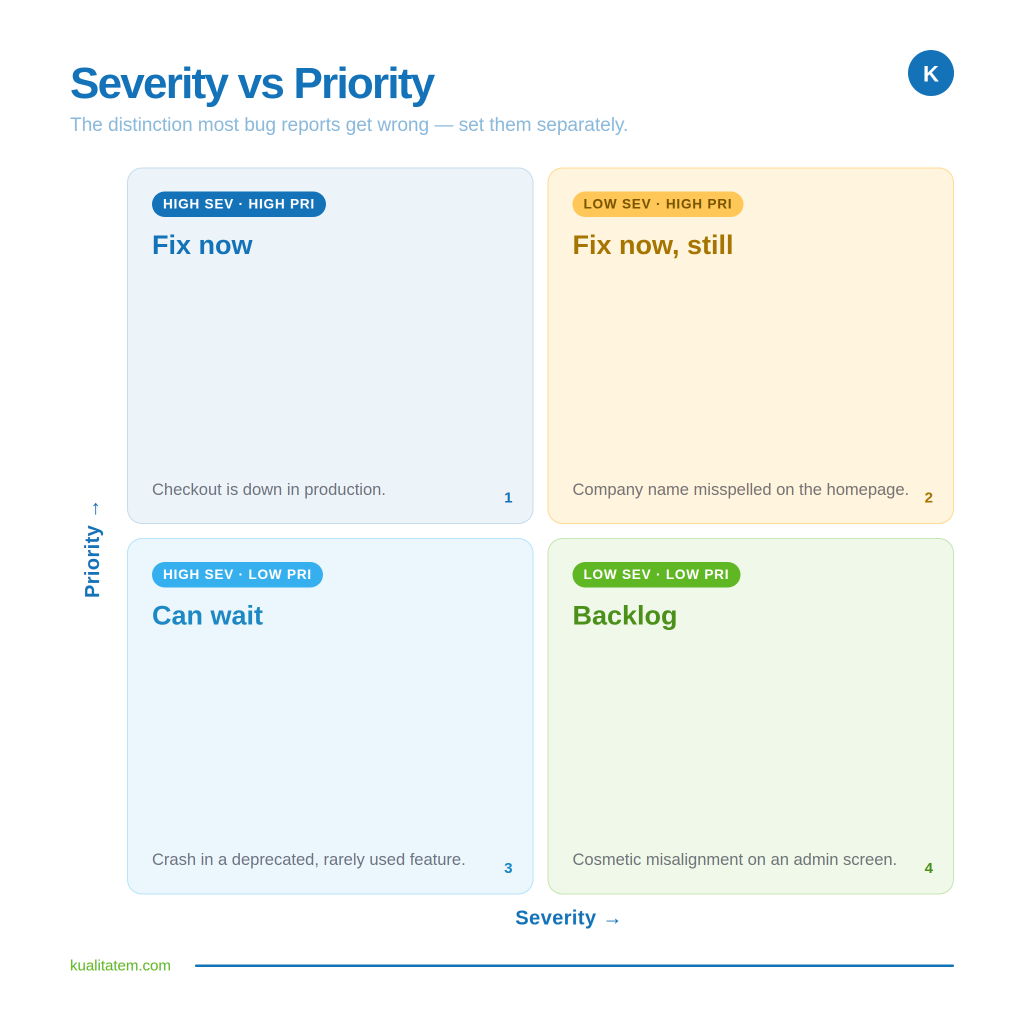
Set severity and priority separately. When teams collapse the two, genuinely urgent defects end up stuck behind cosmetic ones in the queue.
Common Mistakes When Writing Bug Reports
Each of these has a real cost, usually a reopened ticket or a clarification thread that pushes the fix back:
- Vague titles. The report can’t be searched, so it gets duplicated or lost.
- Missing reproduction steps. Developers cannot replicate it and bounce it.
- Missing environment details. Version-specific bugs become impossible to isolate.
- No screenshots or logs. The developer has to reconstruct what you already saw.
- Duplicate reports. Two engineers end up investigating the same issue in parallel.
- Wrong severity or priority. Urgent fixes get buried; trivial ones jump the queue.
- Subjective descriptions. “Looks off” gives the developer nothing to work with.
- Missing expected results. Without the intended behavior, the developer can’t confirm the fix.
Bug Reporting Best Practices
The best reports are written for the developer who has to fix them. A few habits separate professional reporting from the rest:
- Keep reports concise. Informationally dense, not long. Include what is needed, cut the rest.
- Be objective. Describe what happened, not how it felt.
- Verify reproducibility. Confirm you can trigger the defect again before logging it.
- Use standardized templates. Consistency means every report contains what the developer expects to find.
- Include logs whenever possible. They often reveal the root cause faster than any description.
- Check for duplicates first. Add to an existing report instead of creating a new one.
- Update bug status after retesting. Close the loop so the tracker reflects reality.
Standardized reporting also plugs directly into upstream planning. If defects are logged inconsistently, no QA test plan downstream can trust the data coming out of the release cycle.
Common Bug Reporting Tools
Most teams log reports in a dedicated tracker. The common ones:
- Jira. The default for most software teams; strong workflow customization.
- Azure DevOps. Tight integration for Microsoft-stack and enterprise environments.
- Bugzilla. Open-source, widely used in mature engineering orgs.
- GitHub Issues. Lightweight tracking tied directly to the codebase.
- Trello. Simple, visual, common on smaller or cross-functional teams.
- Asana. General-purpose work management, sometimes used for defect tracking.
The tool matters less than the discipline. A well-structured report is more valuable in a spreadsheet than a sloppy one in the most sophisticated tracker on the market.
Bug Report Template (Free)
Everything above comes together in one reusable template. Copy it once, and you have a consistent structure for every defect your team logs, so no report goes out missing the fields a developer needs. Fill in each field before you submit, because anything left blank is a question that comes back to you later.
Free Bug Report TemplateStandardize it across the team and your defect data becomes something you can actually trust at the end of a release cycle.
Still have questions about the details? The most common ones are answered below.
Frequently Asked Questions
What is a bug report?
At an enterprise level, a bug report is a critical handoff protocol and governance tool. It is the formalised documentation of a software defect that dictates engineering velocity by providing the exact telemetry and context required for immediate resolution, rather than just logging a symptom.
How do you write a bug report?
You write a bug report by enforcing a strict standard operating procedure across your QA organisation. This involves structuring data capture so that every report mandates a clear environment configuration, precise reproduction steps, and isolated expected-versus-actual results to eliminate engineering ambiguity.
What should a bug report include?
A good bug report must include:
- The exact environmental data
- Sequential reproduction steps
- Clear expected and actual results
- Attached evidence (like console logs or screen recordings)
- Independent severity and priority triage tags
Missing any of these fields creates a delay in the development cycle.
What is the difference between severity and priority?
Severity is the technical impact of the defect on the system. Priority is the business urgency of fixing it.
A low-severity defect can be a high priority, and vice versa. They should be set independently.
Who writes bug reports?
Most are written by QA testers, but developers and end users file them too. QA leadership and engineering managers are ultimately accountable for the structural integrity and standardisation of the data moving through the pipeline.
What makes a good bug report?
A good bug report has a high signal-to-noise ratio. It provides immediate technical clarity, prevents the costly reopen loop of back-and-forth communication, and protects sprint velocity by allowing developers to move directly to remediation.
What tools are used for bug reporting?
Enterprise tracking platforms like Jira, Azure DevOps, and Bugzilla are the industry standard. However, the ROI of these platforms depends entirely on the QA discipline and reporting standardization enforced within them; a premium tool cannot fix a fractured reporting process.
Conclusion
Writing an effective bug report is one of the highest-leverage skills in software delivery. Strong reports cut debugging time, reduce the back-and-forth between testers and developers, and get defects resolved before they compound into release delays.
But the real payoff is not per-report. It is systemic. When reporting is standardized across the team, it shifts the entire engineering culture:
- Defect data becomes reliable
- Triage becomes predictable
- Releases stop being firefighting exercises.
Standardized reporting is a quality-engineering discipline, not an individual habit. At scale, it is the difference between a release cycle you can forecast and one you cannot.
That is exactly where a mature quality partner earns its place, turning ad-hoc reporting into a repeatable process that holds up under enterprise velocity.
Kualitatem provides the functional testing services needed to seal defect-data leaks, backed by:
- 15 years of quality engineering experience for Fortune 500 teams across banking, government, and SaaS.
- TMMi Level 5 process maturity.
- 200+ ISTQB-certified engineers.
Turn inconsistent defect reporting into a process your release cycle can rely on. Your next release cycle is the right time to fix this. Speak to an expert at Kualitatem.
Speak to an Expert