

A beta that 5,000 real users are hammering feels like proof a release is safe. It’s closer to the opposite. It’s the moment you find out whether the work before it was done, and by then thousands of people are already inside the thing you’re checking.
Most engineering organisations don’t skip beta. They love beta. They ship to real users constantly, watch the dashboards, and call it validation. The expensive mistake isn’t skipping the stage. It’s treating exposure as if it were a gate.
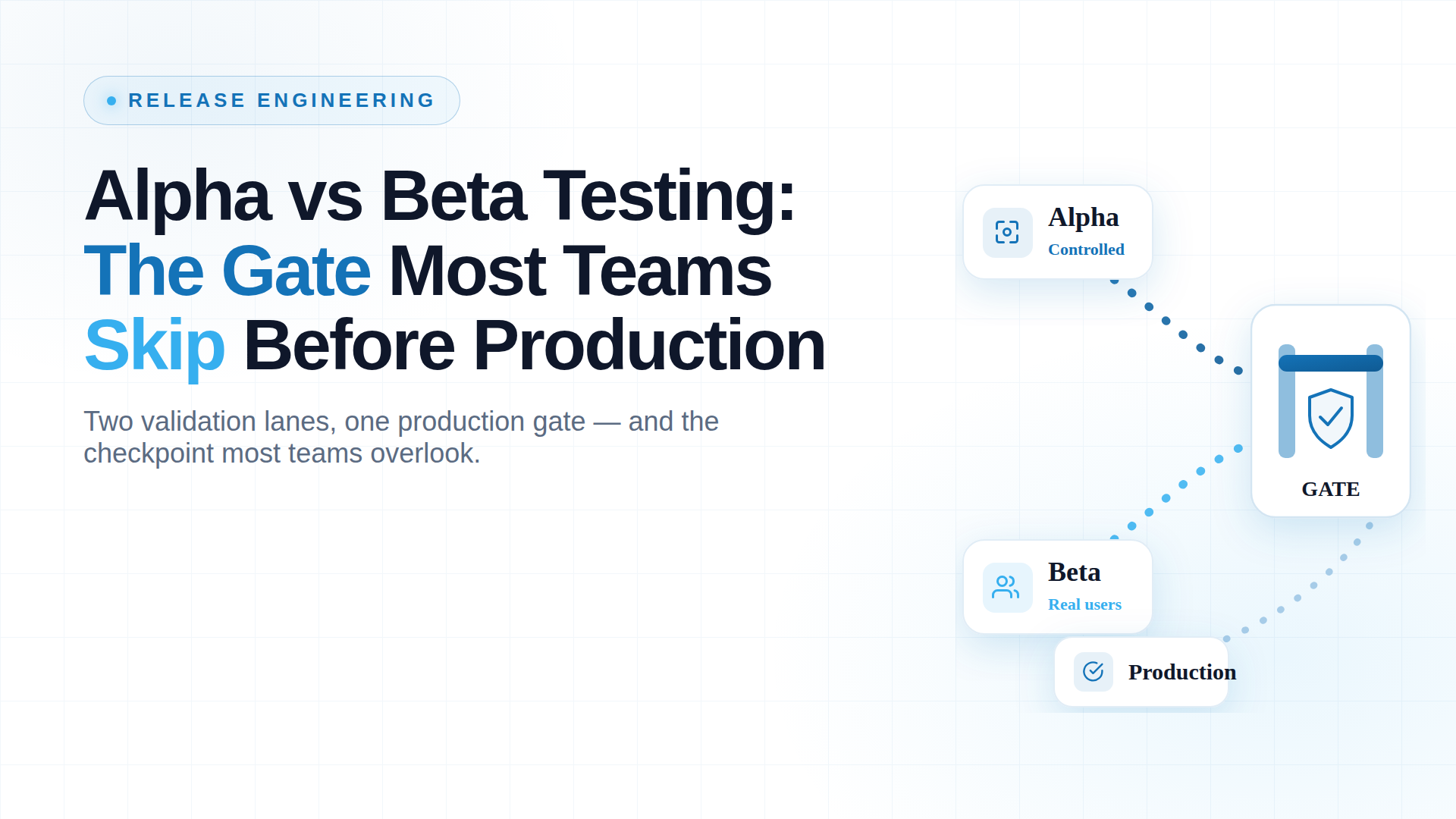
This guide covers what alpha and beta each do, how they differ, and why the order between them is the part most teams get wrong.
The problem isn’t beta. It’s what teams think beta is doing.
Here’s the sign-off that happens in a lot of release meetings: “It’s been in beta three weeks, no major complaints, let’s push it.” On paper that reads like risk coverage. In practice, if no controlled gate ran underneath it, that beta wasn’t reducing your exposure. It was widening it.
Exposure is not validation.
Putting a build in front of real users tells you how it behaves in the wild. It does not tell you whether the build was sound before it got there. When those two ideas collapse into one, a defect a controlled check would have caught internally gets distributed to your customer base instead.
In a regulated environment, that’s not a hotfix ticket. An uncontrolled release that reaches live users can become:
- A reportable compliance event
- A fraud or security vector
- A headline
Beta without a gate doesn’t shrink your blast radius. It maximizes it.
What a missing gate costs at scale
The scale version of this failure is already in every CISO’s slide deck. In July 2024, a single content-configuration update shipped through CrowdStrike’s Falcon sensor with a defect its release path didn’t catch. The out-of-bounds read crashed roughly 8.5 million Windows systems and drove an estimated $5.4 billion in losses across Fortune 500 companies.
That wasn’t a beta problem. It was a no-controlled-gate problem: an update reaching production faster than validation could keep up. The lesson scales down cleanly to any release you own.
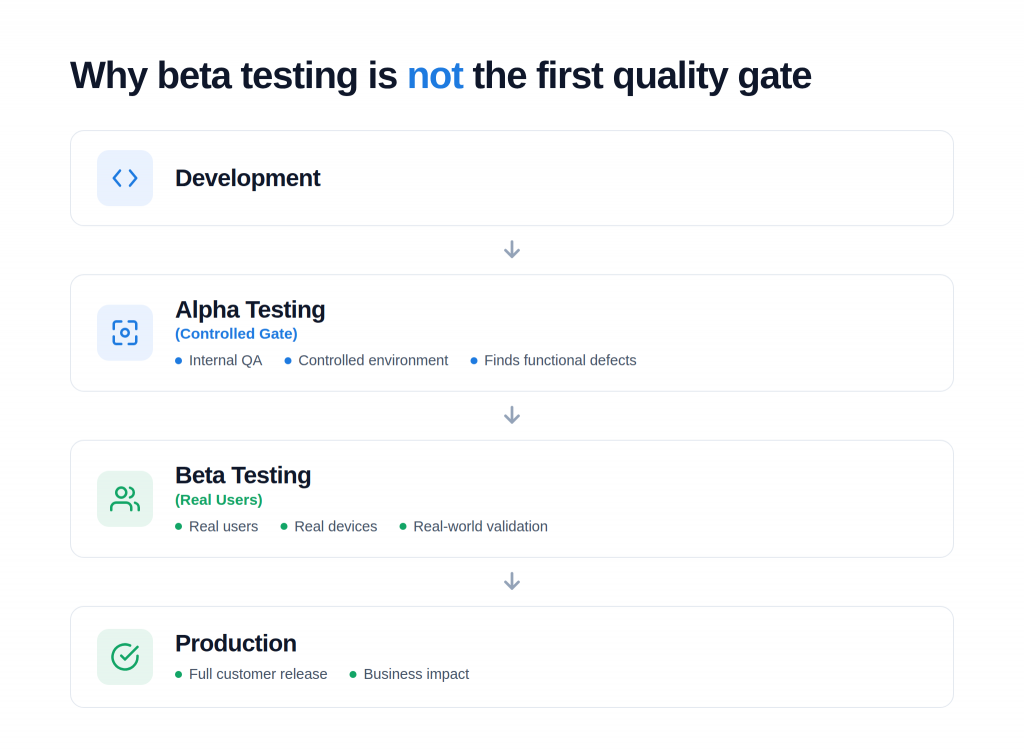
Both alpha and beta testing exist to stop exactly this. They are the two final quality gates before software reaches production. Although both aim to improve quality, they serve different purposes and happen at different stages of User Acceptance Testing.
What is Alpha Testing?
Alpha testing in software testing is the controlled gate.
It’s “Internal validation” that answers one question: does this work under conditions we control, before any external user sees the product.
- Who runs it: QA engineers and sometimes employees outside the immediate build team.
- Environment: An environment the organisation fully owns and instruments.
- Timing: After development is functionally complete, but before any external exposure.
- Defects caught: Functional, logic, integration, and workflow defects, while they are still cheap to fix.
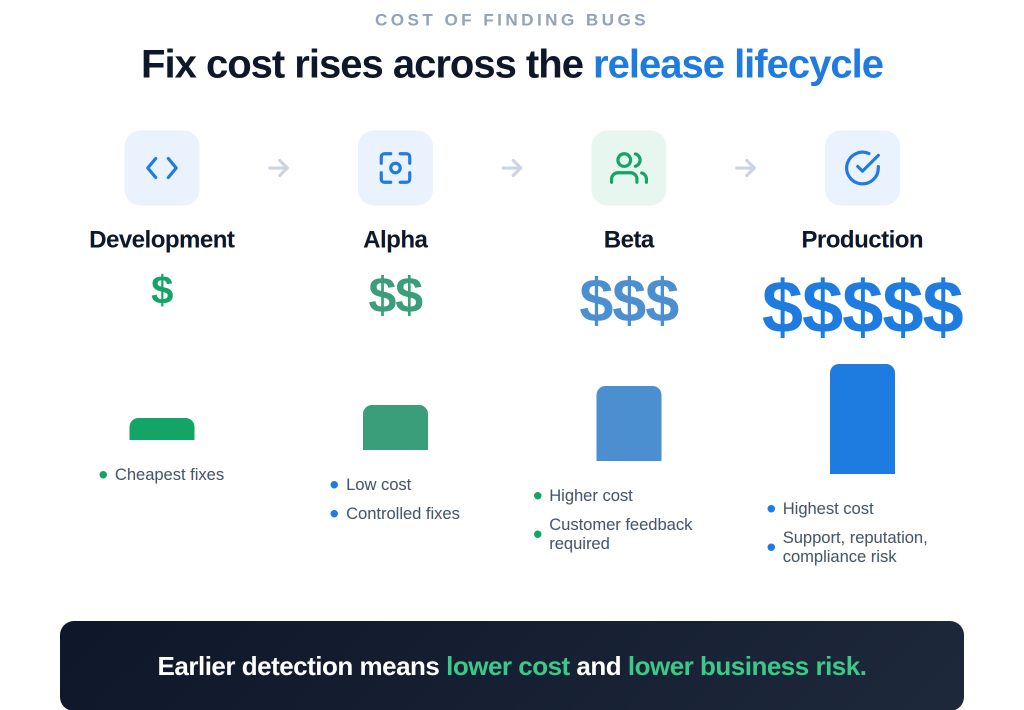
The economic logic is absolute: A defect caught at the controlled gate costs a fraction of the same defect found after rollout. Once a bug reaches production, the cost isn’t just the fix. It’s the incident response, the customer impact, the support load, and in regulated sectors, the audit exposure. The controlled gate is where defects are cheapest to kill, which is exactly why skipping it is so expensive later.
Example: Testing a login, checkout, and payment workflow end-to-end in a lab environment before a single outside user touches it is a classic alpha test.
What is Beta Testing?
Beta testing is real-world validation.
- Definition & Purpose: Releasing a near-final build to actual external users to observe performance under live, uncontrollable conditions no lab can simulate.
- Timing: Late in the SDLC. Final validation step before or during full production rollout.
- UAT Alignment: A core component of User Acceptance Testing that confirms the product is fit for the people who will actually use it.
Example: A food-delivery app releasing a beta to 500 real customers before a worldwide launch is actively pressure-testing real devices, real networks, and real ordering behavior that internal validation could only approximate.
Why is Beta Testing Important?
The commercial stakes of releasing without validation are highly measurable:
- 68% of users abandon an application after encountering just two bugs.
- 88% are less likely to return to an app after a single bad experience.
Real-world validation is where you find those two bugs before your users do, and before churn turns a quality problem into a revenue problem.
How Does Beta Testing Work?
Treating beta testing as a casual release and watch exercise is a common trap. A successful beta is a highly controlled sequence:
- Finalize the beta build. Feature-complete and already cleared through the controlled alpha gate.
- Select beta users. Represent your real audience, not just internal volunteers.
- Define testing goals and exit criteria. Establish exactly what “ready” means, including success metrics and rollback triggers, before opening the gate.
- Release the beta version. Deploy to the defined group with active monitoring in place.
- Collect bug reports and feedback. Gather data through frictionless, easy-to-use channels.
- Prioritize issues by severity. Rank defects by actual severity, not by who complained loudest.
- Fix what clears the bar. Address flaws that fail your predefined success metrics.
- Release to production. Expand the rollout because the gate criteria confirmed it was safe.
Types of beta testing
Beta testing is not a single methodology. Depending on your risk profile and target metrics, you can deploy different variations:
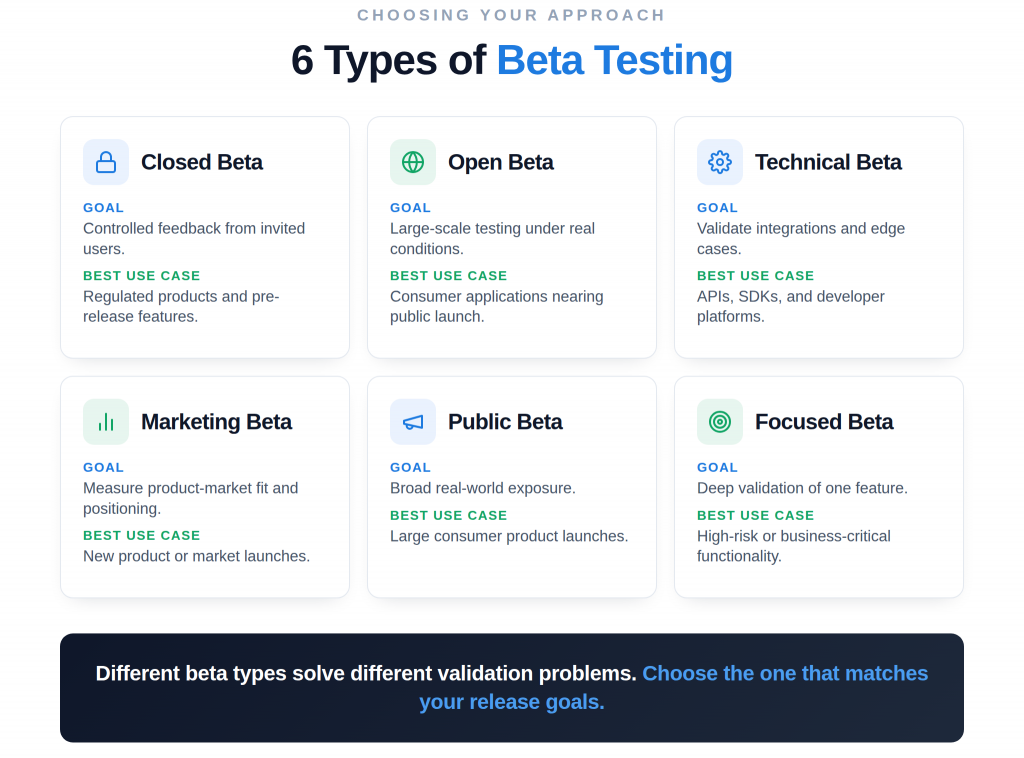
| Beta Type | Who Participates | Main Goal | Best Use Case |
| Closed | Invited, selected users | Controlled feedback, NDA-safe | Regulated products, pre-announcement features |
| Open | Any self-selecting user | Scale and load under real conditions | Consumer apps nearing general availability |
| Technical | Power users and developers | Integration, API, edge-case validation | Platforms, SDKs, developer tools |
| Marketing | Target-segment users | Positioning and product-market signal | New market entry |
| Public | The general public | Broad real-world exposure | Major consumer launches |
| Focused | Narrow, feature-specific group | Deep feedback on one capability | A single high-risk feature |
Modern delivery has blurred the old wall between beta and production through stages and canary rollouts:
- Shipping to a small segment first, typically at 1 – 5%, then expanding to 25%, 50% and 100% as stability holds.
- A 1% rollout catches the exact same defects as a 100% rollout.
The only difference is how many users absorb the impact.
Alpha testing vs Beta Testing
Alpha and beta are not a menu of options. They are a sequence with a strict dependency, two gates that do different jobs in a fixed order, where the second only works if the first one runs.
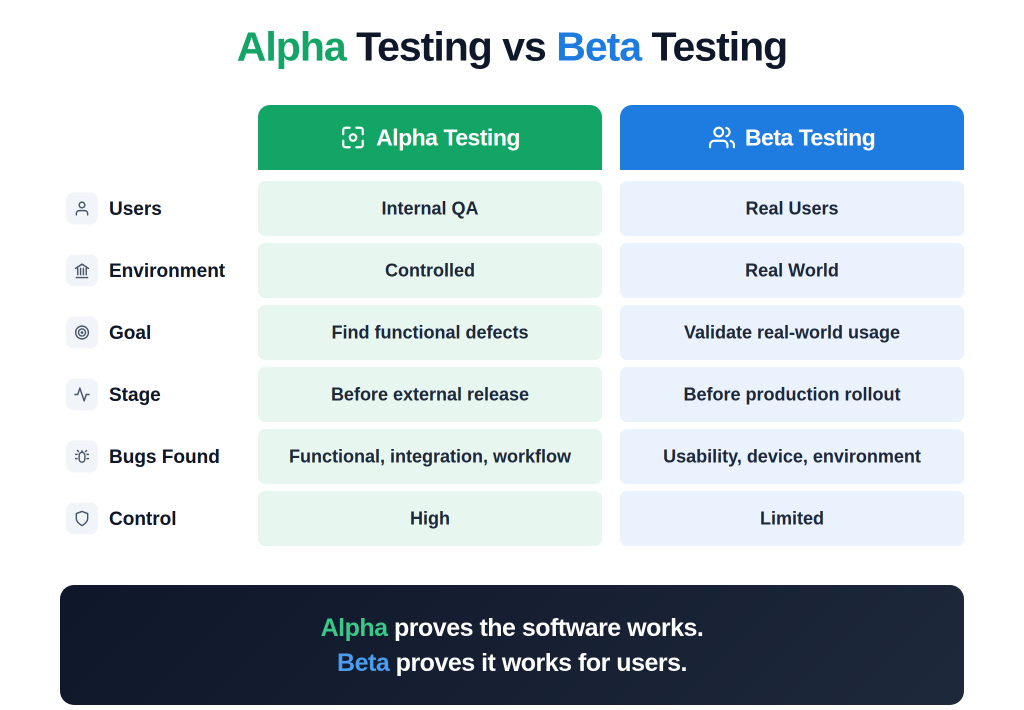
Beta testing should never replace alpha testing. Beta surfaces what alpha structurally cannot, like device fragmentation and live load, but it can only confirm stability that the controlled gate has already established. Run beta without a controlled alpha gate, and it stops being a safety net. It becomes a distribution mechanism for the defects you never checked for, shipped to real people at scale.
What good looks like at the release level
If you’re briefing your VP of Engineering, the standard for a safe release boils down to these core principles:
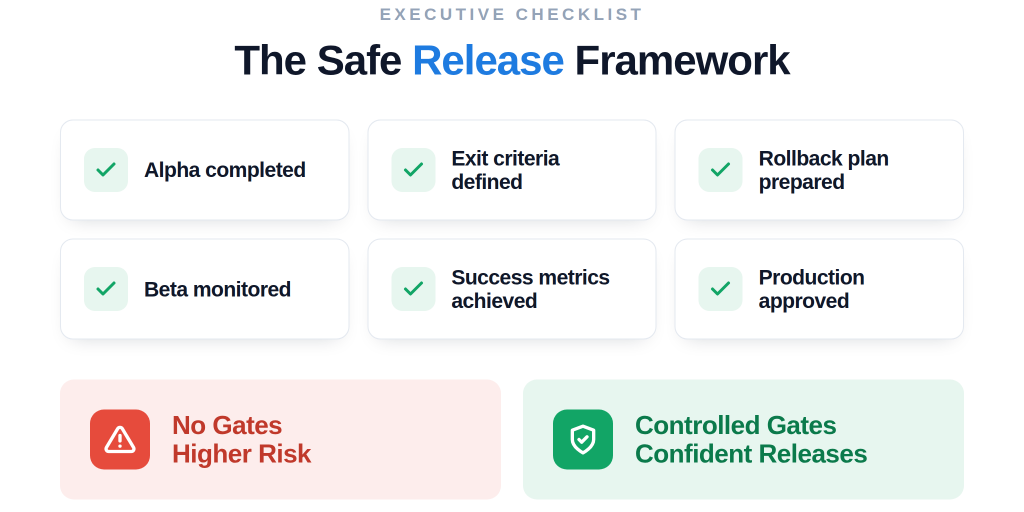
- Alpha and beta are two mandatory, sequential gates, never optional choices.
- Exit criteria and rollback triggers must be agreed upon before either gate opens.
- A staged rollout without active monitoring and a controlled gate isn’t safe; it’s just a slower version of a full release.
- Rollout percentages create the feeling of safety. Enforced gates create the actual safety.
Best practices for Beta Testing
To run a beta phase that reduces risk, enforce these few disciplines:
- Define success metrics before the gate opens. Severity thresholds and exit criteria, agreed in advance, not negotiated once you want to ship.
- Recruit users who mirror your real market, across the full device and condition range they actually span.
- Make feedback frictionless, because user silence reads as success when it isn’t.
- Close the loop. Feed findings back into the next gate instead of burying them in a backlog nobody reopens.
Common Challenges in Beta Testing
Even a well-staffed beta fails to deliver safety when it goes wrong in predictable ways:
- Releasing an unstable build because the alpha gate was skipped, which turns your real users into the people who find defects that should never have left the building.
- Too few users, or the wrong ones, so the signal is either too thin to trust or doesn’t map to your actual market.
- No success criteria, letting “done” drift into a subjective feeling rather than a measured bar.
- Collecting feedback you never act on. This quietly trains users that reporting problems changes nothing.
Tools Used for Beta Testing
While tools handle the logistics of distribution and data collection, remember that they do not replace testing discipline. Standard platforms include:
- TestFlight: For iOS build distribution.
- Google Play Beta: For Android deployment.
- Firebase App Distribution: For cross-platform pre-release testing.
- BrowserStack: For comprehensive device coverage.
- TestRail: For defect and feedback management.
Real-World Beta Testing Examples
Industry leaders use beta as a structured checkpoint:
- Apple TestFlight & Google Play Beta: staged rollouts that expose a controlled slice of users before expanding.
- Microsoft Insider Program: a massive technical audience pressure-testing OS-level integrations across fragmented hardware.
- Slack Early Access: major feature updates routed to opt-in users first, validating live workflows before global enforcement.
These companies succeed because they recognize that the percentages in a staged rollout limit the blast radius, but it is the structured beta gate that actually earns them the confidence to expand.
When Should You Use Beta Testing?
A formal beta earns its cost on any launch carrying real commercial or regulatory downside. You should enforce a beta testing gate when:
- Launching a new product
- Pushing a major feature release
- Deploying a UI redesign
- Executing a mobile app release
- Rolling out SaaS platform updates
- Managing an enterprise software rollout
The proof
This isn’t a theory about gates. It’s the program that runs them.
Kualitatem has:
- 15 years of independent software testing and information systems auditing for a global client base.
- TMMi Level 5 certification, the highest process maturity standard in testing.
- ISO 27001 and ISO 9001, with compliance across ISO 20000, SOC 2, GDPR, HIPAA, and PCI DSS.
- A proven track record of 500+ clients, 350+ applications tested, and more than 500,000 hours in testing,
- An ISTQB-certified team and a cross-vertical library of over a million test cases spanning banking and finance, healthcare, telecom, public services, and enterprise software.
If your last release shipped because it had “been in beta a while”
Not because a gate said it was ready; that’s the conversation worth having. We’ve built structured release validation for regulated enterprises, the kind where an uncontrolled release isn’t a bug ticket but a compliance event. Your next release cycle is the right time to fix the sequence.
Conclusion
Beta testing validates software in the real world, but only as the second of two gates, never a substitute for the first. Treat both as mandatory, and you release higher-quality software with fewer production incidents, and can prove it when it matters.
Make both gates non-negotiable in your next release. Talk to a Kualitatem expert about building controlled validation into your pipeline.
Frequently asked questions
- What is beta testing?
Releasing a near-final build to real users outside the organization to validate how it performs under real-world conditions before full production release.
- What is the purpose of beta testing?
To catch environment-specific, usability, and load-related issues that internal validation can’t reproduce, confirm product-market fit, and build evidence-based release confidence.
- Who performs beta testing?
Real external users, selected to represent the actual target audience, rather than internal QA engineers, who own the controlled alpha gate that runs first.
- What is the difference between alpha and beta testing?
Alpha is the controlled internal gate that catches functional and structural defects in an environment you own.
Beta is real-world validation by external users under conditions you can’t control.
They run in sequence. Beta relies on alpha running first.
- Is beta testing part of UAT?
Yes. Beta is a form of User Acceptance Testing. It confirms the product is fit for the people who will actually use it, in their real environment.
- What are the different types of beta testing?
- Closed
- Open
- Technical
- Marketing
- Public
- Focused betas
- How long should beta testing last?
It should last long enough to meet your predefined exit criteria across a range of users, not a fixed calendar window.