Release Management Best Practices 2026
October 9, 2026




Two engineering leaders run teams the same size, with the same tools and the same budget. Leader A ships on time. Leader B doesn’t.
But when everything is the same, why does one stay ahead and the other behind? The difference is only in their strategy. Something that decides what gets tested, how much, and when to stop. A has that plan. B is testing by feel.
A software testing strategy defines the overall approach to determining what to test, how to test it, when to test it, and where to prioritize effort based on risk, business impact, and product requirements.
Done well, it gives a team a way to:
This guide covers what a software testing strategy is, the most common strategies used today, how to build one for your own organization, and what changes when you’re running Agile or DevOps.
A software testing strategy is a high-level framework. It defines how testing gets planned, prioritized, performed, and evaluated across a project or an organization. It sets the direction that every test plan and test case follows underneath it.
A strategy typically establishes:
Each item has a job. Objectives set the goal for the testing effort. Scope marks what is in and what is out. Risk priorities point the team toward the areas that matter most. Levels and types set the depth of coverage. Techniques, environments, and test data define how the work gets done. Tools support execution and reporting. Roles and responsibilities assign ownership. Entry and exit criteria mark when testing starts and when it ends. Reporting and metrics turn results into something a stakeholder can read and act on.
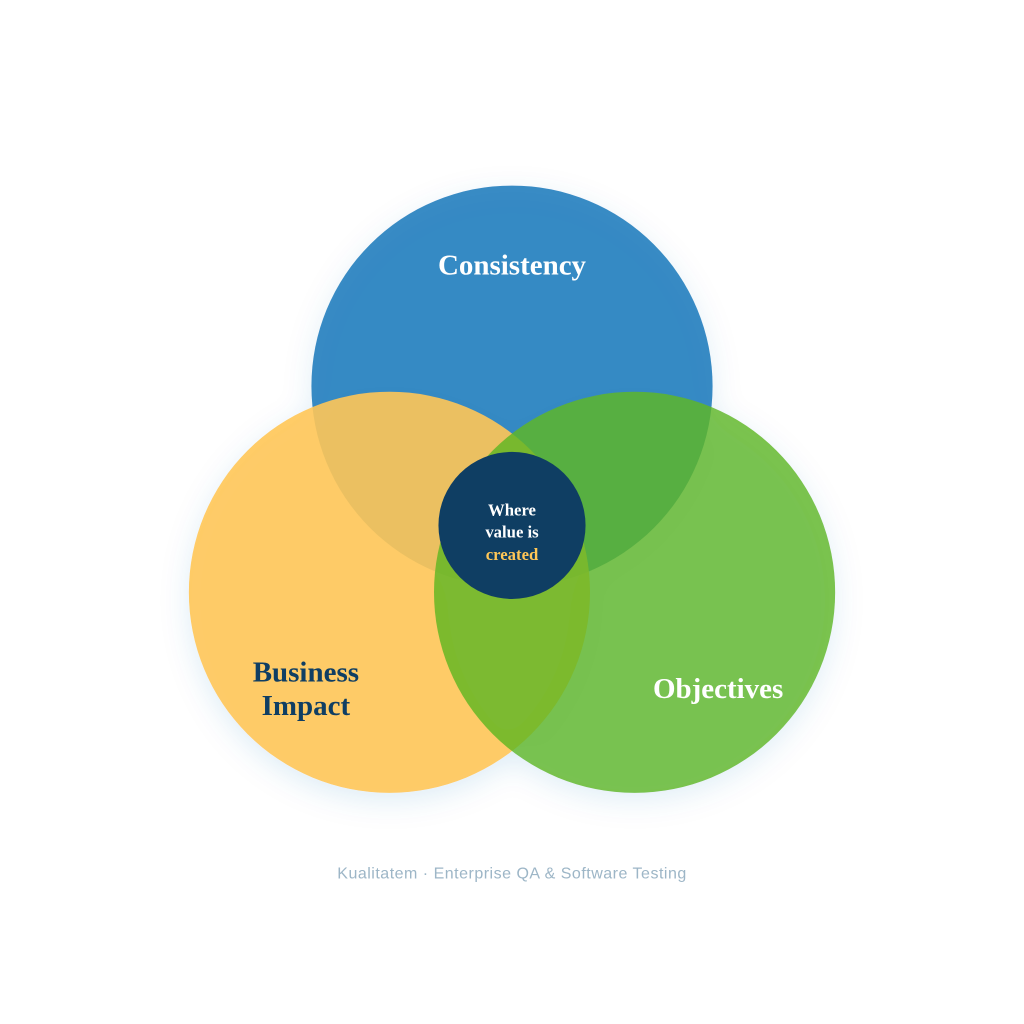
Consistency. A strategy sets which testing types matter most for the project. It sets expectations for software testing automation and quality measurement across every team involved.
Business Impact. A strategy reduces the cost of late-stage defects. It shortens release cycles and gives testing a place as a business function that protects revenue.
Objectives. A strategy focuses the effort on risk reduction, requirement coverage, resource efficiency, and measurable quality outcomes.
| Question | What the Strategy Defines |
|---|---|
| What should we test? | Scope and coverage |
| What should we test first? | Risk and priority |
| How should we test? | Testing approaches and techniques |
| When should we test? | SDLC stages and release cycles |
| Who should test? | Roles and responsibilities |
| What tools are needed? | Testing and automation tools |
| When is testing complete? | Entry and exit criteria |
| How do we measure quality? | Metrics and reporting |
A good strategy has one purpose above the rest. It points a team toward the right things to test at the right time, based on risk, software testing challenges and problems, along with business impact. Test volume is a poor measure of this. Coverage of the highest-risk area is the real measure.
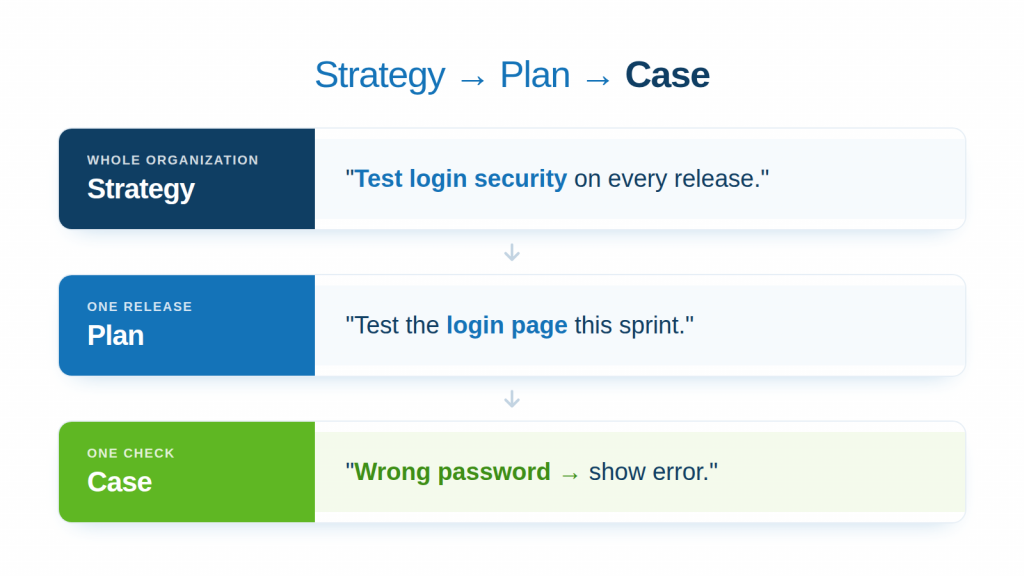
These are the three terms that describe different layers of the same process. Teams often use them interchangeably, and that habit causes real confusion inside a QA org.
Test Strategy. A test strategy defines the overall testing approach and its guiding principles. It applies across a project or an organization and stays stable over time.
Test Plan. A test plan translates the strategy into execution details for a specific project or release. It sets the schedule, resources, and scope for that one testing cycle.
Test Case. A test case gives the specific steps, inputs, conditions, and expected results used to verify one scenario. It is the smallest of the three, and the one updated most often.
| Factor | Test Strategy | Test Plan | Test Case |
|---|---|---|---|
| Purpose | Defines overall approach | Defines testing execution | Verifies a specific scenario |
| Scope | Broad | Project or release | Feature or function |
| Level | High-level | Detailed planning | Detailed execution |
| Focus | What, why, and overall how | Who, when, where, and how | Steps and expected results |
| Updates | Less frequent | Per project or release | Frequent, as features change |
Testing levels are different from a testing strategy. A strategy sets the plan across a project. Levels are the stages that plan moves through, from a single unit of code up to the finished application.
Unit Testing. Unit testing checks individual components or functions in isolation. A developer runs it against a single piece of code, separate from the rest of the system.
Example: A developer tests the function that calculates a transfer fee in a banking app, checking it returns the correct amount for a domestic transfer versus an international one.
Integration Testing. Integration testing checks how components work once they connect. It looks at the data flow between modules, not just the modules themselves.
Example: A QA engineer tests the transfer service’s call to the core banking system, confirming the debit hits one account and the credit hits the other, with the balance updating correctly.
System Testing. System testing checks the complete, integrated application against the original requirements. It treats the product as one whole, not as separate parts.
Example: A tester runs the full transfer flow end to end, from login through entering the amount, confirming with a one-time password, and reaching the success screen.
Acceptance Testing. Acceptance testing checks whether the software meets business and user requirements before release. It is the last check before the product reaches real users.
Example: A compliance stakeholder confirms the transfer completes within the bank’s required processing window and the transaction shows correctly on the statement, matching the regulatory requirement it was built for.
| Level | Primary Focus | Typical Participants |
|---|---|---|
| Unit | Individual components | Developers |
| Integration | Component interactions | Developers/QA |
| System | Complete application | QA |
| Acceptance | Business/user requirements | QA/business users |
A testing strategy is not confined to a single QA phase; it shapes decisions from initial requirements through post-launch monitoring.
By embedding quality checks early, teams catch architectural risks before coding begins, this approach is known as shifting left. Post-deployment, the strategy dictates production validation and feedback loops, an approach known as shifting left. Rather than waiting for code completion, a mature strategy embeds quality gates at every stage of the lifecycle.
| SDLC phase | Strategy | Example |
| Requirements | Risk analysis | Identify critical requirements |
| Design | Testability analysis | Identify integration risks |
| Development | Unit/static testing | Validate code early |
| Integration | API/integration testing | Validate data flows |
| System | Functional/non-functional | Validate complete product |
| UAT | Acceptance testing | Validate business workflows |
| Deployment | Smoke/release testing | Confirm release readiness |
| Production | Monitoring/shift-right | Detect real-world issues |
Most teams don’t stick to one strategy. They mix a few, depending on how risky the app is, what the requirements look like, and how the software gets built and released. A banking feature might get requirements-based testing for audit coverage, static testing on every pull request, and exploratory testing before the release goes out the door. The mix changes, but the reasoning behind it stays the same: match the strategy to where the risk actually sits.
If your team catches a problem in a meeting before anyone writes a line of code, you are already doing static testing. It means checking the software without running it, through reviews, walkthroughs, and automated analysis, catching problems while they are still cheap to fix.
The idea goes back to Michael Fagan at IBM, who published a formal inspection process in the IBM Systems Journal in 1976. Fagan reported that inspections could catch up to 80 percent of errors before execution testing even started, and that basic process still shapes how code reviews work today.
In daily practice, this strategy looks like a requirements review meeting, or a teammate reading through a pull request against a checklist. Teams lean on tools like SonarQube or Checkmarx for automated analysis, and GitHub or GitLab for the review itself.
One QA engineer writing on Medium about adopting static analysis on her own project noted that the first pass rarely comes back clean, and the fix is usually to address the actual issue rather than silence the warning. That distinction is what keeps static testing useful instead of becoming a box-checking exercise.
Day to day, this becomes routine: every pull request goes through review before merge, every requirement goes through review before development starts.
If your test suite lives right next to the code and runs on every commit, that is structural testing. It checks the internal logic of the code itself, commonly called white-box testing.
Glenford Myers described the approach in his 1979 book, The Art of Software Testing. Mutation testing.
In practice, developers write tests around the code’s own logic paths, often aiming at a coverage target like 80 percent.
Common tools include JUnit or pytest to write the tests, JaCoCo or Istanbul to measure coverage, and PIT or Stryker for mutation testing. It adds real time to a developer’s work, but the tests themselves run in seconds once written. The output is a coverage number, plus a list of logic paths nothing has touched.
A team at ING wrote a sample application that had over 80 percent line coverage but only 50 percent mutation coverage, a clear sign that a coverage number and a test’s actual strength are two different things.
Day to day, this shows up as every commit triggering the suite in CI, with a failed build if coverage drops below the line.
If your tester never opens the source code and just checks what the app does when they enter something, that is behavioral testing, commonly called black-box testing. Glenford Myers described boundary value analysis in 1979, and White and Cohen formalized a related approach called domain testing in 1980.
This looks like a test case document, or an automated suite checking real inputs against expected outputs.
Common tools are Selenium, Playwright, or Cypress for the interface, Postman for APIs, and TestRail to manage the cases.
Design takes a few hours per feature, and execution ranges from minutes for an automated run to a full day for manual regression. The result is a pass or fail tied directly to something a real user would notice.
Combining several invalid inputs into one test case can hide a bug, since an error message often reports only the first failure it finds, and checking both sides of a boundary catches off-by-one errors that checking only one side misses. Daily, new features get a fresh set of cases before release, and the automated suite runs on every build.
If you have three days before release and ten features left to check, that is when risk-based testing kicks in. It means scoring each feature by how likely it is to fail and how much damage that failure would do, then testing in that order.
In practice, this looks like a risk matrix or heat map, with features ranked from highest to lowest priority. A spreadsheet handles this for a small team, while larger orgs track it in Jira with custom risk fields. The scoring session for a release takes a few hours with the right people in the room. The result is a prioritized backlog, so the riskiest areas get the deepest testing first. Tania Zhydkova, writing on Medium, frames this as the practical answer for a QA lead with limited time, testing the highest-impact areas on purpose instead of spreading effort evenly across everything. Day to day, the team revisits the risk list at the start of every sprint or release and shifts focus as things change.
If an auditor could ask “show me the test for this requirement” and you could pull it up in seconds, that is requirements-based testing. It means mapping every test back to a specific requirement, so coverage stays visible instead of scattered across someone’s memory.
This looks like a traceability matrix in practice, a table with requirement IDs on one side and test case IDs on the other. Teams build it in Jira with Xray or Zephyr, in Azure DevOps, or in Kualitee. It takes real time upfront per requirement, and that time pays off at audit or release sign-off, when someone needs proof rather than assurance.
The result is full visibility into which requirements have coverage and which do not. Olha Holota, writing for TestCaseLab on Medium, argues its real value is as a shared reference for developers and product managers, not just internal QA bookkeeping.
Daily, this plays out as a simple rule: every new requirement gets a test case attached before development counts as finished.
If your best bugs come from a tester just poking around the app with no script in hand, that is exploratory testing. The tester learns the product, designs a test, and runs it, all in the same pass. This is different from scripted testing, where every step is written down before anyone touches the app.
In practice, this looks like a tester getting a charter, a goal, and a time limit, then working through the app freely and taking notes as they go. Teams support this with session note trackers or screen recorders like Loom, so the exploration is captured even though it was not scripted.
The result is bugs that scripted tests miss, mostly usability problems and edge cases nobody thought to write a case for. James Bach described exploratory testing as the core of all responsible testing, with scripted cases as just one tactic used inside it, not the whole discipline.
Day-to-day, this gets scheduled ahead of a release, or run whenever a tester has a gap between scripted cycles. It fills the space scripted testing cannot reach, because scripted cases only catch what someone already thought to check for.
If your tester sits in the planning meeting before a single line of code gets written, that is shift-left testing. It means moving validation earlier, into requirements and design, instead of waiting for a finished build. Larry Smith coined the term in Dr. Dobb’s Journal in September 2001, making the case for pulling QA earlier into the process to shorten the feedback loop.
This looks like a tester in the sprint planning meeting, or a developer running tests locally before pushing code. Teams build it into CI/CD tools like Jenkins or GitHub Actions, tied to whatever automation framework is already in use. It adds time early in requirements and design, and saves more of it later, since a fix costs less before release than after. The result is fewer defects showing up late and shorter release cycles overall. A test manager writing on Medium, reflecting on two years of running this in practice, said success came down to people and culture more than any tool, and that teams who skipped the upfront investment because they were “too busy” ended up paying for it later. Daily, testers sit in on planning and design meetings, and tests run automatically on every commit.
If you are watching a dashboard the moment a new feature goes live to 5 percent of users, that is shift-right testing. It extends quality work into production, through monitoring, real user feedback, and feature flags. The term has no single credited author. It emerged during the DevOps era of the 2010s as the natural counterpart to shift-left, borrowing the term “canary release” from the old mining practice of using canaries to detect toxic gas underground.
In practice, this looks like a dashboard tracking real user error rates, with a new feature rolled out to a small slice of users before the rest. Teams rely on monitoring tools like Datadog, New Relic, or Sentry, and feature-flag tools like LaunchDarkly or Split. It runs continuously rather than as a one-time task. The result is real data on how the software behaves at scale, and faster detection of problems that only appear under real load. Devender Sharma, writing on Medium, makes the point that shift-right demands its own governance, since monitoring, automatic rollback, and fast feedback loops all have to work together, or speed itself becomes the risk. Day to day, the team checks dashboards constantly, and adjusts or rolls back flags the moment something looks wrong.
| Strategy | Best For | Performed By | Advantages | Limitations |
| Static Testing | Early defect prevention | Developers, reviewers | Low cost, catches issues early | Cannot detect runtime issues |
| Structural Testing | Complex internal logic | Developers, QA engineers | High code coverage accuracy | Requires code-level access and skill |
| Behavioral Testing | User-facing functionality | QA testers | Reflects real user experience | May miss internal logic errors |
| Risk-based Testing | Time-constrained releases | QA leads | Focuses effort where it matters most | Requires accurate risk assessment |
| Requirements-based Testing | Regulated industries | QA analysts | Full traceability for audits | Time-intensive to maintain |
| Exploratory Testing | Usability and edge cases | Experienced testers | Finds issues scripts miss | Difficult to measure coverage |
| Shift-left Testing | Agile and DevOps teams | Developers, QA | Reduces cost of late defects | Requires cultural and process change |
| Shift-right Testing | Post-release quality | SRE, QA, product teams | Validates real-world behavior | Requires strong monitoring infrastructure |
If you’re looking to expand or transform your QA strategy, we can help. Reach out to Kualitatem for a software testing strategy that saves up to 70% of your time with no-code/low-code tools and AI-powered testing and quality engineering.
Speak to an ExpertThese two cover different sides of software quality. One checks whether the thing works. The other checks whether it works well.
Functional testing checks whether the software does what it’s supposed to do. You give it an input, and you check that the output matches what was asked for.
This covers:
Non-functional testing checks how well the software does what it does, not whether it does it. It looks at qualities that sit on top of the individual functions.
This covers:
Think of a login screen. Functional testing asks if it logs the right user in with the right password. Non-functional testing asks if it still logs people in fast when a thousand users hit it at once, if it’s safe from someone trying to break in, and if someone using a screen reader can actually use it.
That’s the real difference. Functional testing services prove the feature exists and works. Non-functional testing proves it holds up once real people and real load hit it.
Choosing between manual, automated, and hybrid testing comes down to how stable the feature is and how much risk it carries. It shouldn’t come down to a fixed preference for one over the other.
Manual testing works best when a human needs to make a judgment call, not just check a box. Use it for:
Automated testing works best on anything repeated often enough that a script earns its keep. Use it for:
Most mature QA teams run both at the same time. They automate the stable, repetitive checks, and they keep manual testers on the exploratory work and the calls a script can’t make. That mix is what most testing programs settle into once they grow past picking just one method.
| Criteria | Manual | Automated | Hybrid |
|---|---|---|---|
| Best for | Exploratory, usability, ad hoc testing | Regression, repetitive test cases | Full lifecycle coverage |
| Speed | Slower, depends on tester availability | Fast, runs continuously | Balanced |
| Initial cost | Low | High, needs tooling and scripting | Moderate |
| Long-term cost | Rises with test volume | Falls as the suite matures | Optimized over time |
| Human judgment | High | None | Present where needed |
| Maintenance | Minimal | Ongoing script upkeep | Shared across both |
Your Testing Strategy Isn’t a Document. It’s Ten Decisions, In Order.
Most testing strategies fail before a single test runs. Not because the team lacks skill, but because nobody made the ten decisions in the right sequence. Skip step three and step seven inherits the mess. Skip step nine and release turns into a debate under pressure instead of a call against a standard.
Here’s the sequence, using a bank building a new transfer feature as the example, because the stakes there make every decision concrete.
1. Define the outcome you’re protecting.
Before anything else, decide what this release cannot afford to get wrong. Skip this and your org tests everything at the same intensity, which means the highest-risk area gets the same attention as the least. The bank’s answer here is specific: every transfer completes accurately, inside the regulator’s required window. That single sentence becomes the filter for every decision after it.
2. Draw the boundary.
Decide which platforms, integrations, and environments this strategy actually covers. An undefined boundary doesn’t disappear; it just shows up later, mid-release, as a gap nobody planned for. The bank scopes this to mobile, iOS and Android, against the core banking API. Desktop waits for the next cycle. That’s not a smaller ambition. It’s a sharper one.
3. Rank the risk.
Now decide where failure would actually hurt. This is the step that tells you where your limited hours go. For the bank, the connection to the core banking system ranks above everything else, because a failure there doesn’t produce a bug ticket. It sends money to the wrong account.
4. Choose where testing happens in the build.
Unit, integration, system, acceptance decide what each layer owns. Skip a layer and you’re betting the next one catches what the last one missed, which is a bet you’ll eventually lose. Here, unit tests own the fee logic, integration tests own the banking system call, system tests own the full transfer flow, and acceptance brings compliance in before release, not after.
5. Decide what you’re actually testing for.
Functional coverage tells you the feature works. It doesn’t tell you it holds up under load, or survives a security review. A transfer feature can pass every functional check and still fail the moment real volume hits it. That’s why performance testing covers peak transfer volume here, and security testing sits specifically on authentication.
6. Split manual from automated.
Automate everything and you waste effort on the cases that actually need a person’s judgment. Manual everything and you’re too slow for your own release calendar. The regression suite for the transfer flow gets automated. The new confirmation screen stays manual until it stabilizes, because that’s still a judgment call, not a repeatable one.
7. Build the environment the results can be trusted in.
Wrong environment, unrealistic data, and your results are theater. The bank builds staging to mirror production, with test accounts carrying realistic balances instead of round numbers that hide edge cases.
8. Assign ownership, not just tasks.
Without a named owner, the same gap gets rediscovered every release, because everyone assumed someone else had it. Developers own unit tests. QA owns integration and system testing. Compliance signs off on acceptance criteria. Three owners, zero ambiguity.
9. Set the entry and exit criteria before you need them.
Decide now what has to be true before testing starts and before release happens, so the decision isn’t made under pressure later. Testing doesn’t start until staging holds stable for 24 hours. Release doesn’t happen until every high-risk defect closes. No exceptions negotiated in the moment.
10. Measure it, then change it.
A strategy that never gets revisited goes stale the moment your product or your risk profile shifts, and it always shifts. The bank tracks the defect escape rate after every release and feeds anything that slipped through back into the risk list from step three. The strategy isn’t finished. It’s a loop.
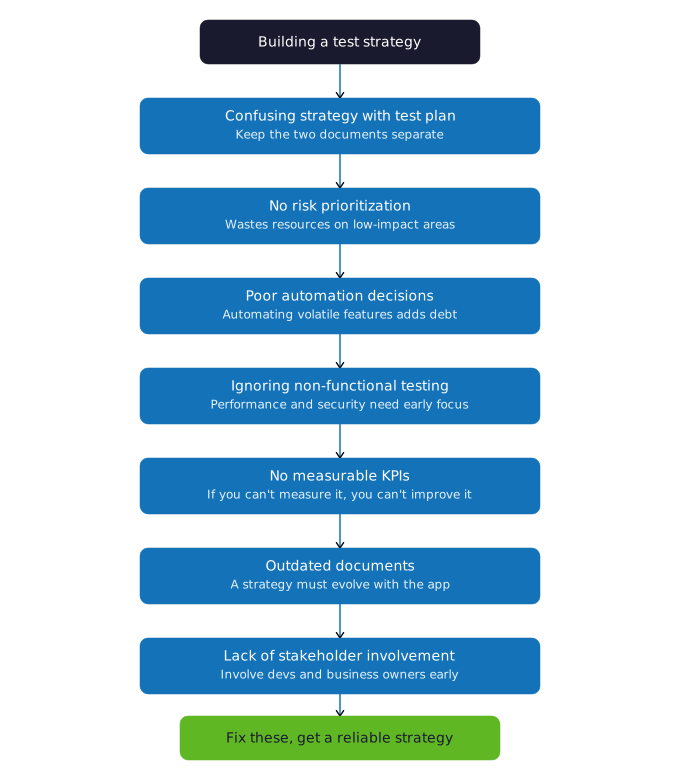
Each of these steps matters because skipping any one of them creates a gap somewhere else in the process. A strategy without risk assessment tests everything equally, wasting effort on low-impact areas. A strategy without defined exit criteria leads to endless testing cycles or premature releases. The sequence itself is what makes the strategy reliable.
Software Testing Strategy Example
Application. A healthcare SaaS patient portal, where patients view records, message providers, and manage prescriptions.
Business Objectives
Key Risks
Testing Strategy
Requirements-based testing was chosen first because HIPAA compliance depends on proving every regulated requirement has a test behind it, not just a general sense that the feature works.
Risk-based testing came next, because the team can’t test every feature to the same depth on every release. The four risks listed above get the deepest testing, and everything else gets tested at a lighter level.
Security testing exists because patient data exposure is both a HIPAA violation and a patient safety issue. Authentication, encryption, and access controls get tested directly, instead of being assumed to be fine because nothing has broken yet.
Performance testing matters here because the 99.9% uptime target only holds up under real patient load, not in a quiet test environment with a handful of test accounts.
Automated regression covers the parts of the portal that change often. A manual regression pass on every release would slow the team down and still miss things a tired reviewer glosses over.
Manual exploratory testing stays in the mix because a script won’t catch every way a patient might get confused, or every edge case hiding in a workflow like refilling a prescription.
Roles
Metrics
Defect resolution: how fast a found issue actually gets fixed
Critical production defects: how many serious issues reach real patients
Requirement coverage: how many HIPAA and business requirements have a test behind them
Test pass rate: how much of the current suite passes at any point
Regression coverage: how much of the existing feature set the automated suite protects
There’s no universal answer here. The right strategy depends on what you’re actually building, not a formula every team can copy.
A few factors decide the choice:
Application type. A banking app and a marketing site carry different risk, and that changes what gets tested first.
Business criticality. A feature the business depends on for revenue gets more testing than one nobody would notice if it broke.
Customer impact. A bug hidden deep in an admin panel matters less than one sitting in a customer’s daily workflow.
Regulatory requirements. An app under HIPAA, PCI DSS, or a government mandate needs traceability and documentation most apps don’t.
Technical complexity. A feature wired into ten integrations needs more integration testing than one that stands alone.
Release frequency. A team shipping weekly needs automation. A team shipping quarterly can lean more on manual testing.
Available budget. Automation costs more upfront. A tight budget often means starting manual and automating later.
Timeline. A short deadline forces real choices about what gets tested and what risk gets accepted instead.
Team expertise. A team without automation skills can’t stand up a mature automated suite overnight, no matter what the ideal strategy calls for.
Automation maturity. A team with an established pipeline can lean harder on it. A team just starting needs to build that foundation first.
Technology stack. Some stacks have mature testing tools built around them already. Others need custom tooling before testing can even start.
| Situation | Recommended Approach |
|---|---|
| High-risk financial application | Risk-based + security validation |
| Frequently released SaaS | Agile + continuous checks |
| Stable, repetitive workflows | Automation + regression |
| New UX feature | Manual + exploratory |
| Regulated application | Requirements-based + traceability |
| Legacy application | Structural + regression |
| High-traffic application | Performance + load |
Most real organizations don’t pick one row and stop there. A regulated financial app usually needs several of these running at once, security testing alongside risk-based testing alongside requirements traceability, not just one picked off the list.
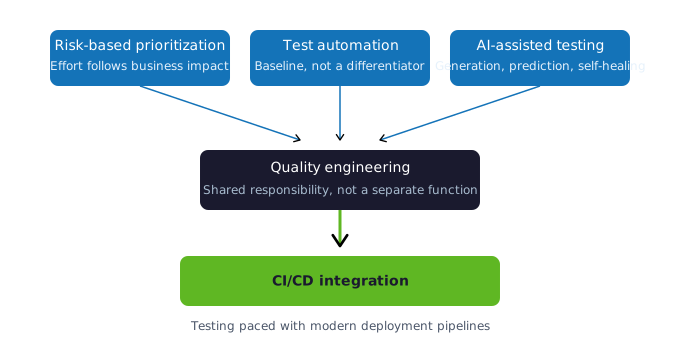
Shift-left and shift-right sit at two ends of the same pipeline: quality checks start at requirements and continue into production monitoring. Continuous testing connects them, embedding automated execution into CI/CD so every code change is validated before it moves forward.
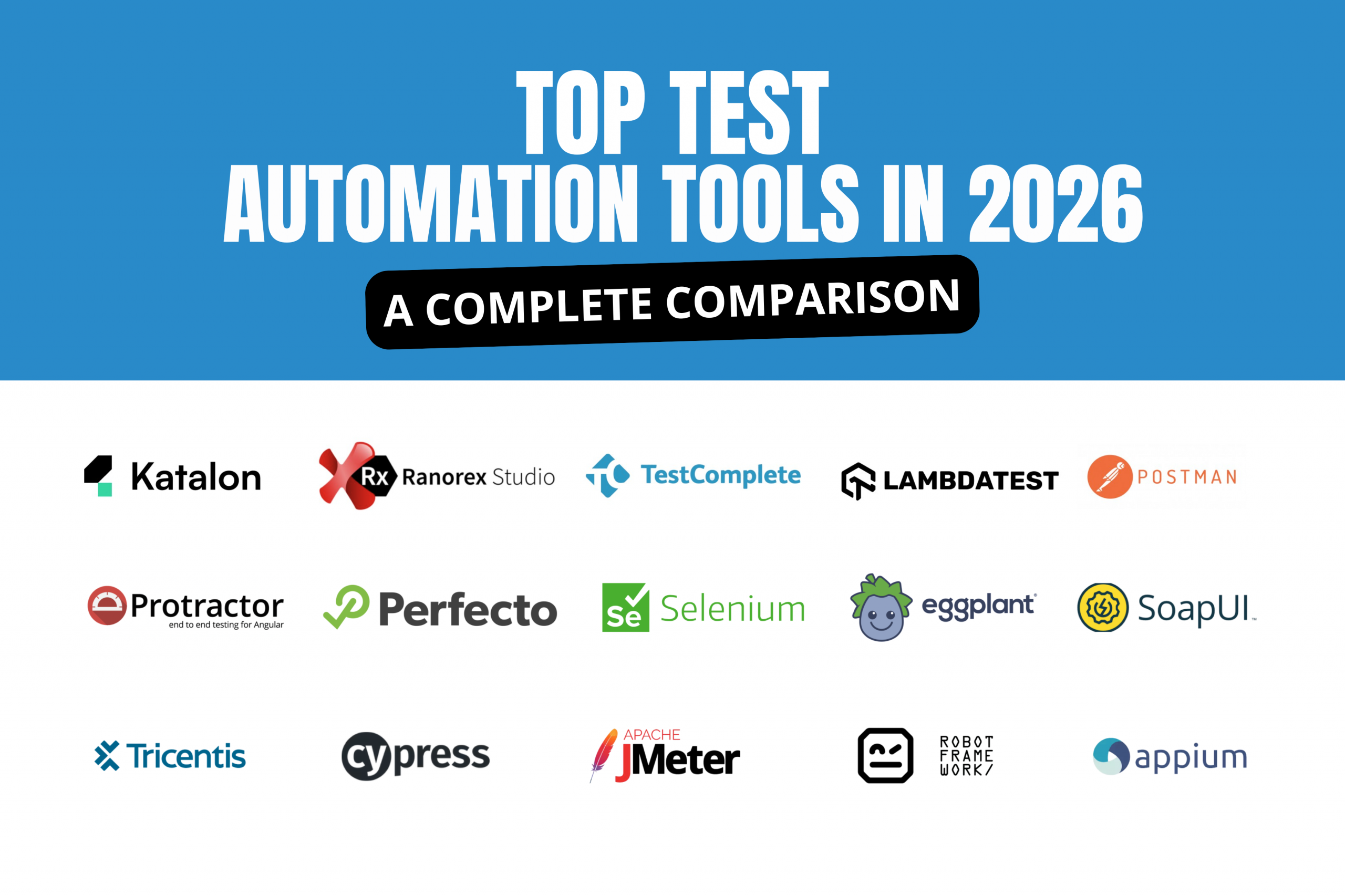
Risk-based prioritization keeps effort where business impact is highest, and test automation is now a baseline expectation rather than a differentiator. Once the strategy defines where automation fits, teams typically evaluate specific platforms; a resource on test automation tools is a useful next step.
Prioritize by risk. Put resources where a failure would actually hurt, not spread evenly across everything on the list, because evenly spread is another way of saying under-covered where it counts.
Start early. Bring validation into requirements and design, before development locks anything in, because the cost of catching a problem only goes up from there.
Combine functional and non-functional checks. A feature that works but falls over under load hasn’t really passed. It’s passed one test and failed the one that matters when it counts.
Automate what’s stable and repetitive. Automation earns its keep on anything that runs the same way release after release. It doesn’t earn its keep on the parts still changing shape.
Keep exploratory work human-led. Some scenarios need a person’s judgment, and no script replaces that. This is where the bugs nobody thought to write a case for actually get found.
Build validation into the pipeline. Run the right automated checks as code moves through CI/CD, not just at the end, so the gap between a mistake and finding it stays short.
Maintain traceability. Connect requirements, coverage, and defects, so a gap is visible instead of hidden until an audit or an incident surfaces it for you.
Review coverage on a schedule, not just when something breaks. Go back and check for the important area nobody’s actually covering, because those areas don’t announce themselves.
Track metrics that mean something. Measure what actually helps a stakeholder decide on release readiness, and skip the ones that just look busy on a dashboard.
Revisit the strategy after every major release. Look at what worked and what didn’t, then update the plan, because a plan that never changes stops matching the product it was built for.
Govern AI-assisted testing. Treat it like any other output you didn’t personally write. Check AI-generated tests before trusting them, and keep sensitive data out of anything fed to the model.
| Category | Example Tools | Purpose |
|---|---|---|
| Test automation | Selenium, Playwright | Automated functional/UI testing |
| API testing | Postman | API validation |
| Performance | JMeter | Load and performance testing |
| Security | OWASP ZAP | Security testing |
| Static analysis | SonarQube | Code quality and static analysis |
| CI/CD | Jenkins, GitHub Actions | Continuous testing |
| Test management | TestRail | Test planning and execution management |
| Defect tracking | Jira | Defect management |
The right tool depends on the strategy behind it, not the other way around. A tool picked before the strategy is decided usually ends up forcing the strategy to fit the tool instead. What actually matters is the technology stack in use, how much automation expertise the team already has, and who’s going to maintain the scripts once the initial setup is done.
There is no universal testing strategy that works for every organization. The right approach depends on industry, application complexity, regulatory requirements, and release cadence.
| Organization Type | Recommended Strategy | Primary Focus |
| Startup | Risk-based, exploratory testing | Speed and flexibility with limited resources |
| SaaS | Shift-left, continuous testing | Frequent releases and CI/CD integration |
| Enterprise | Requirements-based, hybrid automation | Standardization across large, complex systems |
| Healthcare | Requirements-based, security testing | Regulatory compliance and data protection |
| FinTech | Risk-based, security testing | Fraud prevention and transaction accuracy |
| E-commerce | Performance, automated regression testing | Handling peak traffic and transaction volume |
| Legacy applications | Structural, regression testing | Stability during incremental modernization |
Artificial Intelligence is acting as a force multiplier for Quality Engineering, not a replacement for human QA. AI-assisted test generation, predictive defect analysis, and self-healing automation are drastically reducing maintenance burdens. For organizations looking to modernize, exploring AI testing services can help integrate these intelligent, automated practices into the core strategy.
Effective software testing strategies go beyond defining testing activities. It aligns quality assurance with business objectives, release processes, and risk management, giving every stakeholder a shared understanding of how quality will be measured and protected. Organizations should evaluate their approach based on application complexity, development methodology, compliance requirements, automation maturity, and long-term scalability rather than defaulting to whatever worked last time.
As applications, technologies and customer expectations change, the strategy behind them needs to change too. Teams that treat their testing strategy as a living document, reviewed after every major release, are the ones that sustain quality at scale.
Building a testing strategy that holds up under enterprise release cycles takes more than a template. Kualitatem’s quality engineering teams help organizations design, execute and scale testing strategies matched to their industry, risk profile, and compliance requirements.
What is a software testing strategy?
A high-level plan that defines what to test, how to test it, when to test it, and where to focus effort, based on risk and business impact.
Why is a software testing strategy important?
It turns testing into a planned process instead of a last-minute checklist. Teams catch high-impact problems earlier and make release decisions based on real coverage rather than a guess.
What are the main types of software testing strategies?
Static, structural, behavioral, risk-based, requirements-based, exploratory, shift-left, and shift-right. Most teams combine several instead of running just one.
What are the seven principles of software testing?
ISTQB defines them as: testing shows defects exist, exhaustive testing is impossible, early testing saves time and cost, defects cluster in specific areas, repeating the same tests loses value over time, testing depends on context, and passing every test still leaves open whether the product meets what users actually need.
What are the four levels of software testing?
Unit, integration, system, and acceptance testing. Each level checks a bigger piece of the software than the one before it, from a single function up to the finished product.
What is the difference between a test strategy and a test plan?
A test strategy sets the overall approach across a project or organization and stays stable over time. A test plan turns that strategy into the specific schedule, scope, and resources for one project or release.
What is the difference between functional and non-functional testing?
Functional testing checks whether the software does what it’s supposed to do. Non-functional testing checks how well it does it, covering speed, security, and usability.
What is risk-based testing?
Testing the areas most likely to fail and most likely to cause damage, first, so limited time goes where it matters most.
What is the difference between manual and automated testing?
Manual testing relies on a person running the test and using judgment. Automated testing runs a script that repeats the same check consistently, which suits stable, repetitive work better.
How do testing strategies fit into the SDLC?
A strategy places testing at every stage, from reviewing requirements before development starts to monitoring the application after release, rather than saving it for the end.
How do you choose a software testing strategy?
The choice depends on the application’s risk, regulatory requirements, release frequency, budget, and the team’s automation maturity. Most organizations combine several strategies at once.
What is an Agile testing strategy?
A strategy that builds testing into every sprint, with continuous feedback and automation, instead of treating it as a separate phase at the end of development.
What is an automation testing strategy?
A plan for which test scenarios get automated, which tools run them, and how they fit into the CI/CD pipeline, usually targeting stable and repetitive checks first.
How is AI used in software testing?
AI supports test case generation, defect prediction, and test maintenance, and can flag likely problem areas by learning from past defects and code changes.
Does AI replace manual testing?
No. AI speeds up repetitive work and surfaces patterns a person might miss, but usability calls, edge cases, and unclear requirements still need a human tester.

Not sure where your QA stands?
Speak to an Expert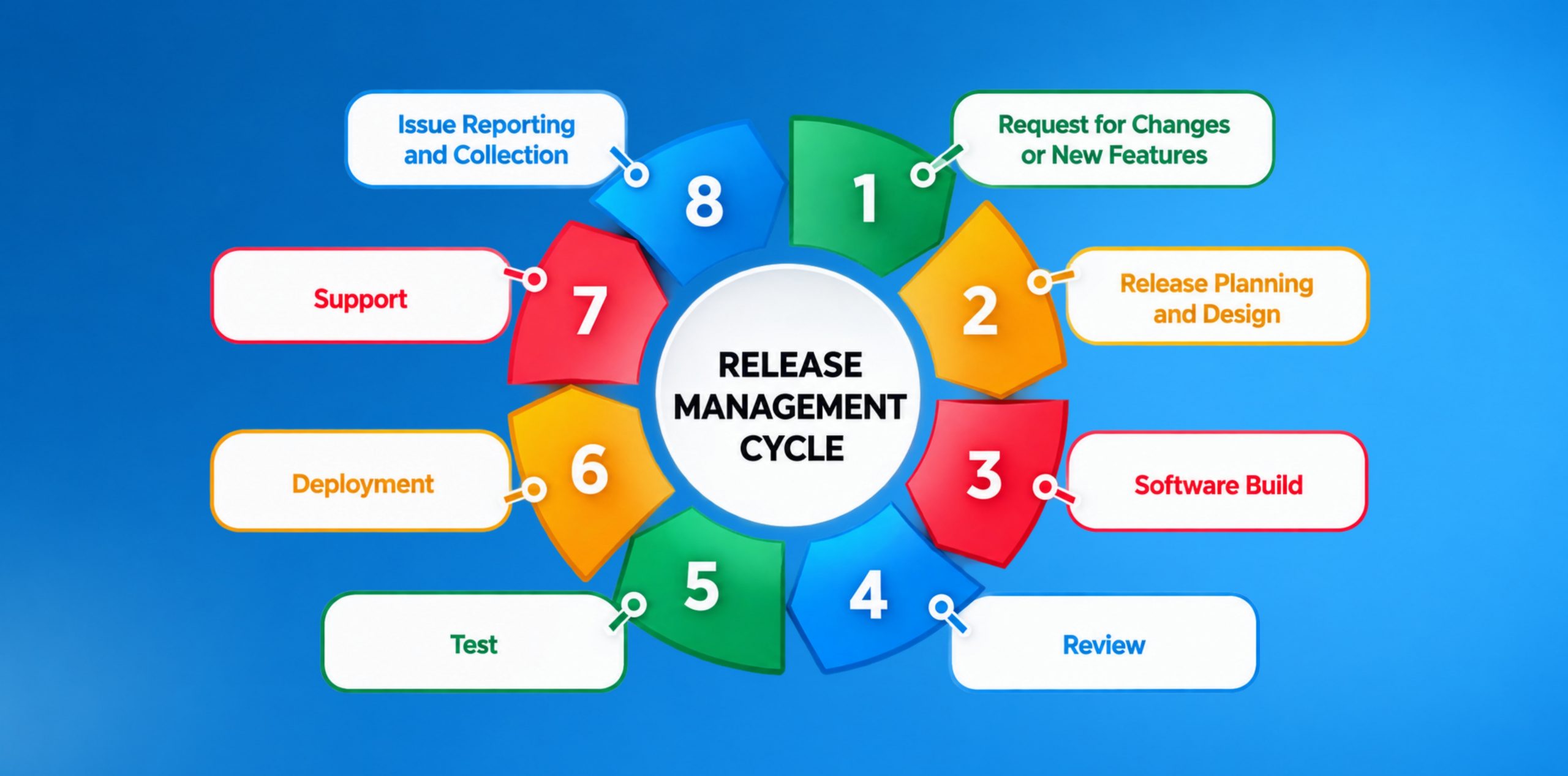

Our experts are all ready. Explain your business needs, and we’ll provide you with the best solutions. With them, you’ll have a success story of your own.
Contact us now and let us know how we can assist.