Penetration Testing Methodology: Frameworks, Phases & Best Practices
October 2, 2026



The app passed every test. Then it went live….
Almost immediately, the one-star reviews started rolling in. A crash on a handset nobody on the QA team actually owns. A checkout flow frozen by a weak signal. A biometric that flat-out fails on an older operating system.
This is exactly why you need a structured mobile app testing process. You cannot test every combination. Mobile apps are expected to perform flawlessly across thousands of device models, dozens of OS skins, and network conditions that drop from 5G to dead zones in seconds.
Stop trying to test everything. Focus on the bugs that actually break things.
This guide breaks down the exact enterprise QA framework used to catch these failures before they ever reach production.
As GeeksforGeeks defines it, Mobile Application Testing is the process of ensuring apps work correctly, securely, and efficiently on different mobile services and operating systems.
Traditional manual testing is a gamble. Without a plan, teams naturally default to testing the devices they happen to own and the paths they easily remember. Meanwhile, the difficult edge cases that reach real users get completely ignored.
A defined process assigns scope, coverage, and exit criteria up front, so quality does not depend on who ran the tests that day.
Testing belongs inside the development lifecycle. In delivery, QA writes test cases while developers write code, run checks through the sprint, and validate the release candidate before launch. After launch, it continues through production monitoring.
The approach shifts with the app type. A native app targets one platform, so testing focuses on device features like camera, GPS, and biometric login. A hybrid app wraps web code in a native shell, so it needs consistency checks across platforms. A cross-platform app runs one codebase on both iOS and Android, so testing has to confirm shared components render and behave the same on each.
A defined mobile app testing process lessens the number of defects that make it to production. By catching issues on a controlled set of devices early, you prevent real users from stumbling into them later.
The cost of missing that window is measurable. Modern users are incredibly unforgiving. A Luciq survey of more than 1,000 US mobile users, found that 15.4% of users uninstall an app after a single crash. If it crashes two or three times, more than half will abandon it entirely.
A separate QualiTest survey reported by Applause found that 88% of people abandon an app because of bugs.
That effort pays off in four ways:
A defined process also supports how modern teams operate:
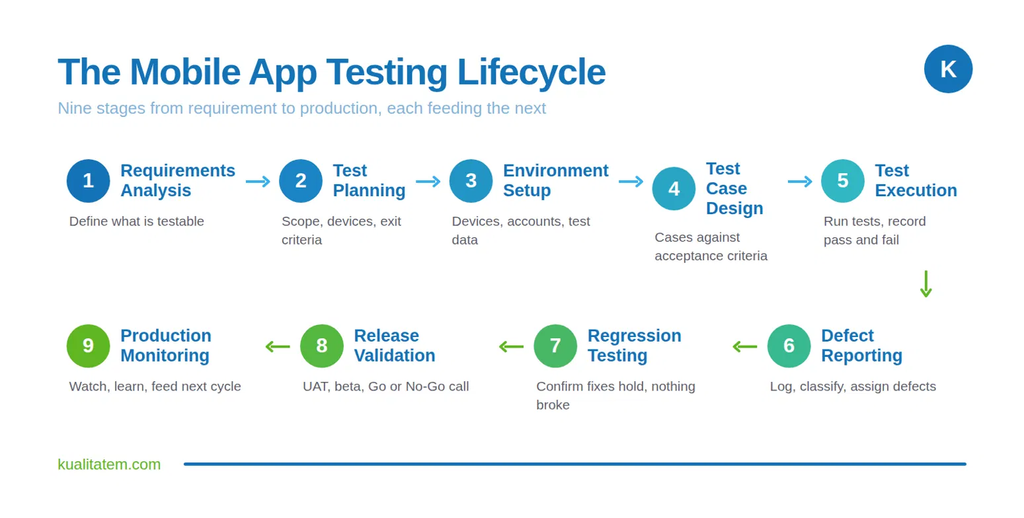
The mobile app testing lifecycle is the sequence of stages a build moves through from requirement to production.
Each stage hands off to the next, so a gap early on shows up late.
Scope sets the boundary of the test effort. The team defines scopes by mapping:
From there, each test area ties back to a business requirement, and a risk assessment ranks those areas by impact and likelihood of failure, which is the foundation of any effective mobile testing strategy. The highest-risk paths get the most coverage.
For a banking app, authentication, transaction processing, and balance accuracy sit at the top of that ranking.
The environment determines how realistic the results are. Because audience setups vary so widely, teams rely on a mix of environments to get the best coverage:
In agile delivery, these are written alongside development so they are ready the moment they build it. Each test case maps directly to an acceptance criterion so that a pass has a clear meaning.
The suite generally includes several test types:
A typical sprint runs smoke first, then functional, then regression, blending a few different testing methods:
When logging a defect, testers capture the exact steps to reproduce it, expected versus actual results, environment details, and visual evidence. From there, the team classifies the bug across two distinct dimensions: severity (the technical impact) and priority (the business urgency). Because these two metrics don’t always align, you have to track them separately.
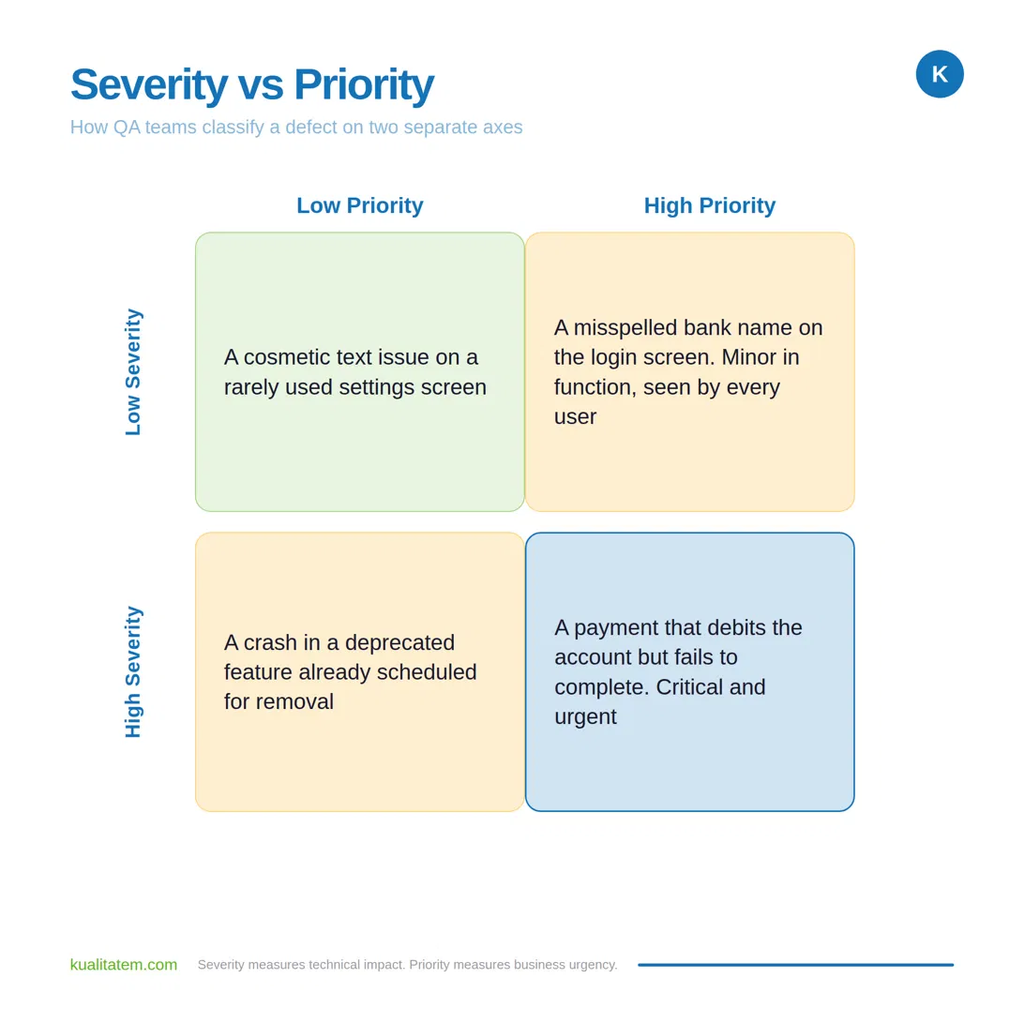
A severity scale gives the team a shared language. A Blocker stops testing or blocks a core journey, such as an app that crashes on launch or a transfer that never completes. A High defect breaks critical functionality but has a workaround. A Medium defect affects non-critical functionality. A Low defect is cosmetic. Teams track defects in a management tool such as Jira so that assignment and status stay visible.
Regression testing confirms that new changes did not break existing functionality. It runs after every fix, feature addition, or dependency update. It matters because a change in one module can affect another in ways the developer did not intend.
The regression suite is the first candidate for automation because it repeats on every release and grows over time. A well-maintained automated regression suite lets the team rerun a large set of checks quickly on each build rather than retesting by hand.
Release validation confirms that the build is ready for real users. User acceptance testing checks the app against business requirements with stakeholders or a representative user group. Beta testing puts the build in front of a limited real-world audience to surface issues that controlled testing missed. A release checklist confirms that each required area passed.
The team then makes a Go or No-Go decision against explicit criteria. A build only gets a Go when all baseline exit criteria are met and zero Blocker or High defects remain. Furthermore, critical user journeys must pass on the priority device matrix, and performance must stay within acceptable threshold. If any of those fail, the build is a No-Go and returns for fixes. This framework replaces a subjective launch call with hard evidence. That distinction is critical when a botched release triggers severe financial or compliance penalties.
Testing does not end at launch. This stage is often called shift-right testing, and it closes the loop by feeding real-world data back into the next cycle. The team watches the app in production by:
A complete process applies several testing types, each targeting a different quality dimension.
Functional testing verifies that features work as specified. It checks that user actions produce the correct result, from login to checkout.
Usability testing assesses how easily a real user moves through the app. It evaluates navigation, clarity, and friction in core journeys.
Compatibility testing confirms the app works across the target device models, OS versions, screen sizes, and network conditions.
Performance testing measures behavior under load and constraints. It checks load times, responsiveness, memory use, and battery consumption under varying network speeds and user volumes. Poor mobile app performance testing is a direct churn driver, so this type earns real depth in the plan.
Security testing protects user data and the app from vulnerabilities. It checks authentication, authorization, data storage, encryption, and secure transmission. For a banking or fintech app, security testing carries the highest stakes, because a breach carries regulatory, financial, and reputational costs. It validates against standards relevant to the sector and confirms that sensitive data is never exposed in logs, storage, or transit.
Accessibility testing confirms the app is usable by people with disabilities and meets standards such as WCAG. It checks screen-reader support, contrast, touch-target size, and keyboard navigation.
Localization testing confirms the app works correctly in each target language and region, beyond translation, covering formats, layouts, and cultural fit.
Installation testing confirms the app installs, updates, and uninstalls cleanly across the supported device set.
Interrupt testing confirms the app handles interruptions such as incoming calls, notifications, low battery, and network loss without losing data or crashing.
Device coverage is the hardest part of mobile testing because the target set is large and uneven. Teams have to account for a massive variety of hardware and software combinations that change how an app looks and feels.
For example, Android fragmentation spreads users across thousands of device models from different manufacturers, each running its own unique screen size, hardware setup, and OS skin. While iOS has fewer active models, it still spans several OS versions and screen resolutions that require coverage. Add tablets and foldables into the mix, and you suddenly have entirely new form factors that completely change layouts and user interactions.
Since testing every single device is impossible, the goal is to test the right ones. A sound strategy builds a ranked device matrix by prioritizing devices based on three practical inputs:
Once the team builds a ranked matrix from those specific inputs, they execute tests for the top tier of real devices. Any broader coverage beyond that primary tier is then handled efficiently through a cloud device farm.
Modern mobile testing runs inside Agile and CI/CD rather than after them. According to Digital.ai’s State of Agile report, 71% of organizations use Agile in their software development lifecycle, which sets the pace QA has to match. Agile sprints compress the time between build and release, so testing has to keep up with short cycles using these methods:
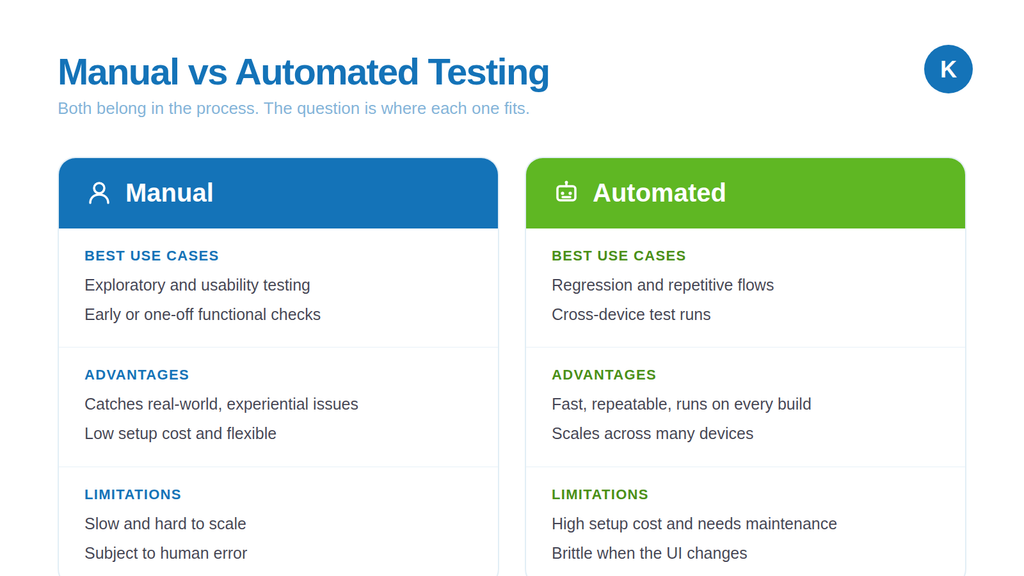
The rule is straightforward. Automate the stable and repetitive work, and keep human testers on the exploratory and experiential work. A regression suite that runs on every build should be automated. A usability pass on a new feature should be manual. Most mature teams run a blend, with automation carrying the repeatable load and manual testing carrying judgment.
No single tool covers mobile testing. A working setup combines an automation framework, a device cloud, a test manager, and a defect tracker, each needing setup and maintenance.
The tools below are the common building blocks. A mature QA partner already runs this stack, which is one reason teams outsource rather than staff and license all of it in-house.
| Tool | Best for | Type |
| Appium | Cross-platform automation | Open source |
| Espresso | Native Android UI testing | Open source |
| XCUITest | Native iOS UI testing | Open source |
| BrowserStack | Cloud real-device testing | Commercial |
| Firebase Test Lab | Android device testing at scale | Commercial |
| Playwright | Mobile web testing | Open source |
| Selenium | Responsive web testing | Open source |
| TestRail | Test case management | Commercial |
| Jira | Defect tracking | Commercial |
Mobile testing carries challenges and each has a practical mitigation:
This checklist is the evidence base for the Go or No-Go decision. Every item should have a documented result before launch.
A team deciding between in-house testing and an outsourced partner evaluates a partner against a clear criteria:
Kualitatem delivers mobile app testing services across iOS and Android, pairing manual and automation testing with performance testing, security testing, and validation on real devices. The work is built for enterprise QA, where what matters is coverage you can prove and results you can repeat.
The track record backs that up:
Our services integrate seamlessly into your existing delivery pipeline, delivering the hard evidence a CTO needs to release with absolute confidence.
To discuss a mobile app testing engagement, speak to an expert at Kualitatem.
1. What is the mobile app testing process?
It is the structured set of activities used to verify that a mobile app works across devices, operating systems, and real-world conditions before and after release. It covers planning, execution, defect management, regression, release validation, and production monitoring against defined acceptance criteria.
2. What are the stages of mobile app testing?
The core stages flow from requirements analysis and test planning directly into environment setup and test case deisgn. From there, you move into execution, defect reporting, regression and final release validation. Skip an early step? You will pay for it in production.
3. When should mobile app testing begin?
On the day one. If you are waiting for a release candidate to start testing, you are already too late. QA must shift left into the very first sprint, writing test cases while developers write code. It is simple math: defects caught in-sprint cost a fraction to fix.
4. What tools are used for mobile app testing?
Common tools include Appium for cross-platform automation, Espresso for Android, XCUITest for iOS, BrowserStack and Firebase Test Lab for device coverage, TestRail for test management, and Jira for defect tracking. The right set depends on platform, app type, and automation needs.
5. Should mobile app testing be automated?
Repetitive, stable work like regression should be automated, since it runs on every build and scales across devices. Exploratory and usability testing is better done by hand. Most mature teams use both rather than choosing one.
6. How many devices should a mobile app be tested on?
There is no fixed number. The team builds a device matrix from audience analytics, regional market share, and OS adoption, then tests the top tier on real devices and covers the rest through a cloud device farm. The aim is to test the devices your users actually run.
7. What is the difference between manual and automated mobile testing?
A person does manual testing and works best for exploratory, usability, and one-off checks. Automated testing runs scripts and is built for repetitive, regression, and cross-device runs. In short, manuals catch how the app feels, and automation gives you speed and scale on stable flows.

Not sure where your QA stands?
Speak to an Expert





Our experts are all ready. Explain your business needs, and we’ll provide you with the best solutions. With them, you’ll have a success story of your own.
Contact us now and let us know how we can assist.