Penetration Testing Methodology: Frameworks, Phases & Best Practices
October 2, 2026



So you have this full test environment all automated. Good coverage is visible on the dashboard. Still, at every release you still need to run a manual suite of regression tests before people feel secure shipping to production.
Here we are seeing the same thing. The investment exists as well as the framework. However, the test strategy is centered around “Automating all the previous manual tests”, rather than on the “speed of release”.
Clearly, two different goals…
So, our team of engineers sat down and compiled original ways you can cut automation testing release cycles by 55%.
Let’s start….
Agility that stems from QA automation allows for reduced release cycles and rapid feedback loops without the loss of product quality. These seven best practices are based on new research, book content, and insight from leadership and are appropriate for CTOs driving speed and cost reduction.
Almost all teams run their test suite as a step in the CI. The build will be built, somebody will kick off the test and will wait until it finishes. This delay from commit to testing is responsible for being released slowly.
The solution to the problem is conceptually very easy: engineers commit code and tests run automatically.
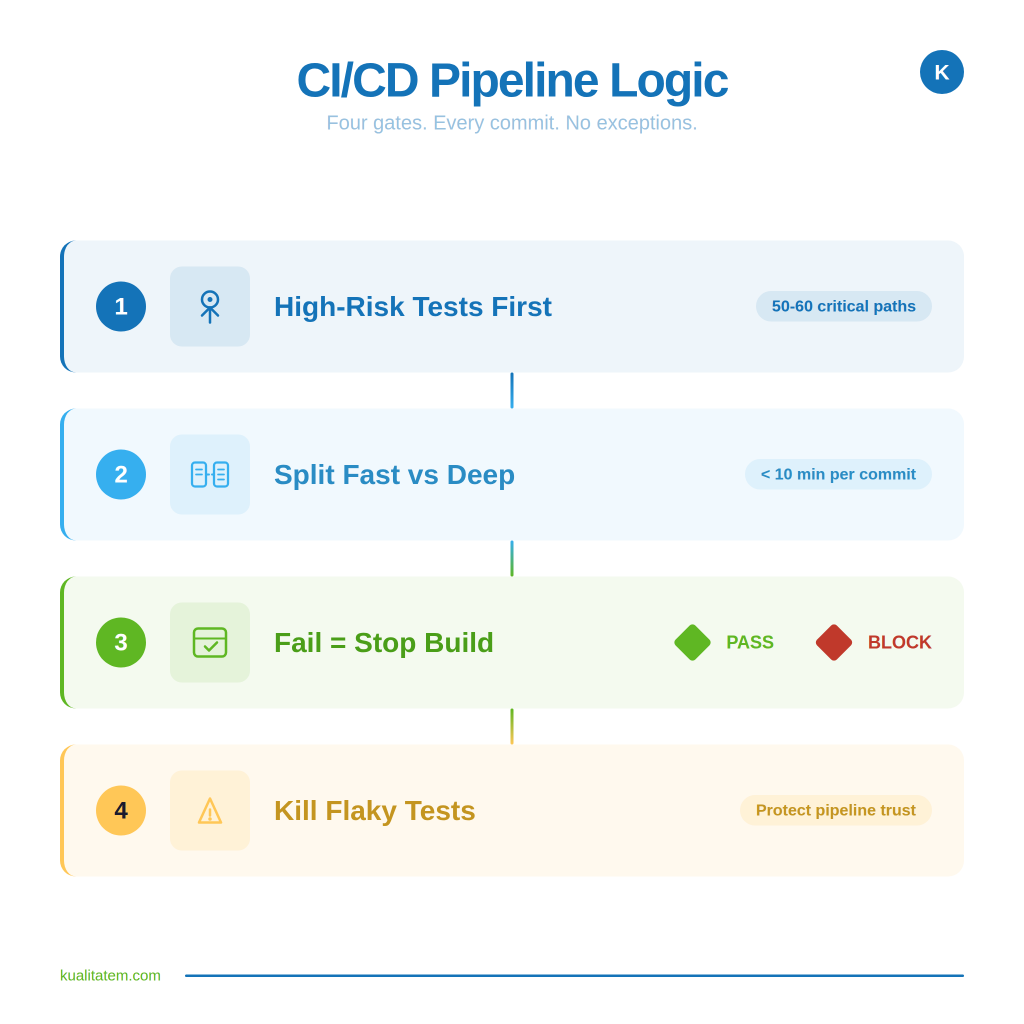
Don’t pour the entirety of your suite into the pipeline from day one. Select the top 50-60 tests that stress your riskiest paths (payment, login, the central transactions).
Quick test runs (10 mins or less) occur after each commit to catch anything obvious that will break before we merge. Full regression (“Deep” tests) run nightly/before releasing a release candidate. That means devs aren’t waiting 4 hours to merge.
Deployment stops when a test fails. I know it sounds harsh, but it’s the only way the team gains confidence of tests done by automation over manual tests. When the quality is dictated by pipeline, the manual regression round is vanishing.
One unreliable test that fails randomly will train your entire engineering org to ignore test results.
50%
Faster release cycles with
pipeline-embedded validation
Your pipeline should enforce quality, not wait for it.
If releases are still bottlenecked by manual regression, that’s a pipeline architecture problem with a measurable fix.
It is by far the quickest way to cut your cycle time down that we’ve seen. There aren’t thousands a day as Netflix does with this model. But there is no Netflix requirement for it. The speed difference between we test before we release’ and we test it when we commit it ‘ is probably going to halve the cycle time of about three-quarters of the clients that we work with in 3 months.
The instinct is to automate. This seems like moving forward. What is created in fact is a bloated suite where in majority, the tests are confirming the function that was never changed.
Pulling the last 6 months of your production incidents would give you modules, which would become your to-do list instead of being a cover sheet.
Login, checkout, payment, account creation. They’re not features. They’re revenue. If your smoke suite covers these journeys, you’ve already snagged the bull by the horns.
Since that page has gone untouched since Q2, there’s no reason to automate it each and every cycle. Automatically running this page just wastes time and is mostly background noise.
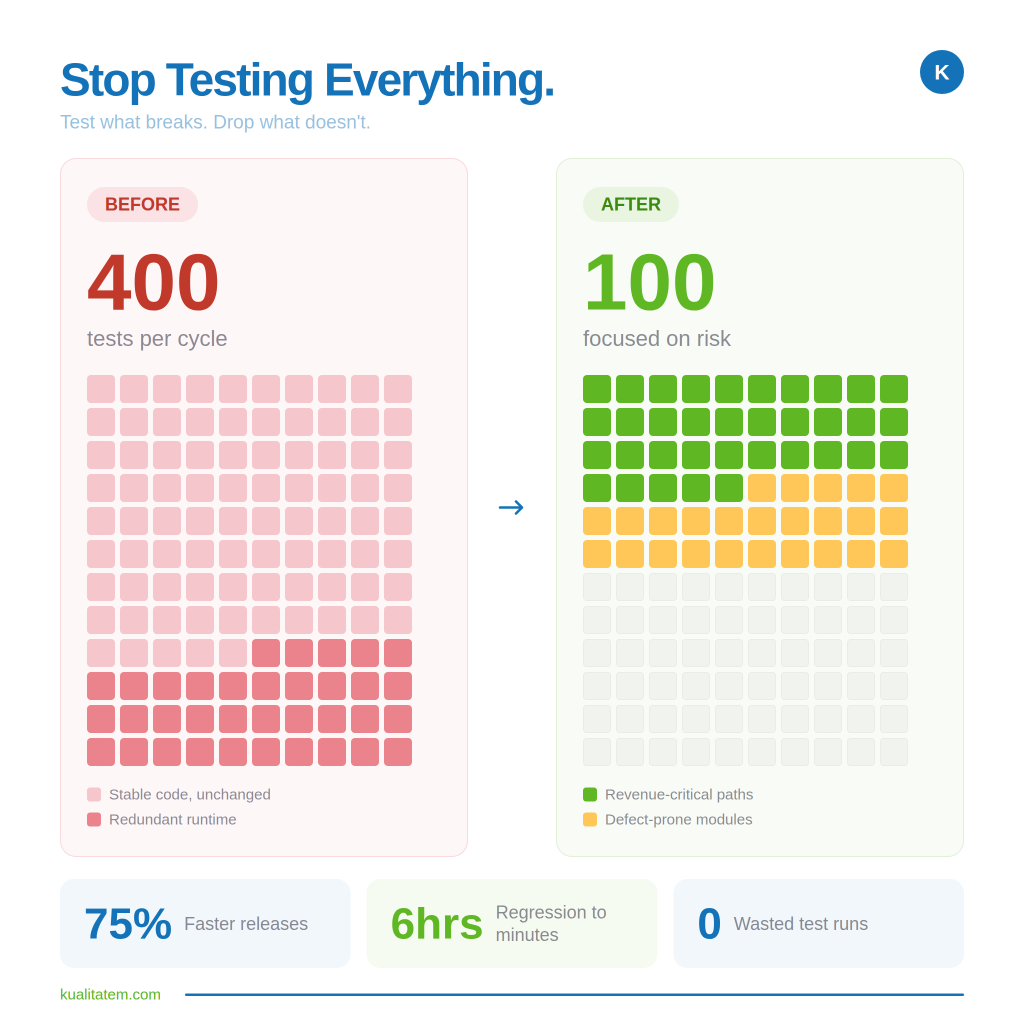
If your core suite of tests take greater than 20 minutes to run then it’s doing way too much. Small fast suites run all the time on every build beats slow thorough suites that only run weekly because everyone has patience.
Supported a customer restructuring around defect-history prioritization & core journey coverage. Reduced regression time from days to hours. Not by testing less, by not testing that which didn’t need it.
Here’s what eats your team’s time:
→ the app changes → a button moves → a field gets renamed → 40 tests break overnight.
Since tests are trying to find something that’s been moved. And your engineers spend the two days after fixing tests instead of implementing features-This is maintenance, not quality.
Self-healing frameworks automatically detect when a UI component is moved or its name is altered; then they rewrite the test accordingly. They will still pass without anyone performing manual locator changes each and every sprint.
But when it comes to maintenance taking a hit you know your team has stopped micromanaging legacy tests and your team is free to do new feature work. That is the true ROI on this, the AI but more the leverage it unlocks.
Track what’s healing and why
If the same tests are self-correcting across every release it tells a story. If the app architecture isn’t robust the tests and therefore their healing data would do a disservice to their intended purpose. Use healing data diagnostically, not just for convenience.
Maintenance usually covers 60-70% of your effort on automation. In banks, self-healing has shortened release cycles by 43%. When the same happened to us we found out that we reduced much of our test releases when our engineers were not fixing locators anymore and spent their time on proper risk coverage.
Your team tests manually out of the requirements docs; this takes days. Plus, the obvious paths are tested but nobody thinks of the edge cases.
The AI agent will parse your user stories and acceptance criteria and generate the test cases for you automatically. It is not going to be ideal. But an 80% quality baseline could save your team a whole week’s work.
“Give AI the context before writing your test cases and see the magic it brings in your coverage.”
Agents do not behave like your team when the application is on the “happy path.” They explore. Unseen sequences of commands, unobserved input, weird device inputs. The exact types of inputs that create production issues, but never appear on a scripted set.
The coverage reports show us what is tested. Officers show us what is not tested. The agents show us the road that was not scripted, as no one thought a user would follow it. The users always follow it.
Login 1,Checkout 1. And scale that across 50 user roles, 12 countries, 3 payment types. That’s right. If your team is hand-scripting each, it will never get done and you’ll never reach 80% without doubling your team size.
✦
Not sure where your automation program stands today? Our Test Automation Maturity Model helps you benchmark your current setup across five levels so you know exactly which of these practices to prioritize first.
Organizations that need help designing scalable frameworks, integrating automation into CI/CD pipelines, or modernizing legacy test suites often work with specialized QA automation services to accelerate implementation and improve long-term maintainability.
The tests don’t hard-code values inside the script, but fetch its input from a plain text file, a spreadsheet (or whatever you want to call a CSV file). You write and use the same script.
You want to run tests for 200 login combinations using various roles and rights? That’s one file update. QA engineers script test logic only once. Business analysts just enter new cases via editing a file.
When creating a new test variation takes 30 seconds rather than one day your team really does create it. Edge cases you would never justify writing a separate script for now become trivial to test, the barrier to entry is so low for it that almost the cost of trying them is the entry point.
Talk to our team about restructuring yours→
Teams running data-driven setups report up to 40-75% faster releases. Not because automation is smarter. Because one framework does the work that used to require hundreds of individual scripts and the headcount to maintain them.
Most teams seem to be dealing with automation as an after-development activity. The feature is developed and handed over. After QA writes the tests, automation covers the feature. By the time, the code being covered by automated tests is two sprint away already. Test defects accumulation due to being so behind.
Write automated checks alongside the feature, not after it
When your dev completes the story, that user story should be in the current sprint in testing. Not the sprint after. Not “if QA is not busy with other things.” Same sprint, same definition of done.
The unit test catches logic flaws the day the code is pushed. Unit tests ensure components talk to each other; coverage by End-To-End is function flows. Layers are released during the Sprint; the bug is caught as long as the engineer can remember it and not a week later that he forgot.
The culture change occurs when automation shifts from being considered ‘work for QA’ to work for ‘Definition of done’. A feature is not finished until we’ve got automated tests. No other rule changed the team faster than this simple rule.
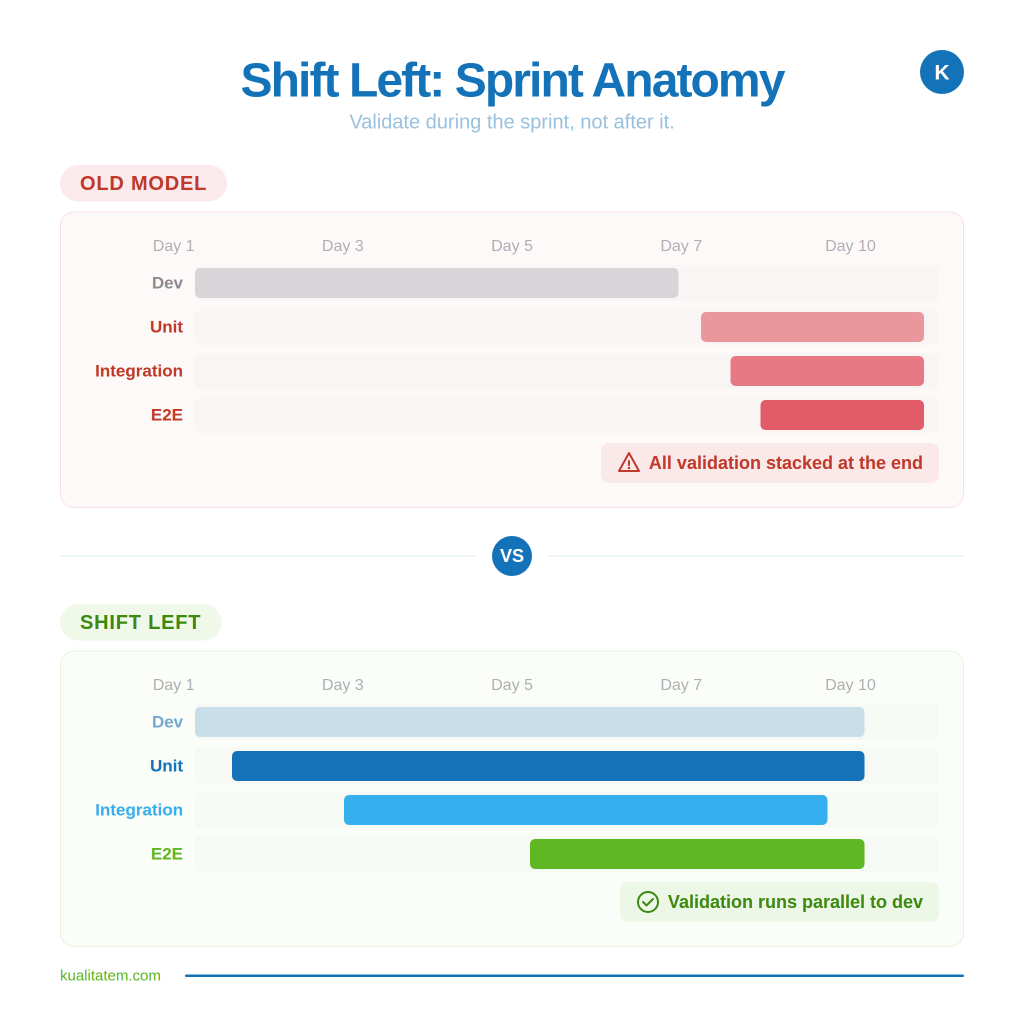
Spotify compressed their cycle times by moving automation regressions back into development instead of having it act as a gatekeeper at the end. We have seen the same thing with our customers. If validation is in-sync with development instead of lagging behind development, defects won’t accumulate and your cycle will be smaller organically.
Seems safe running the whole suite each cycle. Too slow though, and the majority of the runs just prove something didn’t break that hasn’t changed. Not the same as being rigorous: it’s wasted compute, wasted time.
Before a test run kicks off, AI analyzes what actually changed and maps it against your defect history. Tests covering affected modules run first. Tests covering untouched code get skipped or deprioritized.
If a payment module was updated and has a history of breaking, it gets full coverage. If a static page nobody touched is stable for six months, it doesn’t need to run every build.
The goal isn’t running fewer tests. It’s running the right ones first, so your team gets a risk verdict in minutes, not hours.
50%
Less execution time
with same defect detection rate
Still running your full suite on every build? There’s a faster way to gain the same confidence.
Predictive prioritization targets the 400 cases that matter instead of the 2,000 that don’t. Half the execution. Same coverage where it counts.
Teams using risk-based test selection see 50% drops in execution time with fewer production escapes, not more. You stop treating every release like it carries equal risk everywhere and start focusing on validation where it actually matters
Just automated test execution is not a complete solution to automate the software verification process. Automated software verification implies “building quality verification into the process of development and releasing. Instead of checks on a build after its deployment, tests will be executed against a build for each stage and the outcome decided on whether or not the tests have passed.
This means automating:
These checks can then be integrated into CI/CD so they run automatically whenever new code is committed.
Running more tests isn’t always the answer. Running the right test is.
Risk-based test selection helps teams:
This is where automation can deliver one of its fastest wins: less unnecessary execution, faster feedback and continuous confidence.
Test Automation
Release Assurance
Test automation provides the evidence, release assurance uses that evidence to make a release decision.
Here teams can transition automation efforts from not just QA test automation, but automating aspects of the release decision process itself. Quality gates, pass/fail criteria, defect and severity thresholds, regression test results and coverage information can all flow into integrated checks within CI/CD which can initiate automated notifications and approvals. The areas the release is deemed of highest risk are still going to flow to a person for sign-off, but things can still move quite quickly and transparently.
No-code/low-code test automation allows these tasks of running validation even further without scripting every workflow.
Again, it’s not about pushing QA out of releases. It’s about removing redundant manual effort, not performing the repeated verification, and allowing QA to get sped up on having documented, evidence-based decisioning regarding release approvals.
A reduced release cycle doesn’t happen by increasing automation; it does when your automation strategy correctly aligns where the risks actually reside. Each of the seven practices follow a similar paradigm: Stop running all of everything—and start running the critical portions- and hand over to AI what doesn’t require a human.
The difference between “we have automation” and “our automation causes us to release faster” is a strategy issue, not a tooling issue. Virtually every org is using 80% of the tools that they currently have. The 20% missing is organization around the how, when, and what is validated.
If your release cadence has not sped up even after all those years of investing in automation, then it is not the framework, but priorities below the framework.
How do QA automation best practices reduce release cycle time?
Testing becomes an ongoing, rather than an endgame, bottleneck. Automation based on risk, for example, will only test the aspects that have changed, provide a 5-minute as opposed to a five day cycle and contract it.
What’s the first step to scaling automation without adding headcount?
Embrace data-driven, modular frameworks. Write the logic once and increase coverage using flexible inputs such as spreadsheet definitions without needing more scripts or personnel.
How does AI improve enterprise QA testing?
AI auto-generates test cases; self-heals broken tests; executes in a risk-based way. Results: reduced manual effort; faster runs; greater defect detection.
Are cloud QA best practices different from on-prem?
The fundamental concepts remain. The cloud allows for parallel processing, scalable infrastructure, and distributed data management so you can test more, faster and more comprehensively.
What ROI can CTOs expect from QA automation best practices?
Usually, releases are 40-75% faster, with less than 60-70% maintenance (self-healing), and ~300% ROI based on defect reduction, reduced manual work, and delivery speed.

Not sure where your QA stands?
Speak to an Expert






Our experts are all ready. Explain your business needs, and we’ll provide you with the best solutions. With them, you’ll have a success story of your own.
Contact us now and let us know how we can assist.