
Summary
Mobile app testing costs depend on the work required to validate your application, not simply its size.
- Six cost drivers: Devices, platforms, complexity, test types, releases, and compliance.
- Illustrative release budgets: $2,020 for a booking app, $4,740 for an e-commerce release, and $12,370 for a fintech release. These are examples, not market rates.
- Real-device cloud pricing: AWS Device Farm lists $0.17 per device-minute, while subscription options vary by provider.
- Automation ROI: Repeated regression testing can justify automation when recurring savings recover setup and maintenance costs.
- Budget calculation: Combine QA hours, hourly rates, device access, and automation upkeep.
- Cost control: Prioritize important user journeys, use actual device analytics, and clarify included retesting before approving a quote.
Editorial summary · Read the full guide below
Imagine that your team is two weeks away from launching a mobile app. Development is almost done, the release date is already committed, and your product team is preparing for the launch.
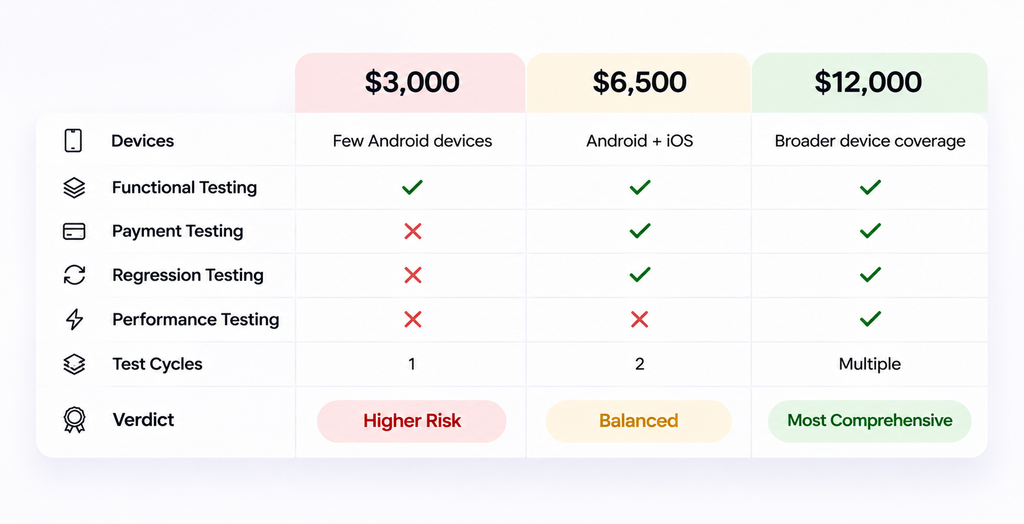
Three QA quotes land in your inbox: 3000$. 6500$ and 12000$
You open these proposals and expect to understand the difference. Instead, all of them mention functional testing, device compatibility, and bug reports.
The 3000$ quote might appear budget-friendly until you notice that it only covers a few Android devices and has one test cycle. The 6500$ proposal adds many things such as payment testing, regression, as well as iOS. The 12000$ option covers broader device coverage, performance testing, and multiple rounds of verification.
Now comes the most difficult part. Your engineering team needs the testing to be completed before launch, but spending another 9000$ needs a business justification. And choosing the cheapest quote could leave critical checkout failures being undiscovered until the customer starts using the app.
This is the exact point where mobile app testing cost becomes more than just a procurement decision. You need to understand that what each of your dollar would cover and which of the failures would affect your business and how testing your release actually needs.
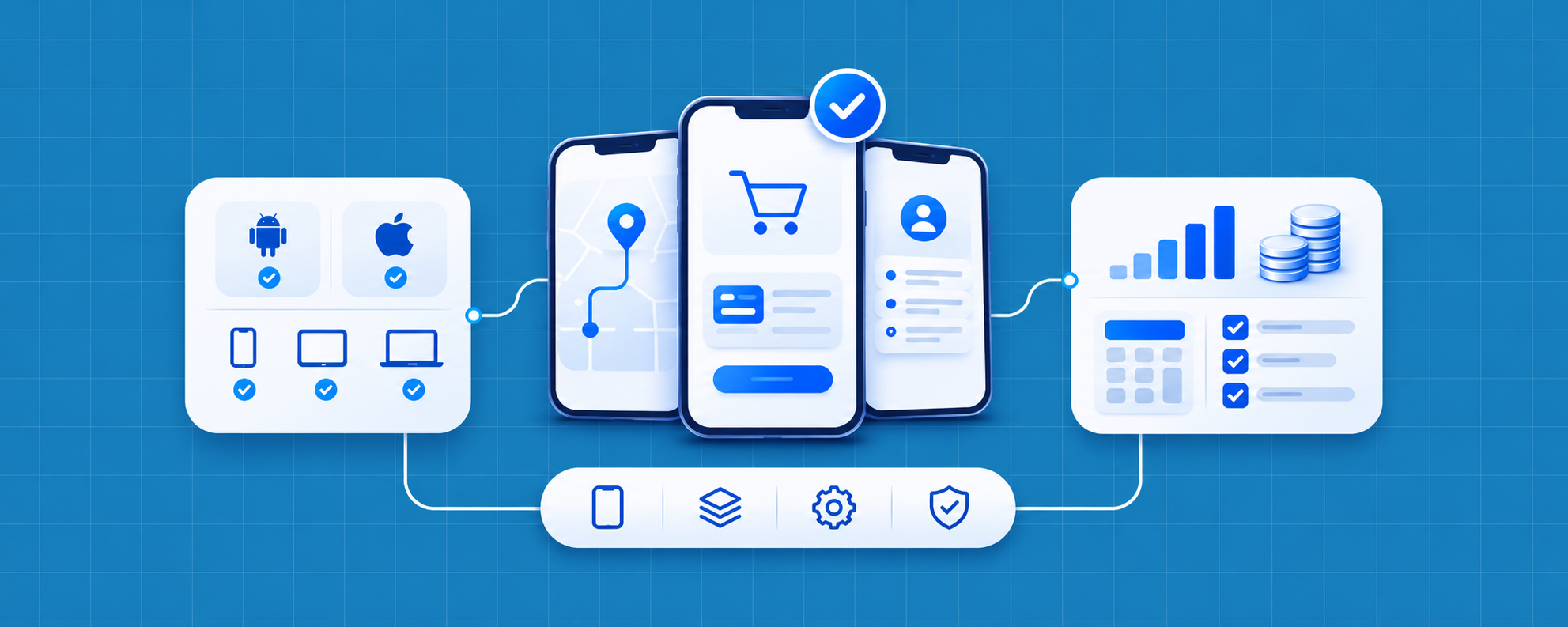
Let me make this breakdown easier for you. The cost depends upon six factors:
- Device coverage
- Platforms
- App complexity
- Test types.
- Release frequency
- Compliance requirements
In this blog, you can learn how to estimate those costs and compare them without guessing.
Quick Answer:
Mobile app testing cost depends on six factors: device coverage, platforms, app complexity, test types, release frequency, and compliance requirements. Based on illustrative budgets, a basic booking app may cost $2,020 per release, an e-commerce app $4,740, and a complex fintech app $12,370. These are examples, not fixed market rates. Your total budget should account for QA hours, device-cloud expenses, automation maintenance, and defect retesting. To avoid unexpected costs, prioritize critical features, automate repetitive tests, and compare quotes based on the testing cycles and coverage included.
What Drives Mobile App Testing Cost?
A simple appointment booking app and a digital wallet may both have ten screens, but the amount of testing they need could be very different.
The booking app may need registration, appointment selection, cancellations, and notification checks. The wallet must also handle authentication, transfers, failed payments, interrupted connections, and transaction accuracy.
A failure in the booking app might require the customer to reschedule. A payment error could involve duplicate charges or incorrect balances.
That’s the reason that why the number of screens tell you very little about the final testing bill.
| Cost driver | Why it changes the cost | How to estimate it |
|---|---|---|
| Device and OS coverage | The more device and operating system combinations, the more checks. | Use your app analytics to count the number of devices and Operating Systems. |
| Platforms | With shared code, iOS and Android must be platform validated separately. | Record the number of platforms and the number of planned test cycles. |
| App complexity | There are more scenarios now due to payment, integrations, offline support, and permissions. | List important user journeys and integrations |
| Test types | The different types of tests require different work in order to achieve functional, regression, performance, accessibility, and security testing. | Determine the types of releases that each requires |
| Release frequency | Each new version might need to be re-regressed. | Multiply annual releases by regression effort (regress effort). |
| Compliance | Testing and evidence collection can be added by regulatory and contractual requirements. | Recognise appropriate standards and necessary tests. |
Example: Why a five-screen app can cost more to test
Think about a fintech startup that has built a simple money transfer application
The interface has five screens, but each transfer passes through authentication, account validation, payment processing, and balance updates.
What happens if the customer loses connectivity after confirming the transfer?
Is the payment completed? Would the application retry? Could it send the money twice by mistake?
These scenarios add testing effort even when the interface is simple.
Testing cost depends more on how complex your app is and what could go wrong than on how many screens it has.
Real Devices, Emulators, and Device Clouds: What Do They Cost?
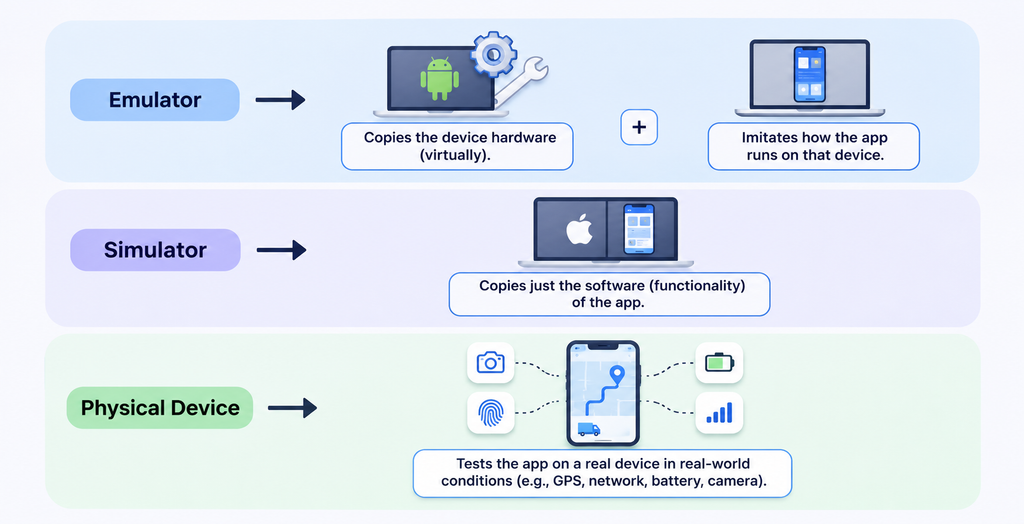
Your app might run smoothly on the engineering team’s phones and still fail on the devices your customers use.
Different OS versions, manufacturers, and hardware configurations can expose problems that don’t appear during development.
Below mentioned are the three practical ways to build the device coverage.
Emulators and Simulators
Purchasing dozens of phones just for the sake of testing your app can quickly eat into your QA budget. That’s why the emulators were created. They allow your staff to test out mobile applications on virtual devices without purchasing a mobile phone.
Google has an Android Emulator, while Apple has the Simulator, which is available in Xcode.
They are both helpful in identifying functional problems, testing the screen layouts, and repeated testing during development.
The primary benefit is reduction in costs of hardware, but there is a downside. The virtual devices can’t simulate real-life conditions, particularly if your app needs to use hardware features or conditions change on the network.
Physical Devices
Some problems only occur in your app when actually running on a phone. That is why it is still important to test physical devices. It helps your team to identify camera or fingerprint authentication issues, battery usage alerts, device behaviour, and more.
Use a GPS tracking driver delivery app. It could all be fine and dandy with a fake location. What if a driver goes into an area with bad reception and switches to a different carrier?
By using real devices, these problems can be identified prior to impacting customers.
The downside is that they will likely be more expensive to maintain. Phones will require buying, updating the operating system, replacing any damaged phones, and preparation for each test cycle.
Real-Device Clouds
What happens if you have to test across 20 different phones and you don’t want to have to purchase and manage them all?
Real-device cloud provides your testers with remote access to real phones running in a testing provider’s environment.
Testing on various devices and operating systems without incurring up-front costs for building a device lab.
The main advantage is the ability to cover devices without a lot of hardware investment. Subscriptions, usage restrictions, and parallel testing capability can all inflate your monthly bill, however.
Here’s what major providers charge, based on their published infrastructure pricing as of November 17, 2026.
| Provider | Published price | Billing model |
|---|---|---|
| AWS Device Farm | $0.17/device-minute | Usage-based |
| AWS Device Farm | $250/device slot/month | Unmetered testing |
| Sauce Labs Real Device Cloud | $199/month | Annual billing, one parallel test |
| Sauce Labs Real Device Cloud | $249/month | Monthly billing, one parallel test |
| BrowserStack App Automate | $150/month | Annual billing, one parallel test |
These are published infrastructure fees, not complete QA project prices. Taxes, additional features, and plan restrictions may apply.
Example: Calculate device-cloud costs
Imagine that your automated regression tool takes 20 minutes to execute on 10 devices. Repeat it 5 times throughout a release.
10 devices × 20 minutes × 5 cycles = 1,000 device-minutes
AWS Device Farm charges $0.17 per minute via its published pricing, and that’s $170 if all the minutes are billable.
For eligible accounts, AWS has also provided up to 500 credits as a one-time trial.
The $170 figure only reflects the cost of using the device. Labor for test creation, defect investigation, or QA is not shared.
If you do purchase devices, or opt for the cloud, which is the best way to go about it?
Should you buy devices or use a cloud?
| Consideration | Own device lab | Device cloud |
|---|---|---|
| Initial cost | Hardware purchases | Subscription or usage fees |
| Maintenance | Internal responsibility | Provider-managed infrastructure |
| Device expansion | Purchase more phones | Access supported cloud inventory |
| Best fit | Predictable device requirements | Broad or changing device needs |
Start with the devices your customers actually use.
If your analytics show that most customers use a small set of models, prioritize those. Add broader coverage when the audience or business risk justifies it.
Manual or Automated: Where the Money Goes
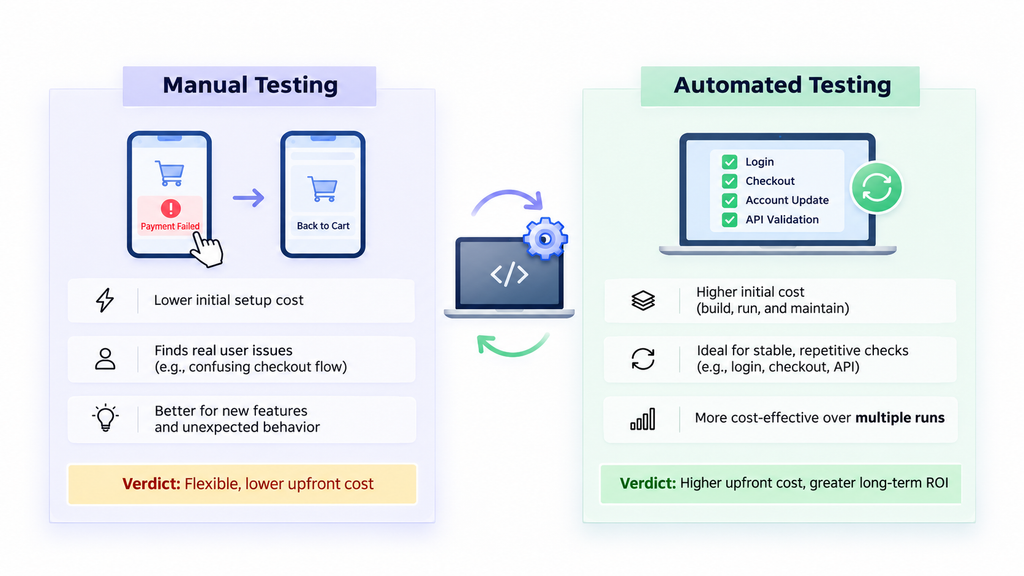
The use of automation can minimize repetitive testing work. However, it’s costly to construct, operate, and maintain.
Manual testing typically involves less initial setup. The testers can test new features, try out unexpected behavior, and assess the experience from the customer’s point of view.
For instance, a tester could find that checkout becomes complicated if a payment fails and the app reverts to the shopping cart.
For stable checks that are repeated in every build (such as login, checkout, account updates, basic API validation, etc.), automation is a better choice.
The key is whether the savings from multiple runs are worth the investment at the outset.
Example: When does automation pay for itself?
Suppose a team spends $900 manually executing the same regression suite each release.
An automated alternative requires $6,000 upfront, followed by $200 in execution costs and $150 in maintenance per release.
| Expense | Manual | Automated |
|---|---|---|
| Initial setup | $0 | $6,000 |
| Recurring cost per release | $900 | $350 |
| Total after 12 releases | $10,800 | $10,200 |
| Total after 24 releases | $21,600 | $14,400 |
Illustrative, not a quote.
The automated approach saves $550 per release after setup.
Break-even releases = $6,000 ÷ $550 = approximately 10.9
In this scenario, the investment pays for itself during the 11th release.
For a team releasing monthly, that’s within the first year. For a team releasing twice annually, recovery takes much longer.
Automation also needs continued maintenance when the application changes.
You can also estimate the potential return using the Test Automation ROI Calculator.
How to Budget Your App
You don’t need a generic industry average to prepare a preliminary testing budget.
You need a clear scope and a few measurable inputs.
Use this formula:
Cost per release = (Number of testers × Hours per tester × Hourly rate) + Device-cloud allocation + Automation upkeep
For an annual budget:
Annual cost = Recurring cost per release × Releases per year + One-time investments
The hourly rate should reflect the agreed provider rate or your fully loaded internal staffing cost.
Three illustrative mobile testing budgets
The following examples use hypothetical staffing rates and workloads. They are not Kualitatem prices or independently established industry averages.
| Scenario | Labor calculation | Additional costs | Total per release |
|---|---|---|---|
| Booking app | 48 hours × $40 = $1,920 | $100 device allocation | $2,020 |
| E-commerce app | 92 hours × $45 = $4,140 | $250 devices + $350 upkeep | $4,740 |
| Fintech app | 204 hours × $55 = $11,220 | $450 devices + $700 upkeep | $12,370 |
In these examples, the labor hours include initial testing, defect verification, and reporting. They do not include separately scoped specialist assessments.
The booking application has limited integrations and a focused device matrix.
The e-commerce application needs checkout validation, payment testing, and recurring regression.
The fintech application has more complex transaction scenarios and a larger testing workload. Security assessments or regulatory validation could increase its total further.
Why testing cycles matter
Imagine your team discovers a checkout defect.
The developer fixes it. QA verifies the fix, but the change affects discount calculations. The team must investigate again.
If the original quote covers only one test cycle, the additional work may cost extra.
Before approving a budget, ask how many full cycles and defect-verification rounds are included.
For annual planning, a $2,450 recurring release cost would become $9,800 for four releases or $29,400 for twelve, assuming identical scope.
Those numbers are illustrative. Real budgets change with feature work and testing requirements.
How to Keep the Cost Down
Three decisions can help control spending without sacrificing important coverage.
1. Test the devices your customers use. Build your device matrix from analytics instead of testing every available model equally.
2. Automate stable regression checks. Prioritize workflows you repeat frequently. Avoid investing heavily in automation for screens that change every sprint.
3. Test features during development. Define scenarios early so developers can address problems before the final release cycle.
A practical mobile app testing strategy can help you balance coverage, release frequency, and testing effort.
What to Ask in a Quote
Two proposals can have similar descriptions but very different deliverables.
Before approving one, ask:
- Devices: Which models and OS versions are covered?
- Platforms: Is the scope for iOS, Android, or both?
- Test types: Which functional, regression, performance, accessibility, and security activities are included?
- Cycles: How many complete testing rounds are covered?
- Retesting: Will the provider verify fixes and rerun affected tests?
- Reports: Will you receive defect evidence, coverage results, and release-readiness findings?
- Security: How will test data, accounts, credentials, and environment access be protected?
- Extra costs: What happens if the release is delayed or the scope increases?
Final Thoughts: Know What You’re Paying For
The lowest price doesn’t necessarily indicate the most cost-effective testing quote. The most expensive isn’t necessarily the safest either.
The important thing is whether the proposed testing includes workflows that may impact your customers, release, and business.
Begin with your users’ devices. Determine the characteristics that are the most important. Try to approximate the hours, testing cycles, infrastructure, and maintenance needed for those features.
Compare providers with the same scope.
Frequently Asked Questions
What is the cost to test a mobile application?
The cost of mobile app testing varies based on the number of cycles, the complexity of the test, the type of test, and the device and platform. Estimate testing time, multiply by staffing rate, and factor in device access and regular maintenance. When comparing quotes, it's a more useful scope than a generic price.
What is the maximum number of units that could be in the system?
Begin with the models & operating systems that your customers use the most. Include representative screen sizes and configurations for important journeys. Expand coverage if there is an audience, features, or risk of releasing. For each application, there is no fixed device count.
Are real devices or emulators more cost-effective?
During initial development, emulators can help to save on hardware expenditure. Physical devices are essential for simulating real hardware behaviour and manufacturer-specific problems. You can use a device cloud without having to purchase each type of device. Virtual and physical devices are sometimes a viable solution to managing coverage and cost.
Do iOS & Android double testing costs?
Not necessarily. Both platforms require verification, and some of the planning and back-end validation can be shared with test cases. Platform-specific behavior still generates extra work. The cost will vary based on the differentiators of the applications, devices supported, integrations, and regression cycles needed.
Do the benefits of automated mobile testing outweigh the expense?
In some cases, where tests are run consistently over releases, automation can be beneficial. Calculate the up-front costs and ongoing upkeep costs versus the time saved in performing manual tasks. If a team releases often, it's possible to recoup costs sooner, but the features can change quickly, and the cost to maintain automation can be expensive.
What is the time required for mobile app testing?
The testing time will vary based on the features being tested, the device coverage, type of testing, and the number of defects detected. For a small feature update, there may be limited validation cycles for that, but for a major release, it may be more cycles. Request an estimate for execution, defect verification, and final regression.
What is included in a mobile app testing quote?
A comprehensive quote should include platforms, devices, activities being tested, hours, cycles, retesting of defects, reporting, security responsibilities, etc. It should also clarify any exemptions and extra fees. This helps streamline the process of evaluating proposals and determine what testing investments will actually provide.