


Summary
A test automation strategy defines what to automate, which tools to use, when tests should run, and how teams measure automation performance.
- An effective strategy includes:
- Measurable goals tied to release speed and software quality.
- Test case prioritization based on business risk and expected return.
- Appropriate coverage across unit, API, integration, and UI testing.
- Automated execution within CI/CD pipelines.
- Defined maintenance responsibilities and performance reviews.
Editorial summary · Read the full guide below
Your engineering team releases software twice a week. Regression testing takes eight hours, so you invest in automation to reduce the testing workload.
After three months, hundreds of automated tests are running! There are still hours of developer investigation for failures, re-running scripts by QA engineers, and manual review for releases.
The investment brought some automation coverage, but the release problem is still there.
The average software quality and security professionals’ responses to the 2026 Sembi Software Quality Pulse Report, show that 57% of software QA tests are automated. Additionally, the report showed 61% of teams found little or no benefit from AI-driven testing, or it had a negative effect.
These results demonstrate the importance of the impact of automation technology and the need to distinguish its adoption from measurable software delivery improvements.
These findings highlight the difference between adopting automation technology and achieving measurable improvements in software delivery.
Kualitatem supports engineering teams in creating test automation strategies that are based on business-critical workflows, reliable test execution, and long-term maintenance requirements. This way, investing in automation aligns with the desired outcomes of teams.
In this guide, you’ll learn to develop a test automation strategy with the help of a prioritization model, real-world applications, a 90-day implementation timeline, and a complimentary strategy template.
What is a test automation strategy?
Test automation strategy is a blueprint for planning, implementing, running, and maintaining automated software tests. It sets out the contribution that automation can make to an organization’s quality goals, development processes, and release requirements.
This strategy will assist you in outlining which test cases are supposed to be automated as well as the resources needed for it. It may also help in analyzing how the test will run along with the criteria of measuring the success.
Test automation strategy vs. test plan vs. test strategy
| Component | Purpose | Example |
|---|---|---|
| Test automation strategy | Defines the long-term direction of automated testing. | Automate critical payment scenarios within 90 days. |
| Test strategy | Defines the overall software testing approach. | Combine functional, performance, security, and exploratory testing. |
| Test plan | Defines testing activities for a specific project or release. | Verify checkout functionality before release 4.2. |
| Test automation framework | Provides the technical structure for automated testing. | Playwright scripts connected to GitHub Actions. |
The automation strategy establishes direction. The test plan translates that direction into activities, while the framework provides the technical means to execute them.
4 signs your team needs a better test automation strategy
The automation strategy provides direction. The test plan is the way of breaking down that direction, and the framework offers the technical methods of doing so.
1. Your automated tests fail inconsistently
One run a test passes and the next run the same test fails even though the application behavior hasn’t changed.
One study published in IEEE Transactions on Software Engineering in August 2026 that analyzed 8.8 billion test runs over four industrial projects found that in all the projects the share of pipeline failures due to previously unseen flaky tests was between 9.8% and 16.3%.
This shows that tests like these can waste developer hours even on teams that already have failure triage tools in place.
2. Releases are still delayed due to regression testing
Even though there’s more automation coverage, the regression testing time is still the same. This usually occurs when slower UI level tests are being used by teams to automate more scenarios.
3. Engineers stop trusting automated results
When a test fails, developers run the test again and again, without investigating the test. As time goes on, real software bugs may be hard to tell apart from infrastructure or script issues.
4. Development capacity is consumed by automation maintenance
As applications get updated, multiple scripts need to be updated as well. Time is allocated to repairing existing automation rather than expanding.
The automation approach is reviewed on the basis of these problems before any more tests are added.
How to create a test automation strategy in 8 steps
- Define measurable goals
- Prioritize test cases
- Select the appropriate test layers.
- Select tools and frameworks
- Create environments and test data
- Infuse automation into CI/CD.
- Set up ownership and upkeep
- Determine performance and ROI metrics
Step 1: Define measurable test automation goals
Start by identifying the problems test automation needs to solve. Is manual regression testing taking too long? Are critical defects reaching production? Are developers spending hours waiting for test results?
Review your existing testing performance, including:
- Regression cycle duration
- Defects reaching production
- Time spent on manual testing
- Developer wait time for test feedback
- Frequency of flaky tests
Use these baseline measurements to set realistic, measurable automation goals.
| General Goal | Measurable Automation Goal |
| Increase test coverage | Automate 90% of identified high-risk workflows within 90 days. |
| Release faster | Reduce regression execution time from 8 hours to 2 hours. |
| Improve software quality | Reduce critical regression defects reaching production by 30%. |
| Improve test reliability | Reduce the flaky test rate to 8% or below. |
| Improve developer productivity | Provide initial test feedback within 15 minutes of a pull request. |
These targets are examples. Adjust them based on application complexity, release frequency, and available engineering resources.
For each goal, document the current baseline, expected outcome, deadline, and person responsible for tracking progress.
Prioritize goals based on business needs. A payment processing company may prioritize transaction accuracy and reliability, while a SaaS company releasing features daily may focus on reducing regression time and providing faster feedback to developers.
Step 2: Decide what to automate
The most useful test cases are typically the ones which preserve crucial functionality, execute a lot, and demand significant manual exertion.
Do not choose test cases according to the choices of each test case writer, but rather use a common prioritization model.
Test automation prioritization matrix
Score each test case from zero to three across five factors.
| Factor | 0 points | 3 points |
| Frequency of execution | Rarely executed | Every build or release |
| Impact on business | Minimal impact | Financial, safety, or regulatory impact |
| Stability of features | Changes frequently | Stays relatively stable |
| Manual effort | Takes a few minutes | Multiple data combinations and hours are required. |
| Human judgement | Requires subjective assessment | Results are predictable |
Using the scores with one or two intermediate conditions
Example: Prioritizing e-commerce test cases
| Test scenario | Frequency | Risk | Stability | Effort | Predictability | Total |
| Payment processing | 3 | 3 | 3 | 3 | 3 | 15 |
| Password reset | 3 | 2 | 3 | 1 | 3 | 12 |
| Homepage usability review | 2 | 1 | 0 | 1 | 0 | 4 |
What should remain manual?
Human testers are considered more reliable for the following:
- Exploratory testing
- Subjective usability evaluations
- New features or those with frequently changing requirements
- Scenarios that must be interpreted in context
Such activities must not be performed completely by automation.
Step 3: Choose the right test automation mix
While each business requirement may be realized via the UI, it could also be automated, as many scenarios in business processes require multiple permutations and combinations.
A well-rounded approach automating only at the UI is slow, more prone to brittleness, and is tightly coupled with browser-specific and UI-specific aspects of the application under test, such as element IDs and UI layout.
It is optimal to cover your requirements across various layers of testing.
Illustrative test automation pyramid. Actual distribution depends on application architecture and risk.
| Testing layer | What it validates | Example |
| Unit testing | Individual functions and business logic | Tax and discount calculations |
| API testing | Service behavior, responses, and data validation | Payment authorization |
| Integration testing | Communication between connected systems | Payment confirmation and inventory updates |
| UI testing | Complete customer journeys | Checkout from cart to order confirmation |
When several business scenarios can be tested without the need to interact with the user interface, API automation can offer excellent ROI.
For example, a checkout business process may require that you complete 30 scenarios of payment types, discounts, and different currency combinations; the majority of these scenarios can be tested at the API layer, while selected scenarios can be tested at the UI for the checkout experience end to end.
By the combination of appropriate integration testing and functional testing coverage across the connected systems could be maintained.
Step 4: Select the right automation tools and framework
Select your tooling based on the needs of the application and skills of your team.
As stated in the 2026 State of AI in Quality Engineering Report by TestMu AI, Playwright was the most popular test automation framework for teams, with Selenium being the second most popular.
Test automation framework adoption in 2026
Percentage of responding teams using each tool. Multiple selections were permitted.

Automation tool selection criteria
| Criteria | What to evaluate |
| Application compatibility | Web, mobile, desktop, API, or enterprise applications |
| Engineering skills | Existing programming languages and technical expertise |
| CI/CD integration | Compatibility with the current delivery pipeline |
| Maintainability | Reusable components and debugging capabilities |
| Reporting | Failure evidence, logs, and execution history |
| Total cost | Licensing, infrastructure, training, and maintenance |
Examples of automation tools
| Testing requirement | Tools to evaluate |
| Web applications | Playwright, Selenium, Cypress |
| Mobile applications | Appium |
| API testing | REST Assured, Postman |
| Unit testing | JUnit, pytest, Jest |
| Performance testing | k6, Apache JMeter |
Before committing to a framework, implement a proof of concept that includes one essential business process, a scenario involving data, and an external dependency test.
Compare implementation time, execution speed, debugging effort, and maintenance requirements.
No-code test automation. is also an option for teams with minimal coding knowledge.
Step 5: Plan test environments and test data
While good scripts help, the dependency on unstable components often has more effect.
According to a November 2026 systemic test flakiness published by IEEE, 77% of tests in the dataset belonged to a cluster. These had issues such as unstable infrastructure components, file system access contention, poorly managed resources, flaky networks, unstable service or database connections, and test environment issues.
This illustrates why looking into common infrastructure and dependencies can be far more valuable than constantly patching individual scripts.
Your strategy should define:
| Requirement | Recommended approach |
| Test environments | Maintain controlled and reproducible configurations. |
| Test data | Generate predictable records before execution. |
| Data isolation | Prevent parallel tests from modifying shared records. |
| Data cleanup | Remove temporary test records after execution. |
| External dependencies | Use dedicated sandboxes, mocks, or stubs where appropriate. |
| Secrets | Manage credentials through approved secret management systems. |
Manage credentials through approved secret management systems.
For example, performing five parallel checkout tests on the same cart may generate inconsistent results if each test alters the contents of the cart.
Separate test data ensures that scenarios do not impact one another.
Having a well-planned strategy for test data generation and management is important to support consistent test automation execution.
Step 6: Integrate automated testing into CI/CD
Automated tests should deliver feedback at a time and place where engineers can do something about it.
Automated tests that provide slow and delayed results can negatively impact velocity. Running every test for every change set will significantly slow development and executing all the tests right before a release will likely lead to regressions being found too late.
The 2026 TestMu AI research found that 22.7% of teams polled still trigger their tests entirely manually and that another 21.5% utilise a regular scripted CI, without any AI-enhanced functionality.
The establishment of a reliable, automated test execution pipeline should thus take precedence over more advanced features.
Example CI/CD test execution schedule
| Pipeline trigger | Tests to execute | Example duration |
|---|---|---|
| Pull request | Unit tests and critical API checks | 5–15 minutes |
| Merge to main branch | Integration and smoke tests | 15–30 minutes |
| Nightly build | Extended regression tests | 1–2 hours |
| Before release | Critical end-to-end workflows | Based on release scope |
| After deployment | Non-destructive production smoke tests | 5–10 minutes |
An example automation testing execution flow in a CI/CD pipeline.
Define quality gates according to business impact.
For instance, in the above diagram a test related to failed payment authorization returns a test failure and will therefore not unblock the release until the test or the related application issue is resolved or a business risk exception is made.
Step 7: Establish maintenance responsibilities and flaky test rules
An automation suite requires continuous maintenance as application behavior and business requirements evolve.
A 2026 research paper presented at the International Symposium on Empirical Software Engineering and Measurement, titled Test Alert Snooze: An Empirical Study of Consecutive Test Failures on CI, examined 27 open-source Python and Java projects.
The researchers found that 42.9% of observed test failures occurred in situations where the same test continued failing across consecutive revisions.
Persistent failures can make new defects harder to identify. Assigning ownership and resolving recurring test failures should therefore form part of the automation strategy.
Define test automation ownership
| Responsibility | Recommended owner |
|---|---|
| Unit test maintenance | Developers |
| API and integration tests | Developers and automation engineers |
| End-to-end regression tests | QA automation engineers |
| Test infrastructure | DevOps engineers |
| Coverage and performance reviews | QA lead and engineering manager |
Create a flaky test quarantine process
When an automated test becomes unreliable:
- Investigate whether the failure represents an application defect.
- Identify the cause of inconsistent execution.
- Quarantine confirmed flaky tests and assign an owner.
- Maintain alternative coverage for affected critical workflows.
- Restore the test after verifying its reliability.
Quarantined tests should remain visible in execution reports. Otherwise, a passing pipeline may conceal missing coverage.
Step 8: Measure test automation performance and ROI
The percentage of automated test cases provides an incomplete picture of automation success.
A team can automate 80% of its test cases while leaving critical payment, authentication, or data integrity scenarios unverified.
Measure how automation affects software quality, engineering capacity, and release decisions.
Six test automation metrics to track
| Metric | How to measure it | Example target |
| Time to feedback | Time between a code change and actionable test results | Within 15 minutes |
| Flaky test rate | Confirmed flaky tests divided by total distinct tests executed | Below 2% |
| Defect detection and escape | Track defects found by automation and defects reaching production separately | 30% fewer critical escaped defects |
| High-risk coverage | Automated high-risk scenarios divided by total identified high-risk scenarios | 90% |
| Test repair time | Average time required to restore a broken automated test | Within one working day |
| Execution cost | Infrastructure and allocated tooling cost per test run | Within agreed budget |
These targets are illustrative. Establish your own targets using historical project data.
Where does AI fit into a test automation strategy in 2026?
According to the 2026 State of Digital Quality in Functional Testing Report by Applause, AI is already being used for several software testing activities.
How surveyed teams use AI in testing
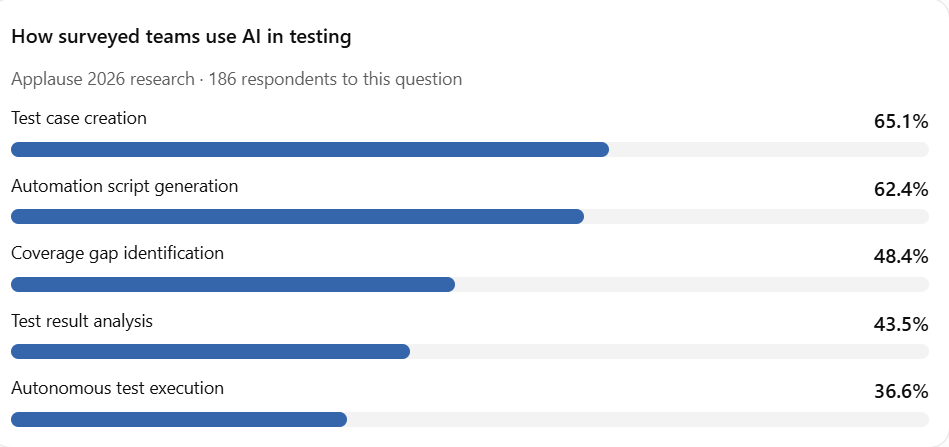
AI-assisted tools can reduce the effort required to create scripts, identify missing scenarios, and diagnose failures.
However, generated tests still require validation against business requirements. A script may execute successfully while checking the wrong expected result.
Include human review, traceability, and approval requirements for AI-generated or AI-modified tests within your automation strategy.
Calculate your test automation ROI
Automation investments should be evaluated against implementation costs, maintenance expenses, execution costs, and manual effort saved.
Consider an engineering team performing four regression cycles each month.
| Cost or resource | Example |
|---|---|
| Manual testing effort per cycle | 40 hours |
| Monthly manual testing effort | 160 hours |
| Monthly testing effort after automation | 40 hours |
| Monthly engineering hours saved | 120 hours |
| Average labor cost | $40/hour |
| Gross monthly labor savings | $4,800 |
| Monthly automation infrastructure and tooling costs | $800 |
| Net monthly savings | $4,000 |
| Initial automation investment | $12,000 |
| Estimated break-even period | 3 months |
Illustrative Financial Outcome of Test Automation
| Performance metric | Financial outcome |
|---|---|
| Monthly testing hours saved | 120 hours |
| Net monthly savings | $4,000 |
| Estimated break-even period | 3 months |
These figures represent a hypothetical automation investment scenario. Actual results depend on implementation costs, maintenance expenses, and testing frequency.
Assumes consistent savings after implementation. Ramp-up time and indirect benefits are excluded.
This is a hypothetical financial model rather than a reported industry benchmark or Kualitatem client result.
Use Kualitatem’s test automation ROI calculator to estimate your own investment, or read our guide to measuring test automation ROI.
Free test automation strategy template with example
A test automation strategy document can begin with one page covering the essential decisions your engineering team needs to make.
The following example illustrates a strategy for an e-commerce platform releasing software twice a week.
| Strategy component | Filled example |
|---|---|
| Automation goal | Reduce regression testing from eight hours to two hours within 90 days. |
| Scope | Include checkout, payments, authentication, refunds, and inventory. Keep exploratory and subjective usability testing manual. |
| Test mix | Unit tests for pricing rules, API tests for transactions, and UI tests for checkout. |
| Tools and framework | Playwright, Jest, and GitHub Actions. |
| Environments and test data | Dedicated staging environment, sandbox payment accounts, isolated customer records, and automated cleanup. |
| Execution schedule | Critical checks on pull requests, extended regression nightly, and end-to-end verification before release. |
| Ownership and maintenance | Developers maintain unit tests. Automation engineers own regression scripts. The QA lead manages flaky test reviews. |
| Metrics and review | Two-hour regression duration, 90% high-risk coverage, and flaky test rate below 2%. Review every 30 days. |
How to Implement a Test Automation Strategy in 90 Days
A phased approach helps teams establish a reliable automation framework, validate its effectiveness, and gradually expand test coverage. The following 30-60-90 day roadmap provides a practical implementation plan.
| Timeline | Phase | Key activities | Expected outcome |
|---|---|---|---|
| Days 1–30 | Assessment and planning | Define automation goals, identify critical business workflows, prioritize test cases, evaluate tools, and conduct a proof of concept. | Approved automation strategy and prioritized test automation backlog. |
| Days 31–60 | Implementation and integration | Develop the automation framework, automate high-priority test cases, prepare test data, and integrate automated tests into CI/CD pipelines. | Functional automation suite covering priority business workflows. |
| Days 61–90 | Stabilization and optimization | Configure reporting, resolve flaky tests, establish maintenance responsibilities, review performance metrics, and identify coverage gaps. | Reliable automation suite with defined ownership and measurable performance. |
The 90-day roadmap serves as a starting point. Implementation timelines may vary depending on application complexity, infrastructure readiness, team expertise, regulatory requirements, and existing automation maturity.
By the end of this period, teams should have sufficient performance data to evaluate their automation investment and determine which workflows to automate next.
5 common test automation strategy mistakes to avoid
– Automating every manual test: Some tests are better performed manually. Focus on repetitive tasks, critical business workflows, and scenarios that require frequent execution.
– Selecting tools too early: Define what you want to achieve before investing in an automation tool. Run a small proof of concept to see how well the tool works with your existing technology and workflows.
– Depending too much on UI testing: UI tests can be slow and difficult to maintain. Test business logic and service functionality at the API and unit levels wherever possible.
– Overlooking script maintenance: Automated tests need regular updates as the application evolves. Assign clear ownership and set aside time for maintaining test scripts.
– Focusing on automation percentage: A high automation percentage means little if critical workflows remain untested. Measure how reliably your tests run, how quickly they detect defects, and how much time they save during releases.
When should you bring in a test automation partner?
Your engineering team can manage test automation in-house if it has the right skills, tools, and time to maintain the test suite. However, as your application grows, keeping up with testing requirements can become difficult alongside regular development work.
Here is how to decide whether your team needs external automation support:
- You already have an experienced automation team: Keep automation in-house and focus on improving your existing framework.
- Your team has limited automation experience: Work with specialists who can build the framework and train your engineers to manage it independently.
- Your automated regression tests are slow or unreliable: Review your existing test suite to understand what is causing delays and inconsistent results.
- Your testing requirements are growing: Bring in additional automation resources to expand test coverage without increasing the workload on your developers.
- You are unsure whether automation is saving money: Review your maintenance costs, test coverage, and the time saved during each release.
Kualitatem provides test automation services to help teams build new frameworks, improve existing test suites, automate critical business workflows, and integrate automated testing into their CI/CD pipelines.
The goal is to help your team release software confidently while keeping automation costs and maintenance efforts manageable as your application grows.
Is your test automation delivering measurable results?
Identify gaps in your automation coverage, framework reliability, execution efficiency, and maintenance process with Kualitatem.
Conclusion
The process of determining how and where to start and continue automation should follow a sustainable model focusing initially on business-critical areas while striving for measurable results during software release cycles.
You may download the automation strategy template at no cost or Kualitatem to discuss your automation requirements.
Frequently Asked Questions
What is a test automation strategy?
A test automation strategy outlines how an organisation will plan, design, build, implement, execute, and maintain automated testing of software. The strategy should articulate an automation testing vision, automation objectives, scope of automation, criteria for selection of test cases for automation, tools, test environments, execution frequency, automation maintenance responsibilities, and automation testing metrics. The strategy should relate automated testing to application risk, business risk, quality goals, and release goals.
How is a test automation strategy different from a test plan?
A test plan is project- and release-specific and provides details on the resources, the tasks, and their schedule. Whereas the test automation strategy is an umbrella plan that directs the automation across applications, and the test plan details how testing will be achieved.
What test cases should I automate first?
Prioritize the automation of tests with stable functionality, predictable output, and business-critical workflows. Examples include payment processing, login, data validation, and common regression-testing scenarios. Prioritize these scenarios by business risk, frequency of execution, manual effort required, and level of human interpretation
How much software testing should be automated?
Automation is best deployed in areas of the application where architectural design aligns well, and business processes offer predictability and a business-critical nature. There, high levels of release activity coupled with high levels of manual testing warrant investment in automation and yield high returns. Focus on highly critical processes that involve multiple system interactions and business processes that feature high levels of change, requiring constant regression testing.
How long does test automation take to pay back?
Investigation of investment versus effort saved over time should be considered, as initial costs may be quite high compared to the often low recurring costs of testing after automation has occurred. Calculating payback can be estimated by taking the initial automation effort and dividing by the savings, in which labor has been freed up and translated as savings per unit of time.