
Summary
This API testing checklist helps engineering teams assess release readiness, prioritize testing investments, and reduce production risks.
- Validate API business logic, data accuracy, and integration behavior alongside HTTP response codes.
- Prioritize API testing according to financial, operational, and customer impact.
- Establish measurable acceptance criteria for functionality, performance, security, and regression.
- Evaluate API test automation based on engineering effort, maintenance costs, and release frequency.
- Use test evidence and production monitoring to support informed release decisions.
Editorial summary · Read the full guide below
Our team at Kualitatem works for dozens of clients each day.
One of our e-commerce clients’ teams released an update to a payment API. All functional tests pass, but after deployment, customers start reporting duplicate charges.
The API processes payment retries without validating existing transaction records in the database.
Developers must now investigate the failure, reconcile transactions, and deploy an emergency fix instead of working on planned product improvements.
APIs directly contribute to business revenue. According to Postman’s 2026 State of the API Report, 62.6% of organizations generate revenue through their APIs. A failure in a payment, billing, or order management API can therefore affect revenue and disrupt business operations. As applications become more interconnected, testing individual endpoints provides limited assurance of overall system reliability. Engineering teams must also validate data consistency, service dependencies, and complete business transactions before deployment.
A structured API testing checklist helps engineering teams validate business logic, database integrity, third-party integrations, performance, and security before deployment.
Kualitatem helps businesses identify API testing gaps, establish automated regression coverage, and validate critical business workflows through its software test automation services. This allows engineering teams to dedicate more resources to product development while maintaining release quality.
This guide provides a 10-step API testing checklist with practical scenarios, testing tools, cost estimates, and measurable release acceptance criteria to help you evaluate and improve your existing API testing strategy.
What to Add to Your API Testing Checklist
Use this checklist to assess your API test coverage before a release or after significant architectural changes.
| API testing activity | What to validate | Business risk addressed |
|---|---|---|
| Review API specifications. | Requirements and expected behavior | Misaligned development and testing |
| Prepare the test environment. | Configuration and test data | Production-specific defects |
| Test endpoints and methods | Business functionality | Broken customer workflows |
| Validate requests and responses. | Data accuracy and compatibility | Integration failures |
| Test authentication and authorization | Access permissions | Unauthorized data access |
| Test errors and edge cases | Failure handling | Service interruptions |
| Validate integrations. | Dependencies and data consistency | Incomplete transactions |
| Test API performance | Response times and capacity | Revenue loss and service degradation |
| Check API security | Vulnerabilities and data protection | Security and compliance risks |
| Automate regression tests | Existing functionality after changes | Release delays and recurring defects |
What Does API Testing Cover?
API testing verifies whether application services meet their technical and business requirements.
As applications introduce new integrations, microservices, and third-party dependencies, API reliability becomes increasingly important to overall system stability.
A comprehensive API testing strategy covers six areas.
| Testing type | What it validates | Why it matters |
|---|---|---|
| Functional testing | Business logic and API operations | Prevents incorrect application behavior |
| Contract testing | Request and response compatibility | Protects existing integrations |
| Integration testing | Communication between services | Prevents inconsistent transactions |
| Security testing | Access controls and vulnerabilities | Protects customer and business data |
| Performance testing | Stability under expected workloads | Supports application scalability |
| Regression testing | Existing functionality after changes | Reduces recurring defects and release delays |
API testing also allows engineering teams to identify defects before the user interface is fully developed, reducing dependency on slower end-to-end testing cycles.
Read more about why API testing matters and the differences between UI and API automation testing.
10-Step API Testing Checklist With Examples
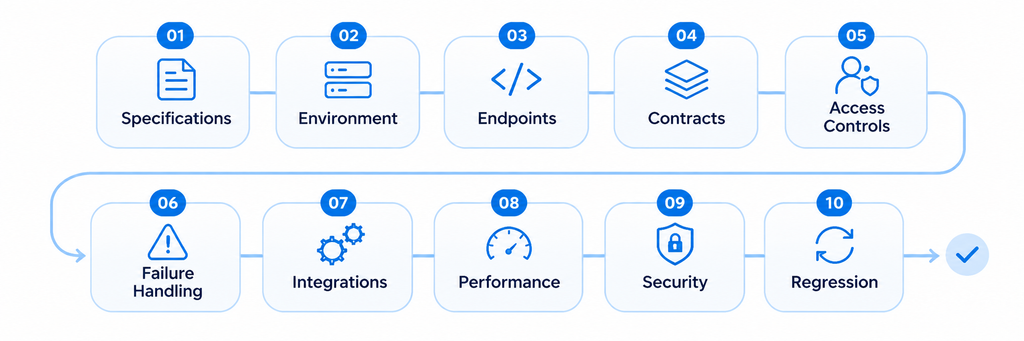
The following checklist uses an e-commerce orders API as a running example. The same principles apply to banking platforms, enterprise software, SaaS products, and other applications with interconnected services.
The scenarios and acceptance thresholds are illustrative. Your team should define them according to actual application requirements.
1. Review API Specifications Before Development and Testing
Unclear API requirements create unnecessary rework. Developers may implement one interpretation of a business rule while testers validate another.
Establish an agreed API contract before development and testing begin.
Use the OpenAPI Specification to document endpoints, supported methods, required parameters, response structures, and expected errors.
What your team should verify:
- API endpoints and supported operations.
- Business rules and validation requirements.
- Request and response formats.
- Consumer compatibility requirements.
- Expected success and failure responses.
Example scenario: An orders API accepts quantities between 1 and 10.
| Order quantity | Expected result |
|---|---|
| 1 | Order accepted |
| 10 | Order accepted |
| 0 | Request rejected |
| 11 | Request rejected |
Documenting these conditions early gives development and QA teams a shared understanding of expected behavior.
Release acceptance criteria: Every critical API operation has documented requirements and corresponding test cases.
2. Establish a Reliable API Test Environment
An unreliable testing environment makes it difficult to distinguish application defects from configuration issues.
When tests produce inconsistent results, developers spend time investigating failures that may have little connection to the actual code change.
Your test environment should reflect relevant production configurations, service dependencies, authentication mechanisms, and database behavior.
| Environment component | What to verify |
|---|---|
| Application configuration | Relevant settings match production requirements |
| Database | Controlled, repeatable test records |
| Authentication | Accounts with different access permissions |
| External dependencies | Sandbox or controlled service access |
| Test data | Synthetic data with reset procedures |
| Logging | Sufficient information for defect investigation |
Example scenario: A payment integration passes in QA because it uses a simplified mock service. The production payment provider applies additional validation rules, causing transactions to fail after deployment.
Include controlled integration testing against the provider’s sandbox before release.
Release acceptance criteria: Critical API tests produce reproducible results without relying on individual tester accounts or uncontrolled data.
3. Test Every Critical Endpoint and HTTP Method
Endpoint coverage should reflect business importance rather than the number of available API requests.
An application may have hundreds of endpoints, but a small subset may handle the majority of its revenue-generating or operationally critical workflows.
Prioritize these operations first.
| HTTP method | Example endpoint | Business operation |
|---|---|---|
| POST | /orders | Create a customer order |
| GET | /orders/101 | Retrieve order information |
| PUT | /orders/101 | Replace permitted order details |
| PATCH | /orders/101 | Modify selected order details |
| DELETE | /orders/101 | Remove or cancel an order, where supported |
Refer to RFC 9110 for HTTP method and response code semantics.
Example scenario: A customer increases an order quantity from two to three. The API returns a successful response, but the database retains the original quantity.
The test should verify the response, persisted quantity, revised order total, and any affected downstream records.
Release acceptance criteria: Critical API operations return the expected response and produce the correct application state.
4. Validate API Requests, Responses, and Backward Compatibility
A successful HTTP response does not establish that the underlying business operation completed correctly.
Validate response values, data types, required fields, and calculations. Include contract testing to protect applications that depend on your API.
Protect existing integrations from API changes
As products evolve, multiple applications may depend on the same API.
A minor response structure change can create additional development work across mobile applications, partner integrations, and internal services.
| API change | Potential impact |
|---|---|
| Renaming a response field | Existing applications fail to process responses |
| Changing a data type | Incorrect calculations or parsing errors |
| Introducing a required parameter | Older client requests fail |
| Removing an endpoint | Third-party integration stops working |
| Changing a default value | Unexpected business behavior |
Maintain contract tests for supported API versions and consumer applications.
Release acceptance criteria: Response data is accurate, and API changes preserve agreed compatibility requirements.
5. Verify Authentication and Authorization
An API may authenticate users correctly while allowing access to resources outside their assigned permissions.
This creates a direct risk for applications handling customer records, financial transactions, or confidential business information.
Authentication and authorization require separate test coverage.
| Test scenario | Expected behavior |
|---|---|
| Valid credentials | Access permitted |
| Missing authentication token | 401 Unauthorized |
| Expired token | 401 Unauthorized |
| Insufficient permissions | 403 Forbidden |
| Another customer’s private record | Access denied according to policy |
| Restricted administrative operation | Access denied |
Example scenario: Customer A attempts to retrieve an order belonging to Customer B.
Even with a valid authentication token, the request should fail according to the application’s authorization policy.
OWASP classifies this risk as Broken Object Level Authorization.
Release acceptance criteria: Every sensitive resource and privileged operation enforces the documented access control policy.
6. Test API Errors, Edge Cases, and Recovery Behavior
Production applications operate under unpredictable conditions. Requests arrive with missing information, external services become unavailable, and customers repeat operations after timeouts.
Testing only successful workflows provides limited evidence of production reliability.
| Failure scenario | Expected behavior | Business risk |
|---|---|---|
| Invalid transaction amount | Request rejected | Financial discrepancies |
| Missing required field | Validation error | Incomplete records |
| Duplicate request | Controlled handling | Duplicate transactions |
| Dependency timeout | Safe recovery or failure | Interrupted customer workflows |
| Unknown resource | Appropriate error response | Application instability |
| Invalid data type | Request rejected | Data corruption |
Example scenario: A customer submits an order with a negative quantity.
Verify that the API rejects the request, creates no order, and leaves inventory records unchanged.
The error response should also provide enough information for authorized clients to handle the failure appropriately.
Release acceptance criteria: Invalid requests and foreseeable failure conditions leave the application in a valid, recoverable state.
7. Validate API Integrations Across Business-Critical Workflows
As applications adopt microservices and third-party integrations, defects increasingly occur between services rather than within individual components.
An order may involve payment processing, inventory management, customer records, and notification services.
Testing these APIs independently provides only partial coverage.
Validate the complete business transaction rather than individual API responses alone.
Example scenario: Payment timeout and duplicate transactions
A payment provider processes a $150 payment, but the order service times out before receiving confirmation.
The customer retries the transaction.
Without appropriate retry handling and reconciliation, the customer could be charged twice or receive no order confirmation.
| Integration failure | What to verify |
|---|---|
| Payment timeout | Safe retries and transaction reconciliation |
| Inventory unavailable | Correct order rejection or reservation handling |
| Notification failure | Order remains valid and notification can be retried |
| Database interruption | Controlled recovery and consistent records |
| Duplicate request | No unintended duplicate order or charge |
Release acceptance criteria: Critical business transactions maintain data consistency across normal operations, retries, and dependency failures.
Validate Your APIs Across Connected Systems
Kualitatem helps engineering teams identify integration defects, data inconsistencies, and transaction failures before deployment.
8. Test API Performance Against Expected Business Demand
API performance testing should reflect the workloads your business expects to handle.
A service that performs well during functional testing may struggle during a product launch, seasonal sales event, or increase in customer adoption.
Define measurable performance targets before executing load tests.
| Performance metric | Decision it supports |
|---|---|
| P95 response time | Whether most requests meet latency requirements |
| Throughput | Whether the system can handle expected demand |
| Error rate | Whether increasing traffic affects reliability |
| Resource utilization | Whether infrastructure requires optimization |
| Recovery time | Whether services recover after workload spikes |
Example: Preparing for a high-traffic sales event
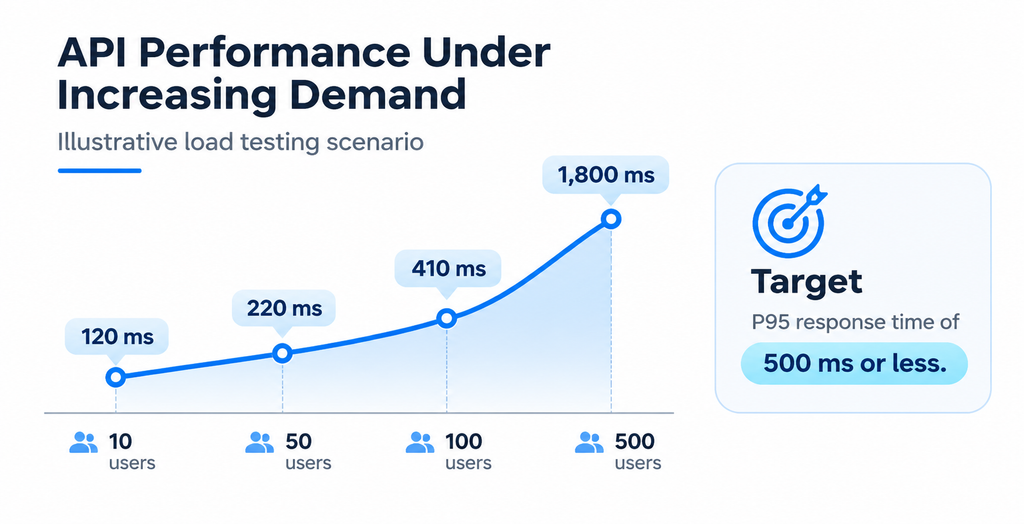
Suppose an e-commerce platform expects 500 concurrent users during a sales campaign.
The engineering team establishes a P95 response time target of 500 milliseconds and an error rate below 1%.
API performance under increasing demand
| Concurrent users | P95 response time | Error rate | Release requirement |
|---|---|---|---|
| 10 | 120 ms | 0% | Met |
| 50 | 220 ms | 0% | Met |
| 100 | 410 ms | 0.2% | Met |
| 500 | 1,800 ms | 4% | Unmet |
These hypothetical results show that the application meets its requirements at lower workloads but exceeds both acceptance thresholds at expected peak demand.
The findings allow engineering teams to investigate bottlenecks before committing to additional infrastructure or approving the release.
Also validate configured rate limits and recovery after traffic spikes.
9. Include API Security in the Release Process
Security vulnerabilities can introduce financial, operational, and regulatory risks that extend beyond the engineering team.
Include API security checks throughout development, particularly when introducing new endpoints, external integrations, or access permissions.
The OWASP API Security Top 10 provides a reference for assessing common API security risks.
| Selected OWASP risk | Potential business exposure |
|---|---|
| Broken Object Level Authorization | Unauthorized customer record access |
| Broken Authentication | Compromised accounts |
| Broken Object Property Level Authorization | Exposure or modification of restricted fields |
| Unrestricted Resource Consumption | Service disruption and increased infrastructure costs |
| Broken Function Level Authorization | Unauthorized privileged operations |
| Security Misconfiguration | Exposure of application resources |
| Unsafe Consumption of APIs | Risks introduced through external dependencies |
Example scenario: An API returns internal payment credentials alongside customer order information.
Functional testing may consider the request successful because the correct order was returned. Security testing should identify the unnecessary sensitive information in the response.
For applications handling sensitive data, dedicated penetration testing can provide deeper vulnerability assessment.
Release acceptance criteria: Applicable security requirements are validated, and release-blocking vulnerabilities are resolved.
10. Automate API Regression Testing and Monitor Production
As development teams release software more frequently, manual regression testing can become a bottleneck.
Automating stable, business-critical API tests allows engineering teams to validate changes consistently while reserving manual testing capacity for new functionality and complex scenarios.
Automated API regression testing provides continuous feedback on code changes.
A Postman collection, for example, can be executed through Newman.
See the official Newman documentation for CI/CD configuration guidance.
Recommended API testing frequency
| Testing activity | Execution frequency |
|---|---|
| Critical API smoke tests | Every relevant code change |
| Contract tests | Every contract change |
| Functional regression | Every build or scheduled execution |
| Full integration suite | Before major releases |
| Performance testing | Before significant workload or architecture changes |
| Security assessment | Based on application risk and changes |
| Production monitoring | Continuous |
Measure automation effectiveness
Test count alone provides limited information about automation quality.
Track metrics that demonstrate whether automation improves engineering and release outcomes.
| Metric | What it tells you |
|---|---|
| Critical workflow coverage | Whether important business operations are tested |
| Regression execution time | How quickly teams receive feedback |
| Flaky test rate | How reliable automated results are |
| Escaped API defects | Whether important defects reach production |
| Automation maintenance effort | How much engineering capacity the suite requires |
| Mean time to detect failures | How quickly production issues become visible |
Use our test automation ROI calculator to evaluate the financial impact of automating repeatable tests.
Release acceptance criteria: Critical API tests execute automatically, failures provide actionable feedback, and production monitoring covers important business transactions.
REST vs SOAP vs GraphQL API Testing Checklist
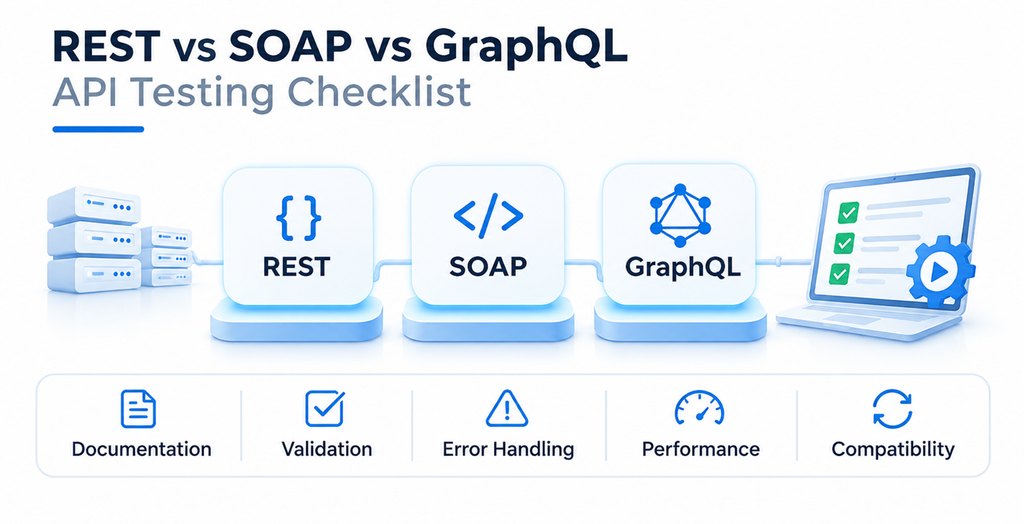
Your testing strategy should account for the API architectures your organization maintains.
This becomes particularly important when modern applications communicate with legacy enterprise systems.
| Testing requirement | REST | SOAP | GraphQL |
|---|---|---|---|
| Documentation | OpenAPI | WSDL | GraphQL schema |
| Request validation | HTTP methods and parameters | XML messages | Queries and mutations |
| Response validation | JSON or XML | XML schemas | Fields and data types |
| Error handling | HTTP response codes | SOAP faults | Errors and partial responses |
| Performance | Request concurrency | Message processing | Query complexity |
| Compatibility | Endpoint and version changes | WSDL changes | Schema and field changes |
For GraphQL APIs, validate both response data and execution errors. A successful HTTP response may still contain errors affecting requested fields.
Refer to the GraphQL documentation when planning schema and query validation.
How to Prioritize API Testing Based on Business Risk
Giving every endpoint the same testing priority can consume engineering resources without proportionate risk reduction.
Start with APIs whose failure would directly affect revenue, customer access, regulatory obligations, or business operations.
| Priority | API workflow | Potential consequence | Testing approach |
|---|---|---|---|
| Critical | Payments and fund transfers | Financial loss | Extensive automated and integration coverage |
| Critical | Authentication | Unauthorized access or service disruption | Functional and security testing |
| High | Order management | Incorrect transactions | Functional and integration regression |
| High | Subscription billing | Revenue discrepancies | Automated business rule validation |
| Medium | Reporting | Incorrect operational information | Scheduled regression |
| Low | Promotional content | Limited customer inconvenience | Basic functional coverage |
These priorities are examples. Assess each API according to its actual business impact and dependencies.
Risk-based prioritization helps your team allocate testing capacity where failures would have the greatest consequences.
API Test Case Examples With Expected Results
Test cases should connect technical outcomes to business requirements.
The following example demonstrates how an orders API test suite can be organized.
| Test ID | Scenario | Expected result | Priority |
|---|---|---|---|
| API-001 | Create valid order | 201; correct order total | High |
| API-002 | Retrieve existing order | 200; accurate order details | High |
| API-003 | Submit invalid quantity | 400; no order created | High |
| API-004 | Access another customer’s order | Access denied | Critical |
| API-005 | Submit unauthenticated request | 401; no private data returned | Critical |
| API-006 | Update order quantity | Correct total recalculated | High |
| API-007 | Retry timed-out payment | No duplicate payment | Critical |
| API-008 | Exceed configured rate limit | 429, where specified | High |
| API-009 | Retrieve unknown order | Appropriate error response | Medium |
| API-010 | Validate existing client after API update | Contract remains compatible | High |
Maintain traceability between these tests, business requirements, execution results, and identified defects.
This allows release stakeholders to understand which requirements have been validated and which risks remain outstanding.
Five API Testing Mistakes That Increase Engineering Costs
API testing gaps often create additional work beyond fixing the original defect. Developers must investigate production issues, reproduce failures, update integrations, and support affected customers.
| Common mistake | Operational impact | Recommended approach |
|---|---|---|
| Checking status codes alone | Incorrect business data reaches production | Validate response values and application state |
| Ignoring API contract changes | Multiple consumer applications require emergency fixes | Automate contract validation |
| Testing with one user account | Access control defects remain undiscovered | Test multiple roles and ownership conditions |
| Mocking every dependency | Production integration defects remain undetected | Validate actual service integrations |
| Measuring success by test count | Engineering resources cover low-value scenarios | Prioritize changed functionality and business risk |
Review these API testing best practices when assessing the effectiveness of your existing test suite.
API Testing Tools and Pricing
The right API testing tool should fit your engineering environment, automation strategy, and maintenance capacity.
Introducing additional tools creates costs beyond licensing. Teams also need to consider onboarding, framework integration, execution infrastructure, and long-term maintenance.
| API testing tool | Best suited for | Pricing model |
|---|---|---|
| Postman | Exploratory testing and collaborative API collections | Free and paid subscriptions |
| REST Assured | Java-based REST API regression automation | Free, open source |
| SoapUI | SOAP and REST web service testing | Free; commercial alternatives available |
| Grafana k6 | API performance and scalability testing | Free and usage-based cloud plans |
| Swagger UI | API documentation and endpoint exploration | Free, open source |
| Apache JMeter | Load and protocol-level performance testing | Free, open source |
Refer to vendor pricing pages for current commercial subscription rates and usage allowances.
How to select the right API testing tool
| Engineering requirement | Suitable option |
|---|---|
| Existing Java automation framework | REST Assured |
| Collaborative exploratory testing | Postman |
| Legacy enterprise SOAP services | SoapUI |
| Performance testing for high-traffic APIs | k6 or JMeter |
| API documentation and contract review | Swagger UI |
| Automated regression within CI/CD | REST Assured or Newman |
Before purchasing additional tools, assess whether your existing framework can support the required API testing coverage.
A smaller, well-integrated toolset can reduce training requirements and maintenance overhead.
How Much Does API Testing Cost?
The total cost of API testing depends on engineering effort, endpoint complexity, service dependencies, automation coverage, infrastructure, and ongoing maintenance.
Licensing costs are only one component of the overall investment.
Example API testing project budget
The following estimates use an assumed engineering rate of $50 per hour to demonstrate how project scope affects testing costs.
| API testing scope | Illustrative effort | Engineering cost |
|---|---|---|
| Basic functional testing | 20–40 hours | 1,000–2,000 |
| Functional and integration testing | 40–80 hours | 2,000–4,000 |
| Automated regression suite | 80–160 hours | 4,000–8,000 |
| Functional, integration, performance, and security testing | 160–300 hours | 8,000–15,000 |
These figures are hypothetical budgeting examples, rather than industry averages or Kualitatem service quotations. Additional software, infrastructure, and maintenance costs may apply.
Estimate your API testing budget
API Testing Cost Calculator
Estimate your API testing budget based on engineering effort, software licensing and testing infrastructure.
Project cost inputs
- Estimated testing hours
- Engineering hourly rate ($)
- Software and tool licensing costs ($)
- Testing infrastructure costs ($)
Calculate Testing Cost
Estimated API Testing Budget
$4,200.00
| Cost breakdown | Estimated cost |
|---|---|
| Engineering and testing effort | $4,000.00 |
| Software and tool licensing | $100.00 |
| Testing infrastructure | $100.00 |
| Total project investment | $4,200.00 |
When does API test automation become financially beneficial?
Consider a team that spends 30 engineering hours executing manual API regression tests during each release cycle.
Suppose the team invests 120 hours in building an automated regression suite. After implementation, execution review and ongoing maintenance require five hours per release.
| Cost factor | Manual testing | Automated testing |
|---|---|---|
| Initial automation development | 0 hours | 120 hours |
| Effort per release | 30 hours | 5 hours |
| Effort across 12 releases | 360 hours | 60 hours |
| Total first-year effort | 360 hours | 180 hours |
| Engineering cost at $50/hour | $18,000 | $9,000 |
Illustrative cumulative regression testing cost
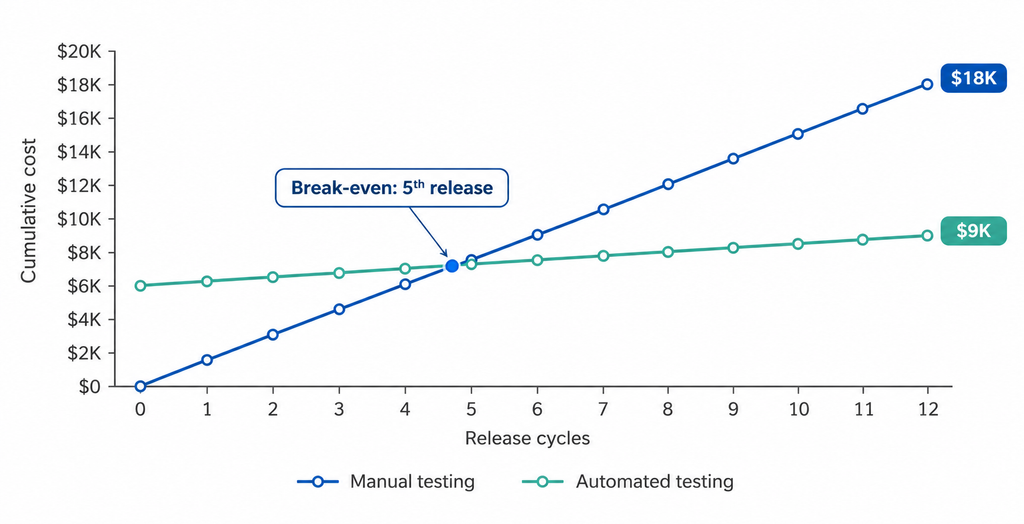
When Does API Test Automation Pay for Itself?
5th release
Initial automation investment recovered.
$9,000
Estimated annual engineering cost savings.
300 hours
Manual regression effort reduced annually after automation is implemented, excluding initial development.
50%
Reduction in first-year regression testing labor costs.
The initial $6,000 automation investment is recovered during the fifth release. After this point, each release generates further labor savings, giving engineering teams more capacity for product development and critical testing activities.
Before investing in API test automation, evaluate your release frequency, current regression workload and expected maintenance effort. These factors determine when automation becomes financially beneficial.
Illustrative model based on 12 annual releases, an engineering rate of $50 per hour and five hours of automation review and maintenance per release. Software licensing and infrastructure costs are excluded.
API Testing Scenarios Across Industries
API failures have different consequences depending on the business workflow they support.
Your testing strategy should account for these differences.
| Industry | Critical API workflow | Testing priority | Potential business impact |
|---|---|---|---|
| Banking | Fund transfers and reconciliation | Transaction accuracy and retry handling | Financial discrepancies |
| E-commerce | Checkout and inventory | Payment and stock synchronization | Lost sales and incorrect charges |
| Healthcare | Patient record exchange | Data accuracy and authorization | Sensitive data exposure |
| SaaS | Subscription management | Billing and account permissions | Revenue leakage |
| Logistics | Shipment tracking | Data synchronization and availability | Operational delays |
| Insurance | Claims processing | Validation and workflow consistency | Incorrect or delayed claims |
Prioritize API coverage according to the cost of failure rather than the number of endpoints in each service.
When Should You Outsource API Testing?
An internal engineering team can manage API testing effectively when it has sufficient expertise, testing capacity, and a maintainable automation framework.
As the application grows, however, testing requirements may begin to compete with product development priorities.
External API testing services can help address specific capacity or expertise gaps.
| Business situation | Recommended approach |
|---|---|
| Stable application with manageable API coverage | Maintain in-house testing |
| Frequent releases with growing regression workload | Expand automation coverage |
| Complex third-party integrations | Consider specialist integration testing |
| Major architectural migration | Consider dedicated testing capacity |
| Sensitive or high-volume transactions | Bring in security or performance specialists where required |
| Long-term testing capacity constraints | Evaluate a managed QA engagement |
How to evaluate an API testing partner
A testing partner should help your team improve coverage while maintaining ownership and visibility over the testing process.
| Evaluation criterion | What to ask |
|---|---|
| Technical capability | Can the team work with our existing API architecture and frameworks? |
| Coverage measurement | How will tests be mapped to critical requirements and code changes? |
| Automation ownership | Will we retain test scripts, frameworks, and documentation? |
| CI/CD compatibility | Can tests execute within our existing development pipeline? |
| Maintenance | Who updates tests when requirements or API contracts change? |
| Reporting | Will we receive actionable defect reports and release evidence? |
| Security | How will credentials and sensitive test data be handled? |
| Commercial model | How are implementation, execution, and maintenance costs calculated? |
Start with a pilot covering one critical API workflow. Evaluate the quality of test coverage, defect evidence, automation scripts, and communication before expanding the engagement.
Explore our RESTful API performance testing case study for an example of API performance testing in practice.
Conclusion
API testing should give your engineering team clear evidence that critical business workflows can operate reliably after a release.
A structured API testing checklist helps establish that evidence while improving coverage, prioritizing engineering resources, and reducing avoidable production risks.
Frequently Asked Questions
What is API testing?
API testing verifies whether application programming interfaces meet functional, integration, security, and performance requirements. It involves sending requests, validating responses, checking business logic, and assessing communication between connected services. API testing helps engineering teams identify defects directly at the application service level.
What should an API testing checklist include?
An API testing checklist should include specification review, environment preparation, endpoint validation, request and response testing, authentication, authorization, error handling, integration testing, performance testing, security checks, and regression automation. Each activity should include measurable acceptance criteria and documented test evidence.
How do you measure API testing effectiveness?
Measure critical business workflow coverage, escaped API defects, regression execution time, automation maintenance effort, flaky test rates, and contract compatibility. These metrics provide more meaningful insight into testing effectiveness than the total number of executed or passing test cases alone.
How often should API tests run?
Critical API smoke tests should run after every relevant code change. Broader regression suites can execute during scheduled builds or before releases. Performance and security assessments should reflect application risk, architectural changes, infrastructure updates, and expected production demand.
Which tools are used for API testing?
Postman, REST Assured, SoapUI, Grafana k6, Apache JMeter, and Swagger UI support different API testing requirements. Select tools according to existing frameworks, application protocols, automation needs, team capabilities, and long-term maintenance costs.
How much does API testing cost?
API testing costs depend on engineering hours, endpoint complexity, integrations, infrastructure, and automation requirements. For example, a project requiring 80 engineering hours at an assumed rate of $50 per hour would cost $4,000 before software licensing and infrastructure expenses.