Modern software serves users across dozens of countries, languages, and cultural contexts at once. A single release might reach a shopper in Tokyo, a bank customer in Berlin, and a student in São Paulo, all on the same day. Localization testing and internationalization testing exist to make sure that release actually works for all three.
Automation is a practical way to validate language, formatting, usability, and regional functionality at that scale. Manual testing works for one or two languages. It breaks down once a product supports a dozen.
This guide covers what localization and internationalization testing actually check, how the two differ, which tools and strategies teams use to automate them, and the practical scenarios and challenges that come up along the way.
Introduction to Localization and Internationalization Testing
Localization testing checks whether an application has been correctly adapted for a specific target market. This covers language, currency, date formats, cultural references, and anything else a local user would expect to see done right.
Internationalization testing checks something different: whether the application’s underlying architecture supports that adaptation in the first place. A well-internationalized app separates translatable text from code, handles Unicode properly, and does not hardcode assumptions like a specific date format or currency symbol.
Both processes matter for the same reason: a global product needs to feel local, everywhere it ships.
Localization Testing vs Internationalization Testing
Localization and internationalization solve related problems at different points in the development timeline, and testing each one looks different too.
Internationalization comes first. It happens during design and development, and it builds the foundation, like Unicode support and separated string resources, that makes localization possible later. Localization comes after. It happens once that foundation exists, and it adapts the product for one specific market at a time: translated text, local currency, region-specific content.
Aspect
Localization (L10n)
Internationalization (i18n)
Purpose
Adapt the product for a specific language, region, or culture
Build the product so it can be adapted to any language or region later
Development stage
Happens after the core product is built, often per-market
Happens during initial architecture and design
Examples
Translating UI text, converting currency, adjusting date formats for one country
Using Unicode encoding, externalizing strings, avoiding hardcoded formats
Testing focus
Correct translations, cultural fit, regional formatting, layout
Architecture flexibility, encoding support, locale switching, no hardcoded assumptions
Common challenges
Text expansion breaking layouts, mistranslations, wrong date or currency formats
Hardcoded strings, encoding bugs, business logic tied to one locale
The World Wide Web Consortium’s Internationalization Activity defines internationalization as designing a product so it can be adapted to various languages and regions without engineering changes. Localization is the adaptation work that happens on top of that foundation, market by market.
The Importance of Automation Testing
Automated testing checks localization and internationalization scenarios quickly and repeatedly. It confirms the application behaves consistently across language settings, cultural contexts, and geographic locations, without a QA engineer manually clicking through every screen in every supported language.
CSA Research’s “Can’t Read, Won’t Buy” study found that 76% of online shoppers prefer to buy products with information in their own language, and 40% will not buy from a website in another language at all. That is the business stake behind getting localization right, and automation is what makes checking it at scale realistic.
Why Automate Localization and Internationalization Testing?
Manual testing works for one language and one release. It stops working once a product supports twenty languages and ships every two weeks.
Scalability. A test suite that runs across ten locales costs the same engineering effort as one that runs across two, once it is automated.
Faster feedback. Automated locale tests run on every build, so a broken translation string or a layout break surfaces in minutes, not during a manual pass days before release.
Consistency. A script tests the German build the exact same way every time. A person testing the same flow twice, a week apart, will not.
Regression protection. New features roll out constantly. Automated locale regression suites confirm last month’s translations and formats still work after this month’s changes.
CI/CD integration. Locale tests that run inside the CI/CD pipeline block a broken build before it reaches production, the same way any other automated test gate does.
Factors to Consider in Localized Automation Testing
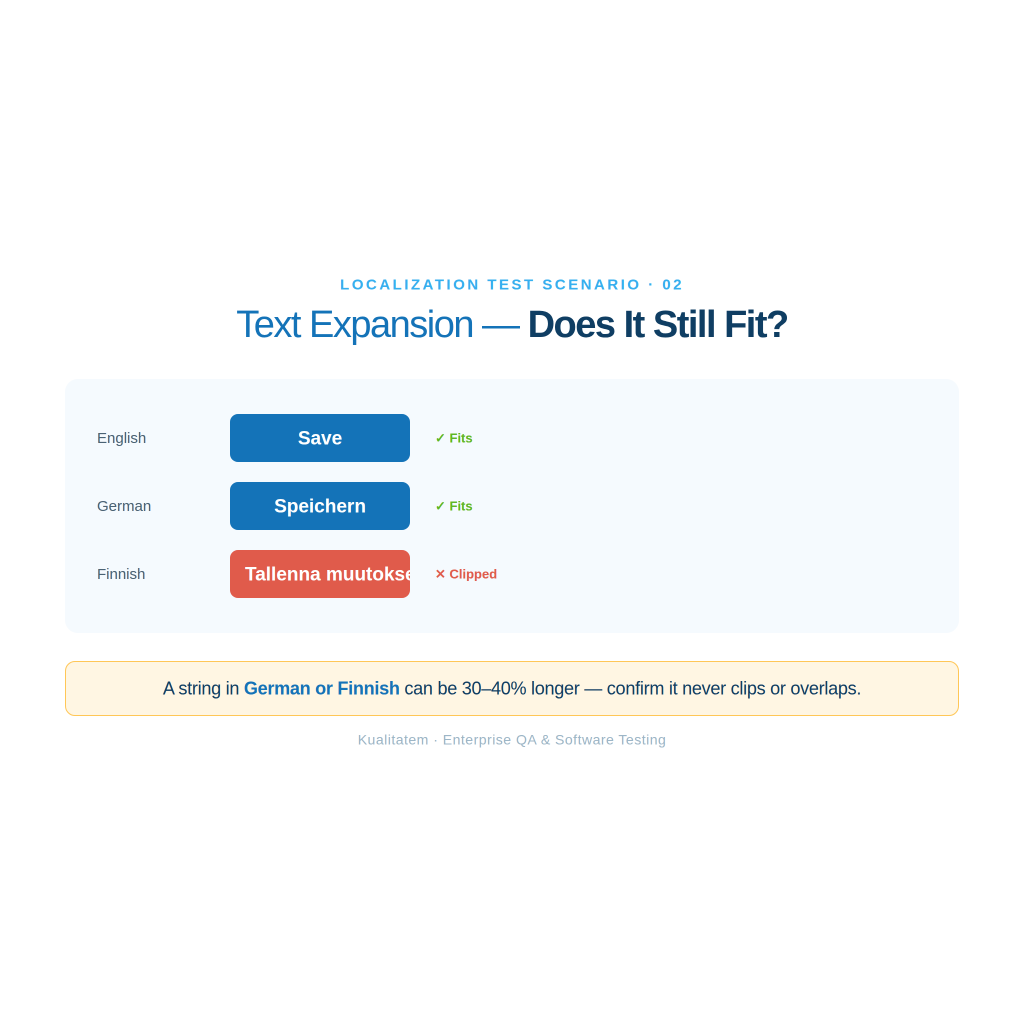
Language and text expansion. Some languages need more space than English to say the same thing. German and Finnish text commonly runs 30% to 40% longer, and automated tests need to catch truncation and overlap before a user does.
Cultural sensitivity and norms. Automated visual checks should confirm that icons, colors, and imagery fit the target culture, since a symbol that reads as neutral in one market can read as inappropriate in another.
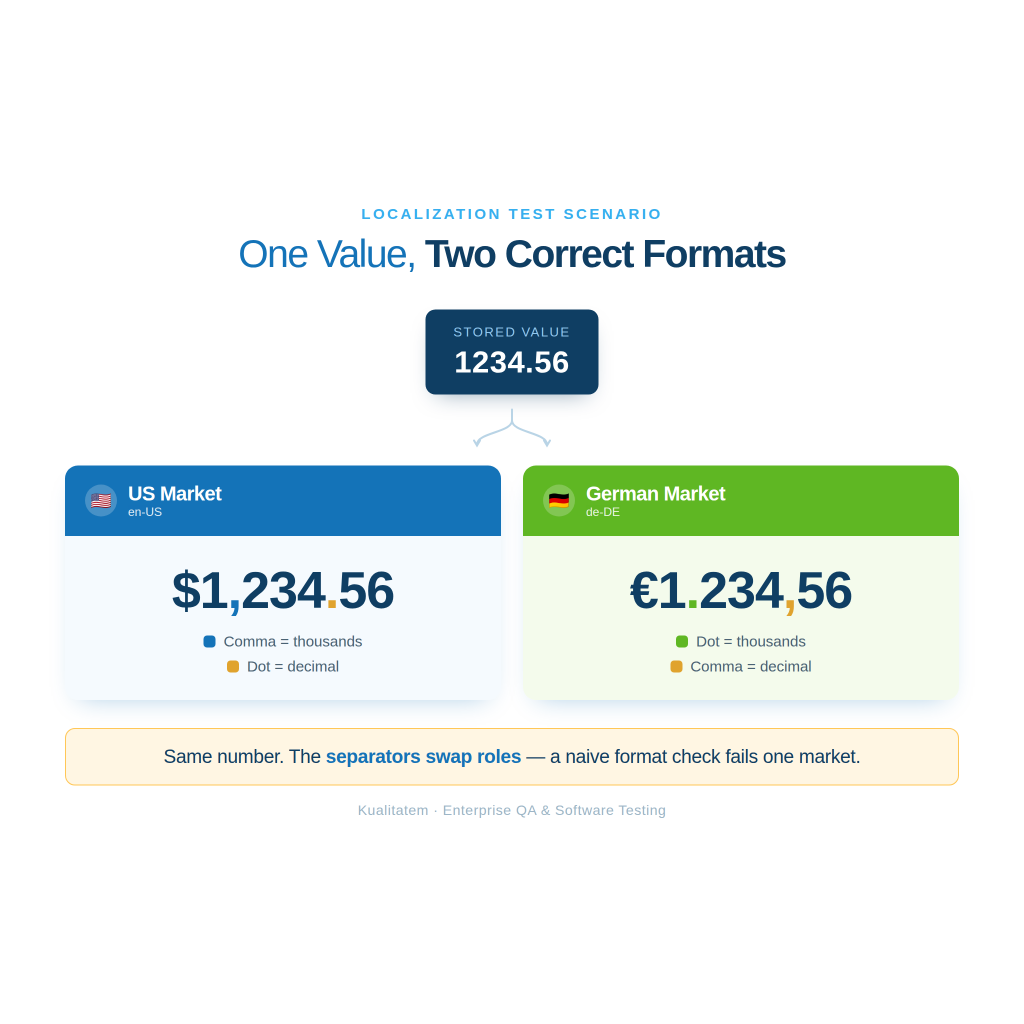
Date, time, and number formats. A date written 03/04/2026 means March 4 in the United States and April 3 in most of Europe. Automated tests need to check the app renders the correct one for each locale.
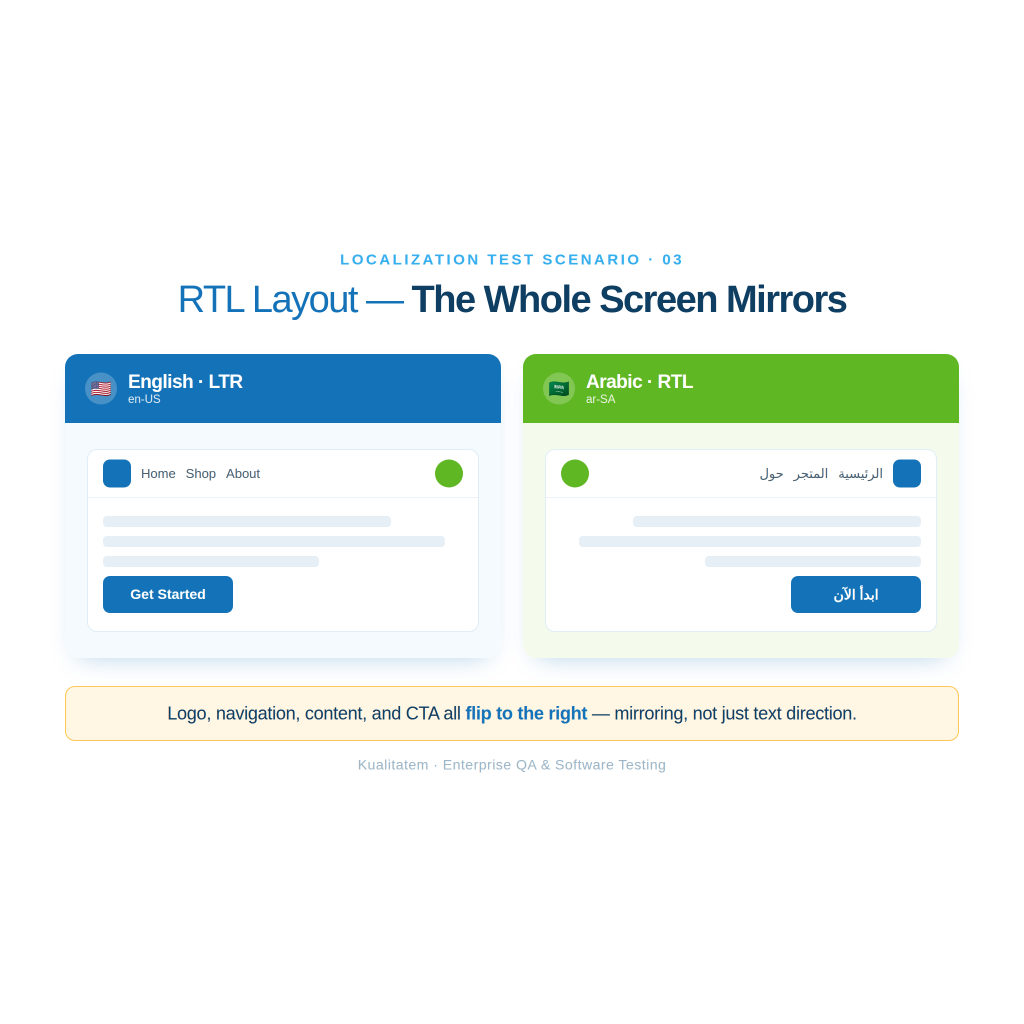
Right-to-left (RTL) languages. Arabic and Hebrew read right to left, and the entire layout, not just the text, needs to mirror correctly.
Font rendering. Some scripts, like Thai or Devanagari, need specific fonts to render correctly. A missing font shows up as boxes or missing characters.
Special characters and Unicode support. Accented characters, umlauts, and non-Latin scripts all need to display and save correctly, including in database fields and form inputs.
Localized images and icons. A hand gesture icon, a holiday graphic, or a stock photo can carry different meaning in different regions, and localized builds sometimes swap these out entirely.
Regional legal requirements. Cookie consent banners, data privacy notices, and age verification rules differ by country, and localized builds need to show the right one.
Accessibility across languages. Screen readers and accessibility tools need to work correctly in every supported language, not just the default one.
Common Localization Testing Scenarios
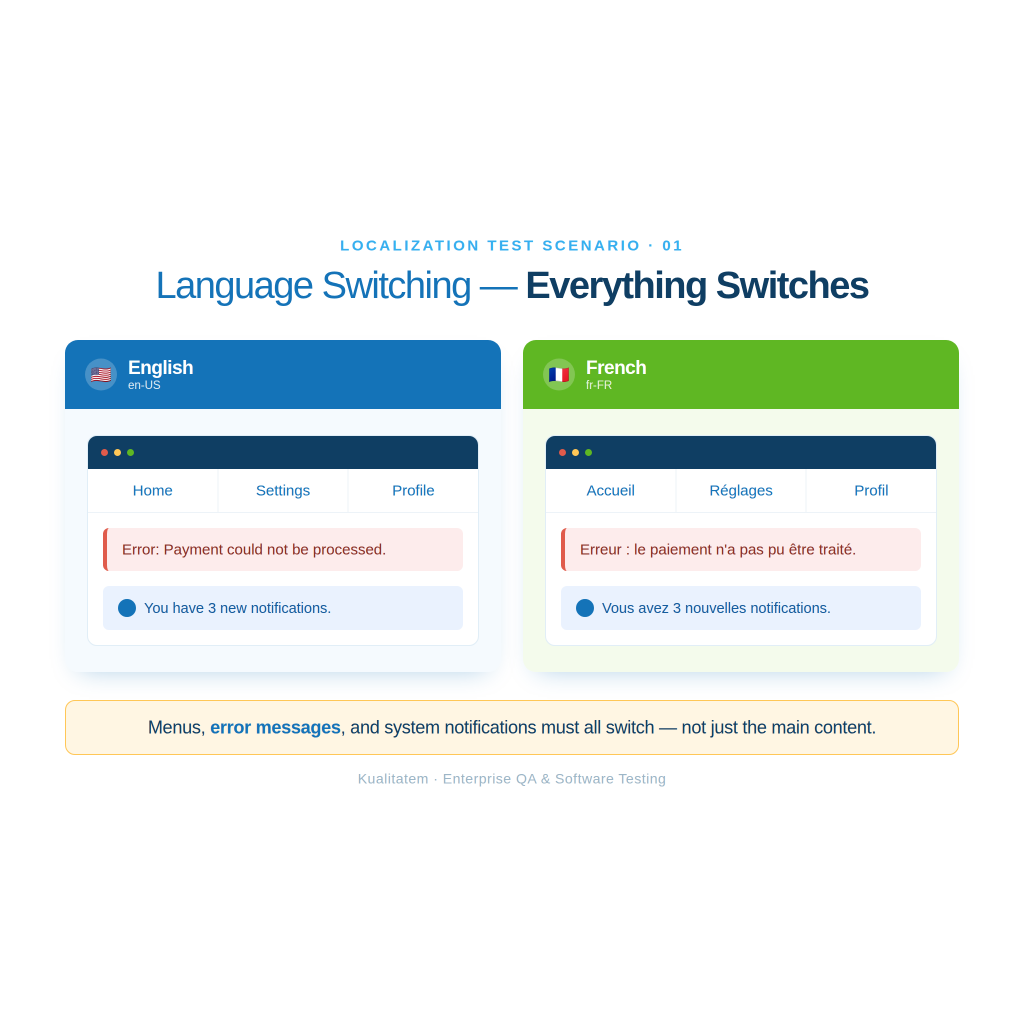
Language switching
Confirm the app fully switches, including menus, error messages, and system notifications, not just the main content.
Text expansion and truncation
Test a string in German or Finnish and confirm it does not get cut off or overlap a neighboring element.
RTL layout testing
Switch to Arabic or Hebrew and confirm the layout mirrors, not just the text direction.
Localized images
Confirm region-specific graphics load for the correct locale and default graphics load everywhere else.
Pluralization rules
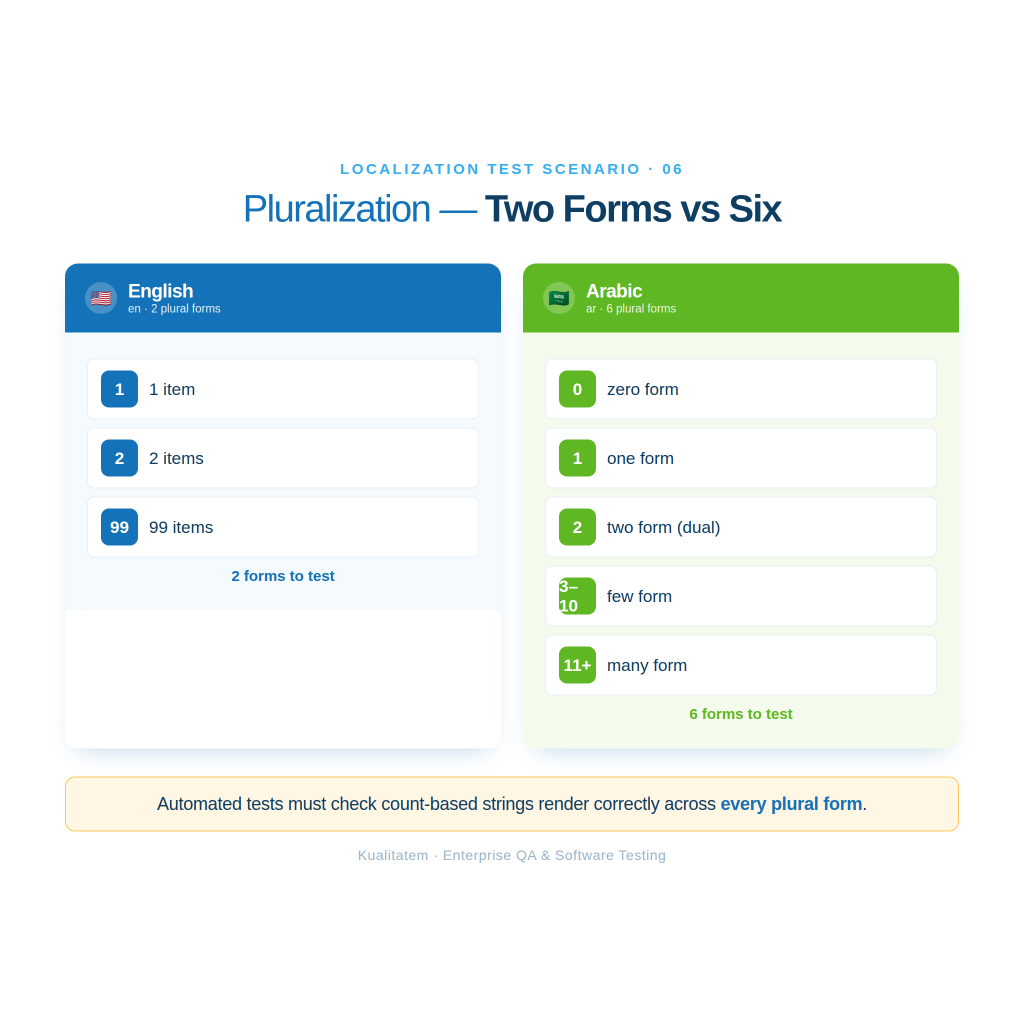
English has two plural forms. Some languages, like Arabic, have six. Automated tests need to check that count-based strings render correctly across all of them.
Sorting rules
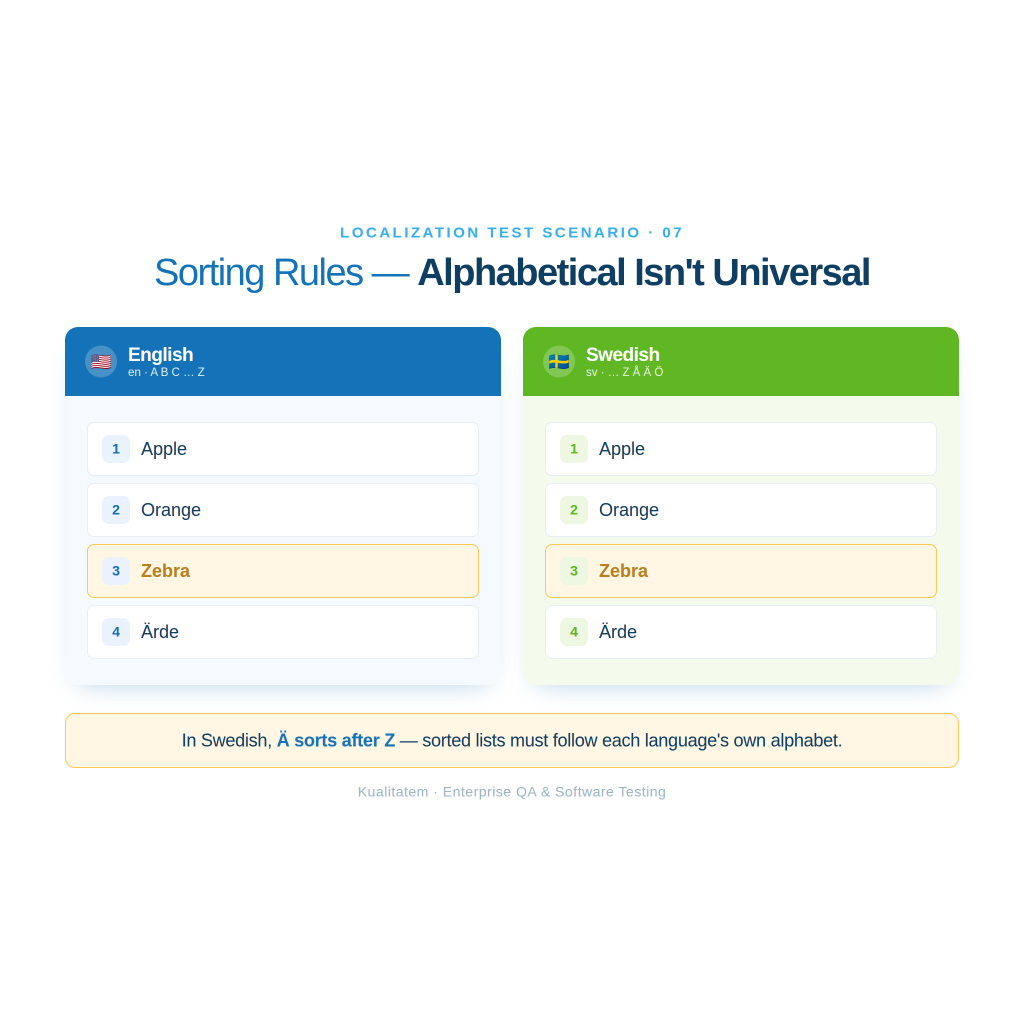
Alphabetical order is not universal. Automated tests should confirm sorted lists follow the correct order for each language’s alphabet.
Regional formatting differences
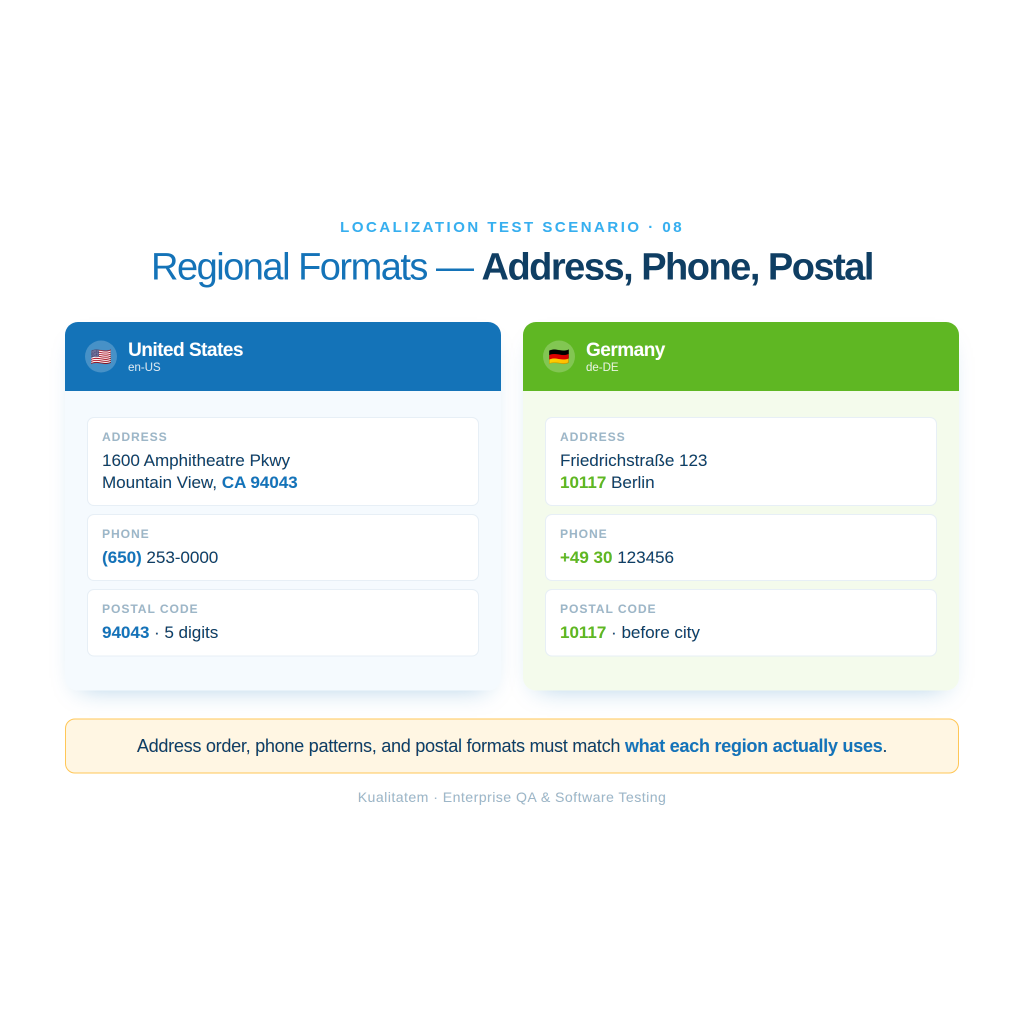
Confirm address formats, phone number formats, and postal code formats match what each region actually uses.
Factors to Consider in Internationalization Automation Testing
User interface adaptation. Automated tests should confirm the interface adapts to different scripts, checking alignment, text direction, and font rendering together.
Currency and payment methods. Test that currency symbols, decimal conventions, and locally available payment methods display correctly based on the user’s location.
Time zones and localized content. Confirm time-sensitive features like event scheduling account for the user’s time zone, and that region-specific images, videos, or ads match the user’s actual region.
Unicode compliance. Confirm the application correctly stores, displays, and processes Unicode text across every supported script.
Locale switching. Test that switching a user’s locale setting updates every part of the application consistently, not just the visible UI.
Character encoding. Confirm UTF-8 (or the encoding standard in use) is applied consistently from input field to database to API response, so characters do not corrupt anywhere in that chain.
API localization readiness. Test that APIs return locale-appropriate data, like formatted dates and translated error messages, when a client requests a specific locale.
Database compatibility. Confirm the database can store and retrieve non-Latin characters without data loss or corruption.
Multi-language search. Test that search functionality returns correct results across languages, including for accented characters and non-Latin scripts.
Language-independent business logic. Confirm core business rules, like tax calculation or eligibility checks, produce the same correct result regardless of the interface language.
Regional feature flags. Test that features gated to specific regions, for legal or business reasons, actually stay gated to those regions and no others.
Common Internationalization Testing Scenarios
Unicode support. Enter text in Japanese, Arabic, and emoji in the same input field, and confirm all three save and display correctly.
Character encoding validation. Submit a form with accented characters, save it, then reload the page and confirm nothing turned into garbled symbols.
Locale switching. Change the account locale setting and confirm dates, currency, and text all update together, not just some of them.
Unicode normalization. Test that visually identical characters encoded two different ways, like an accented letter typed directly versus built from a base letter plus a combining accent, are treated as equivalent by the application.
Language-independent business logic. Run the same transaction in two different interface languages and confirm the calculated result is identical in both.
API localization readiness. Send a request with an Accept-Language header set to French and confirm the API returns French-formatted dates and translated error messages.
Database character support. Store a name containing non-Latin characters, restart the application, and confirm the name still displays correctly.
Selecting the Right Automation Testing Tools
The right automation testing tool needs to fit three things: the development environment, the languages the product supports, and how the team manages its test cases.
Compatibility with the development environment. The tool should integrate with the existing tech stack and CI/CD pipeline without extra glue code.
Support for multiple languages. The tool needs to handle the full script and language range the product supports, including non-Latin scripts and RTL layouts.
Test case management. The tool, or the platform around it, needs to track test coverage across locales, manage test suites, and report failures in a way the team can act on.
Selenium runs the same test script against Chrome, Firefox, Safari, and Edge, which matters when a layout bug shows up in one browser’s Arabic rendering but not another’s.
Playwright handles modern, JavaScript-heavy web applications well, and its built-in support for multiple browser contexts makes it efficient for testing several locales in parallel.
Appium extends the same automation approach to native iOS and Android apps, which is where most localization bugs involving fonts and RTL layouts actually surface first.
Cypress works well for fast, front-end-focused localization checks, like confirming a translated string renders where it should on a specific page.
BrowserStack gives access to real devices and browser versions without a team having to maintain that device lab in-house, useful for confirming a fix works on the actual Samsung phone a bug report came from.
LambdaTest offers similar cross-device, cross-browser coverage in the cloud, and scales well when a team needs to run the same locale suite across a large device and browser matrix.
Applitools uses visual AI to catch layout problems, like text overlapping a button in German, that a purely functional test would miss because the page still “works,” it just looks broken.
Implementing an Effective Automation Testing Strategy
A strategy works best mapped to the stages where locale issues actually get introduced.
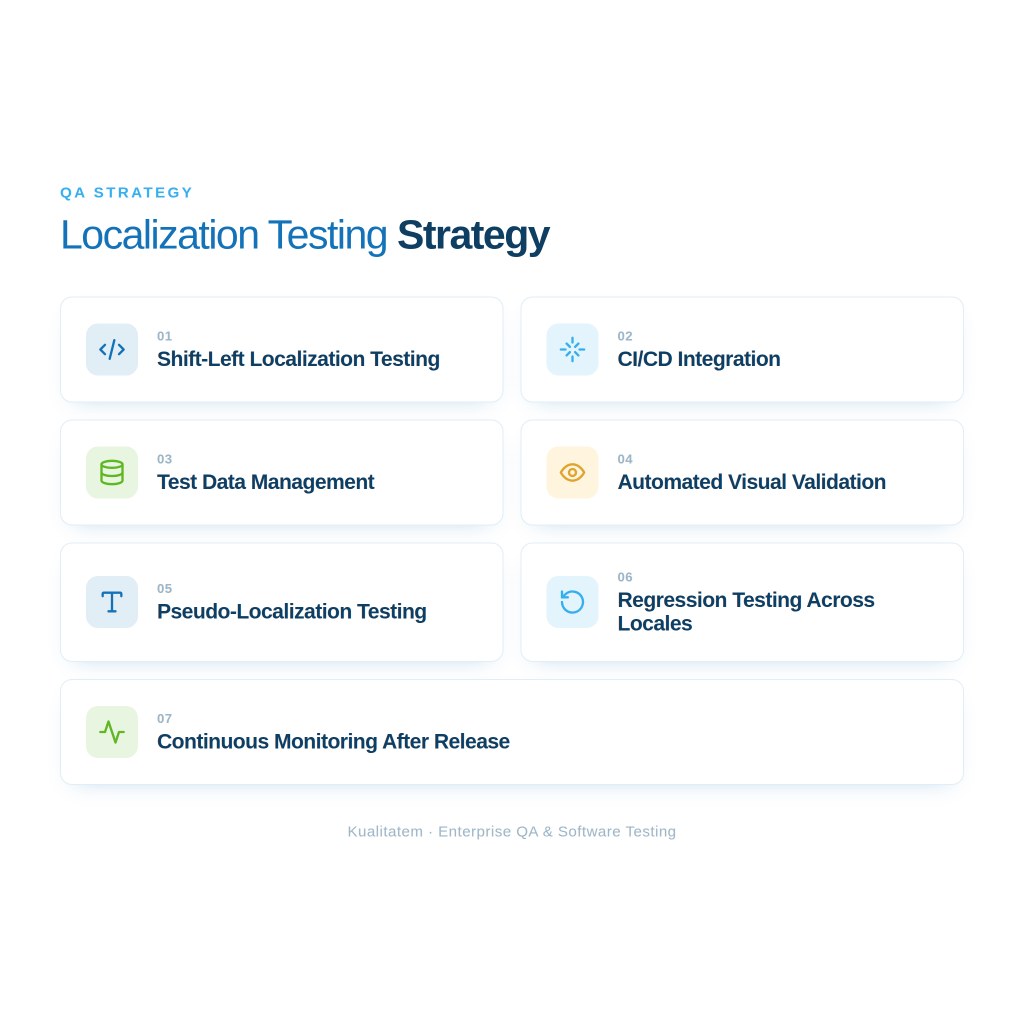
Shift-left localization testing. Catch issues during design and development, not after translation. Reviewing string length limits and layout flexibility before code ships is far cheaper than fixing a broken layout in production.
CI/CD integration. Run locale test suites automatically on every build, so a broken translation key or a layout regression blocks the build instead of reaching users.
Test data management. Maintain a current set of translated strings and locale-specific test data, since testing against last quarter’s translations produces false confidence.
Automated visual validation. Use visual regression tools to catch layout breaks that functional tests miss, since a page can pass every functional assertion and still look broken to a real user.
Pseudo-localization testing. Replace UI strings with modified placeholder text, expanded, accented, or written in a different script, before real translations exist. This surfaces text-expansion and encoding issues early, without waiting on the translation team.
Regression testing across locales. Run the full locale suite on every release, not just the locales that changed, since a shared component update can silently break formatting in a locale nobody touched directly.
Continuous monitoring after release. Track locale-specific error rates and user feedback after launch, since some issues, like a mistranslation a native speaker flags, only surface once real users see the release.
Best Practices for Localization Automation Testing
Test early, ideally with pseudo-localization, before real translations are ready.
Keep automation scripts reusable across locales instead of writing a separate script per language.
Wire every locale suite into the CI/CD pipeline so it runs on every build automatically.
Validate pseudo-localized builds specifically for text expansion and encoding issues.
Combine automated and manual testing. Automation catches the repeatable checks; a native speaker still catches whether a translation actually reads naturally.
Refresh test data and translation strings on a regular schedule, not just before a major release.
Keep monitoring localized releases after launch, since real users surface issues automated tests do not always catch.
Common Challenges in Localization Automation Testing
Dynamic content. User-generated text and real-time data do not follow a fixed script, which makes them harder to test automatically. Teams typically handle this with targeted spot checks rather than full automation coverage.
Constantly changing translations. Translation strings update often, sometimes after every sprint, and automated tests need a process to stay in sync instead of testing against stale text.
Maintaining scripts across languages. A test script written for one locale needs to work reliably across every other supported locale too, which takes deliberate script design, not a copy-paste per language.
Visual validation. A layout can pass every functional check and still look broken once real, often longer, translated text goes in. Drizz, a company that builds AI-based localization testing tools, reports that around 40% of the localization defects its vision models catch are pure layout failures, truncation and overlap, the kind a selector-based test misses because the element is still technically present on the page.
RTL layouts. Right-to-left languages need dedicated test coverage, since a layout bug specific to RTL rendering will not show up in any left-to-right test run. Aqua Cloud’s testing guide, published December 8, 2025 by Paul Elsner, warns against assuming a simple mirror image is correct: languages like Arabic, Hebrew, Persian, and Urdu also mix in left-to-right content, like an English brand name or a phone number, inline, and the layout has to handle both directions correctly at once.
Unicode compatibility. Encoding issues can hide for a long time, since they may not appear until a specific character combination gets entered, saved, and displayed. Mixed-direction text, like an Arabic sentence containing an English URL, depends on the Unicode Bidirectional Algorithm to render in the correct order, and Aqua Cloud’s guide names this as one of the areas teams most often get wrong.
Third-party localized content. Ads, embedded widgets, and other third-party content are not always under the team’s control, and testing needs to account for content the team does not own.
Cross-platform consistency. Web, mobile, and desktop versions of the same product need to behave the same way in every locale, and gaps between platforms are easy to miss without dedicated cross-platform test coverage.
AI-generated translation quality control. Machine translation keeps improving, but output still needs a QA layer before it ships. Phrase’s Matt Owen, in an article updated March 12, 2026, quotes Motorola’s Luz Pineda on AI-driven QA: “It’s an iterative process that requires careful collaboration, the right tools, and a willingness to learn.” The same article reports that newer translation models, like Translated’s LARA, aim to cut error rates from around 12 per 1,000 words in typical machine translation systems to roughly 2.5. Automated tests increasingly need to check AI-generated strings for fluency and terminology consistency, not only for whether a string exists.
Accessibility compliance across languages. The European Accessibility Act took effect on June 28, 2025, and covers e-commerce, banking, transport, telephony, and audiovisual products sold into the EU. Locize’s analysis of the law lists common localization failures under it: untranslated alt text, captions, error messages, and form labels, plus inconsistent button terminology, like “Accept,” “Agree,” and “Continue,” that breaks the flow for screen reader users across languages. Locale-specific accessibility checks now belong in the same test suite as functional and visual checks, not off to one side.
The Future of Automation Testing for Localization and Internationalization
Gartner published its first Magic Quadrant for AI-Augmented Software Testing Tools in October 2025. The report, authored by analysts including Joachim Herschmann, projects that 70% of enterprises will use AI-augmented testing tools by 2028, up from about 20% in early 2025.
Visual validation tools like Applitools already use this kind of AI to flag layout problems, such as text overlapping a button in German, that a rules-based test would miss. That matters for localization testing specifically. A model trained on layout patterns can flag a broken translation render across many locales in one pass, instead of a QA engineer checking each language by hand.
Running this kind of automation well still takes skilled setup and ongoing maintenance. A team without in-house automation expertise is often better served by hiring a specialized automation testing company partner to build and run these pipelines, rather than bolting AI tools onto a process that was never built to support them. That trend is likely to continue as more of the industry adopts AI-assisted testing for locale-specific checks.
Frequently Asked Questions
What is localization testing?
Localization testing checks whether a software application has been correctly adapted for a specific language, region, or culture. This covers translated text, currency, date formats, and regional content.
What is internationalization testing?
Internationalization testing checks whether an application’s underlying architecture supports adaptation to different languages and regions in the first place, including Unicode support, character encoding, and the separation of translatable text from code.
What is the difference between localization and internationalization?
Internationalization builds the foundation during design and development. Localization adapts the finished product for one specific market at a time, on top of that foundation. The comparison table earlier in this article covers the full breakdown.
Why automate localization testing?
Manual testing does not scale once a product supports more than a handful of languages and ships on a regular release cycle. Automation makes it possible to test every supported locale on every build, consistently and quickly.
Which tools are best for localization automation testing?
Selenium and Playwright cover web applications, Appium covers mobile, BrowserStack and LambdaTest cover cross-device and cross-browser testing at scale, and Applitools covers visual validation. The tool tables earlier in this article match each one to its best use case.
What is pseudo-localization testing?
Pseudo-localization testing replaces UI strings with modified placeholder text, often expanded or written with accented characters, before real translations exist. It surfaces text-expansion and encoding problems early, without waiting on the translation team.
Conclusion
Localization and internationalization testing solve two different problems for the same global product. Internationalization builds an architecture that can support any language. Localization adapts that architecture for one market at a time; language, currency, formatting, and cultural fit all included.
Automation is what makes checking both of these at scale realistic. A CI/CD pipeline that runs locale regression suites on every build, backed by pseudo-localization testing early and visual validation throughout, catches the issues that manual testing alone would find too late, or not at all.
Nabeesha is a Digital Content Executive at Kualitatem Inc. With a background in communication and extensive knowledge of QA and cybersecurity, she brings a business-first lens to technical content. Her work helps CTOs and engineering leaders cut through the noise and make confident decisions about software quality.
Our experts are all ready. Explain your business needs, and we’ll provide you with the best solutions. With them, you’ll have a success story of your own.
Contact us now and let us know how we can assist.
Subscribe to Us
Subscribe to our newsletter and get our latest posts instantly!