How to Write a Bug Report Like a QA Professional
July 24, 2026



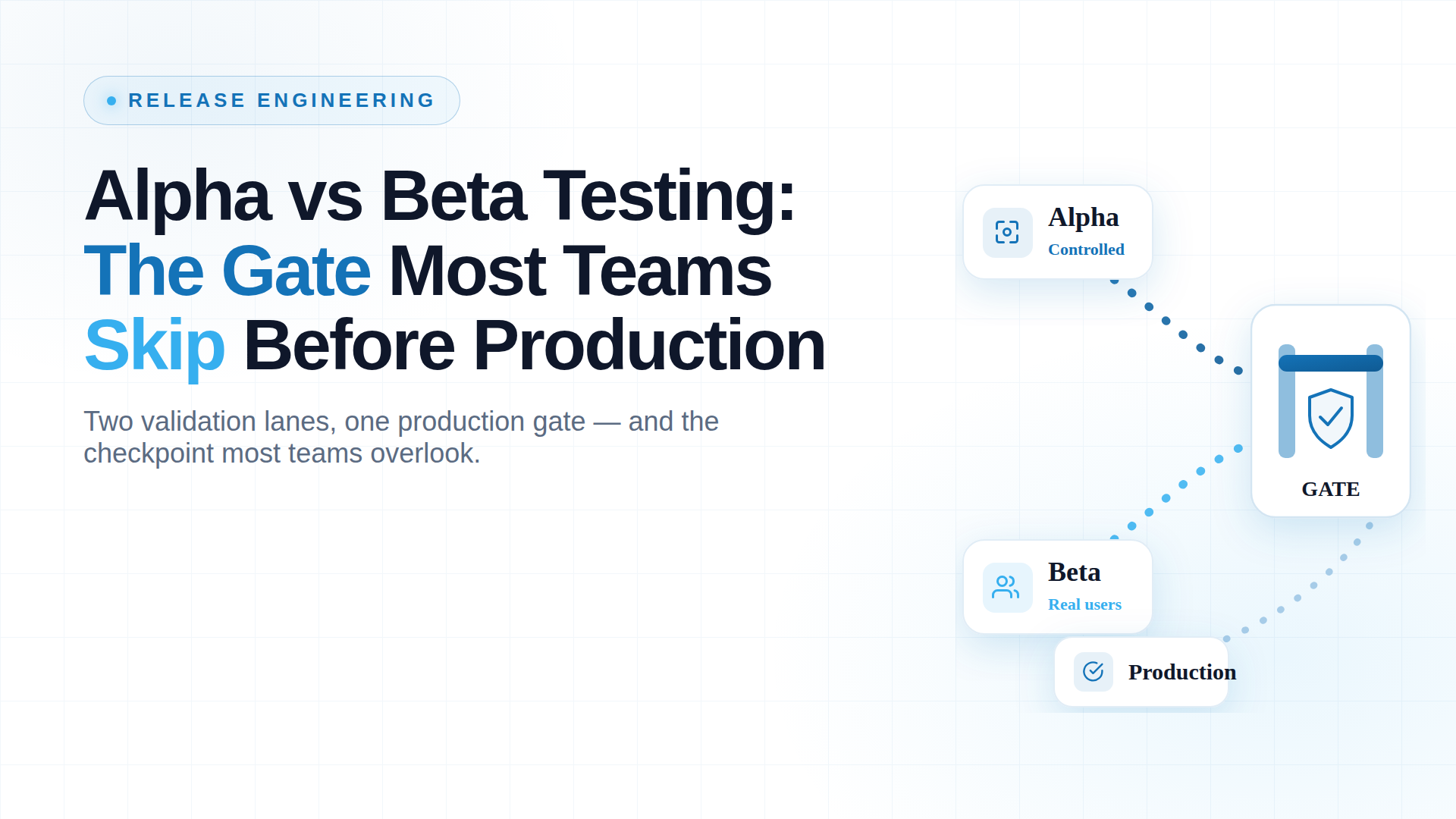
A beta that 5,000 real users are hammering feels like proof a release is safe. It’s closer to the opposite. It’s the moment you find out whether the work before it was done, and by then thousands of people are already inside the thing you’re checking.
Most engineering organisations don’t skip beta. They love beta. They ship to real users constantly, watch the dashboards, and call it validation. The expensive mistake isn’t skipping the stage. It’s treating exposure as if it were a gate.
This guide covers what alpha and beta each do, how they differ, and why the order between them is the part most teams get wrong.
Here’s the sign-off that happens in a lot of release meetings: “It’s been in beta three weeks, no major complaints, let’s push it.” On paper that reads like risk coverage. In practice, if no controlled gate ran underneath it, that beta wasn’t reducing your exposure. It was widening it.
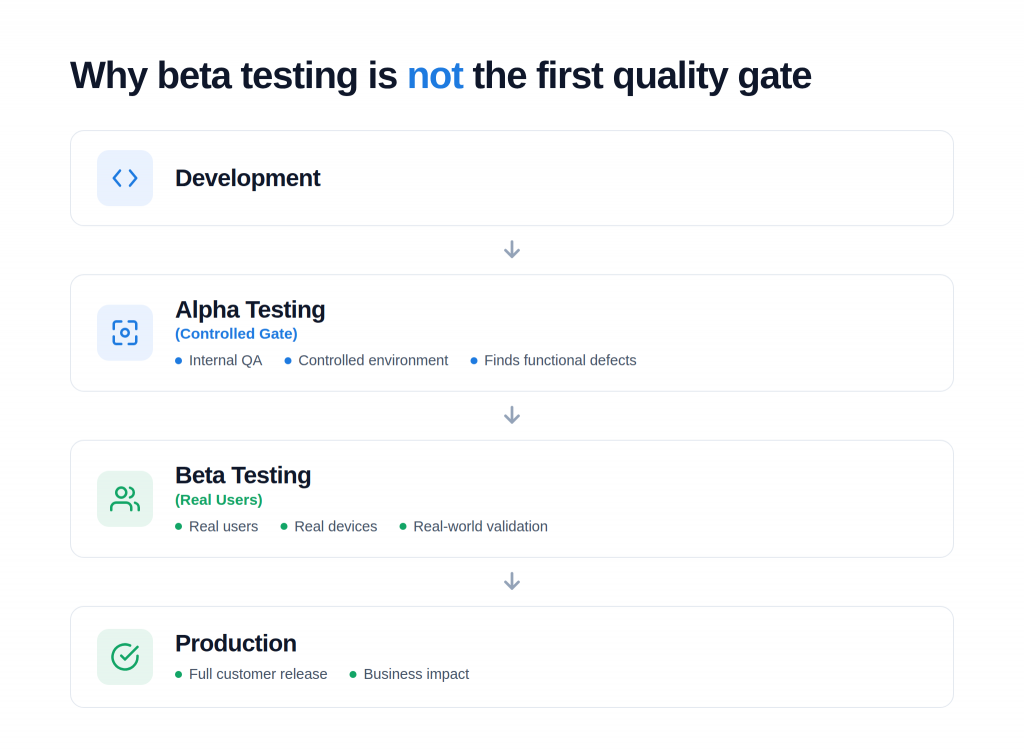
Putting a build in front of real users tells you how it behaves in the wild. It does not tell you whether the build was sound before it got there. When those two ideas collapse into one, a defect a controlled check would have caught internally gets distributed to your customer base instead.
In a regulated environment, that’s not a hotfix ticket. An uncontrolled release that reaches live users can become:
Beta without a gate doesn’t shrink your blast radius. It maximizes it.
The scale version of this failure is already in every CISO’s slide deck. In July 2024, a single content-configuration update shipped through CrowdStrike’s Falcon sensor with a defect its release path didn’t catch. The out-of-bounds read crashed roughly 8.5 million Windows systems and drove an estimated $5.4 billion in losses across Fortune 500 companies.
That wasn’t a beta problem. It was a no-controlled-gate problem: an update reaching production faster than validation could keep up. The lesson scales down cleanly to any release you own.
Both alpha and beta testing exist to stop exactly this. They are the two final quality gates before software reaches production. Although both aim to improve quality, they serve different purposes and happen at different stages of User Acceptance Testing.
Alpha testing in software testing is the controlled gate.
It’s “Internal validation” that answers one question: does this work under conditions we control, before any external user sees the product.
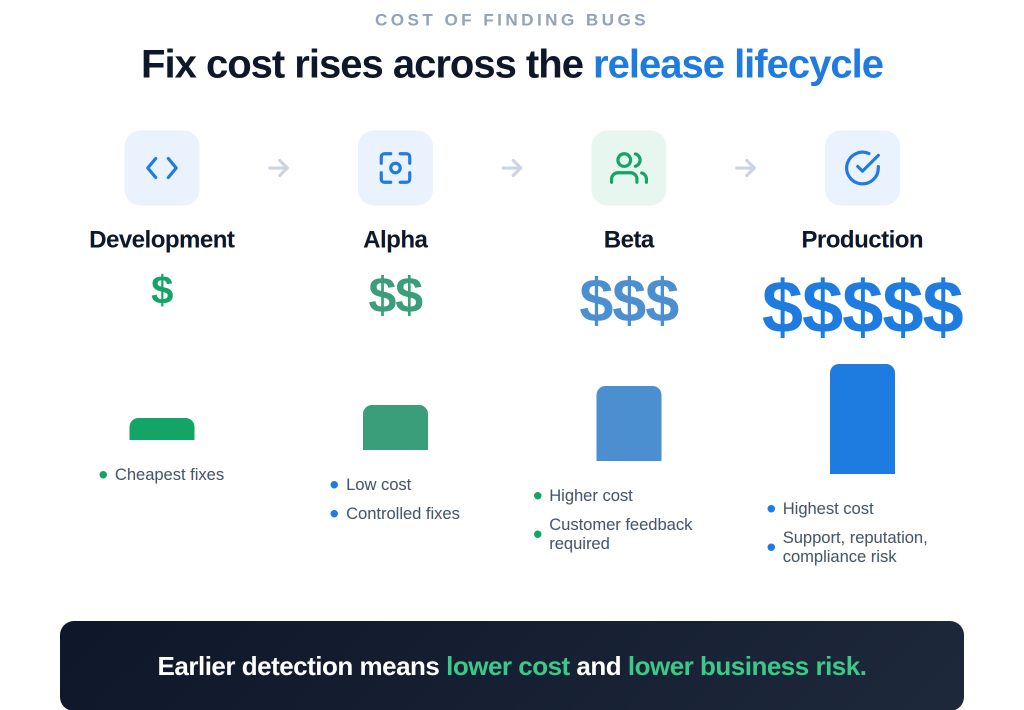
The economic logic is absolute: A defect caught at the controlled gate costs a fraction of the same defect found after rollout. Once a bug reaches production, the cost isn’t just the fix. It’s the incident response, the customer impact, the support load, and in regulated sectors, the audit exposure. The controlled gate is where defects are cheapest to kill, which is exactly why skipping it is so expensive later.
Example: Testing a login, checkout, and payment workflow end-to-end in a lab environment before a single outside user touches it is a classic alpha test.
Beta testing is real-world validation.
Example: A food-delivery app releasing a beta to 500 real customers before a worldwide launch is actively pressure-testing real devices, real networks, and real ordering behavior that internal validation could only approximate.
The commercial stakes of releasing without validation are highly measurable:
Real-world validation is where you find those two bugs before your users do, and before churn turns a quality problem into a revenue problem.
Treating beta testing as a casual release and watch exercise is a common trap. A successful beta is a highly controlled sequence:
Beta testing is not a single methodology. Depending on your risk profile and target metrics, you can deploy different variations:
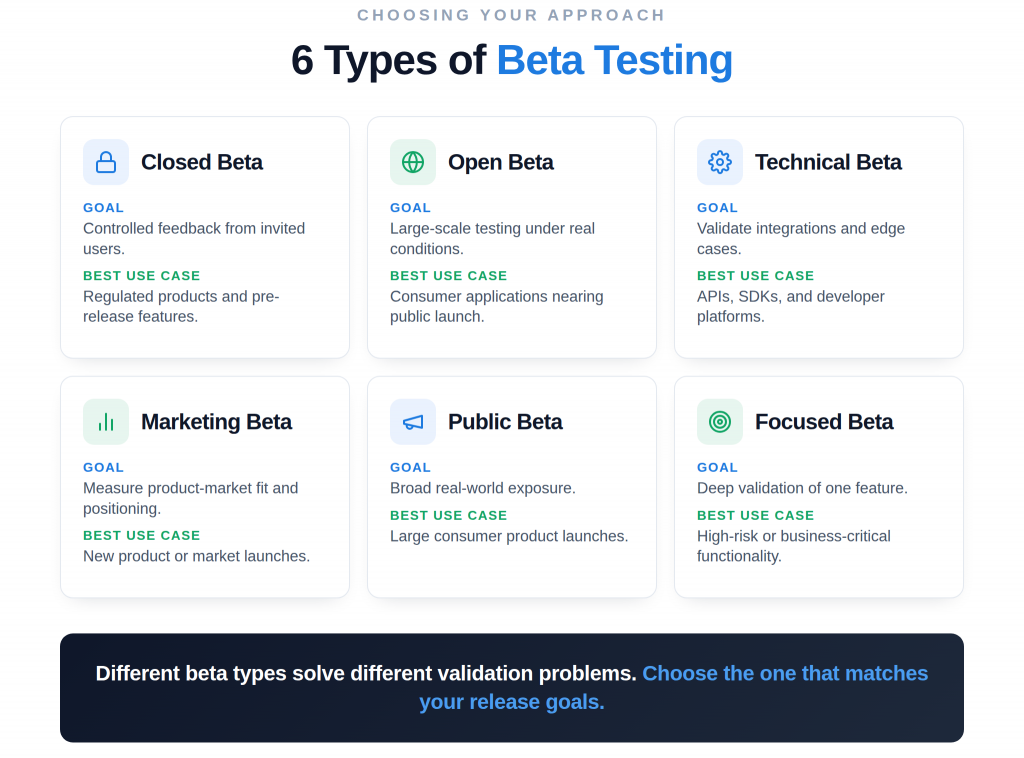
| Beta Type | Who Participates | Main Goal | Best Use Case |
| Closed | Invited, selected users | Controlled feedback, NDA-safe | Regulated products, pre-announcement features |
| Open | Any self-selecting user | Scale and load under real conditions | Consumer apps nearing general availability |
| Technical | Power users and developers | Integration, API, edge-case validation | Platforms, SDKs, developer tools |
| Marketing | Target-segment users | Positioning and product-market signal | New market entry |
| Public | The general public | Broad real-world exposure | Major consumer launches |
| Focused | Narrow, feature-specific group | Deep feedback on one capability | A single high-risk feature |
Modern delivery has blurred the old wall between beta and production through stages and canary rollouts:
The only difference is how many users absorb the impact.
Alpha and beta are not a menu of options. They are a sequence with a strict dependency, two gates that do different jobs in a fixed order, where the second only works if the first one runs.
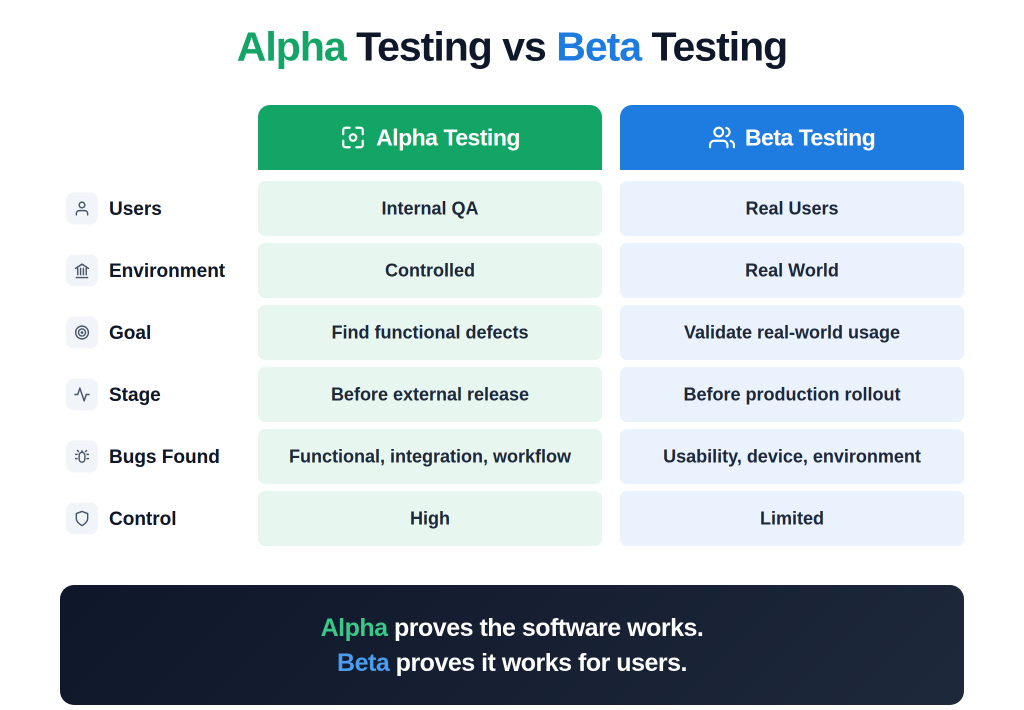
Beta testing should never replace alpha testing. Beta surfaces what alpha structurally cannot, like device fragmentation and live load, but it can only confirm stability that the controlled gate has already established. Run beta without a controlled alpha gate, and it stops being a safety net. It becomes a distribution mechanism for the defects you never checked for, shipped to real people at scale.
If you’re briefing your VP of Engineering, the standard for a safe release boils down to these core principles:
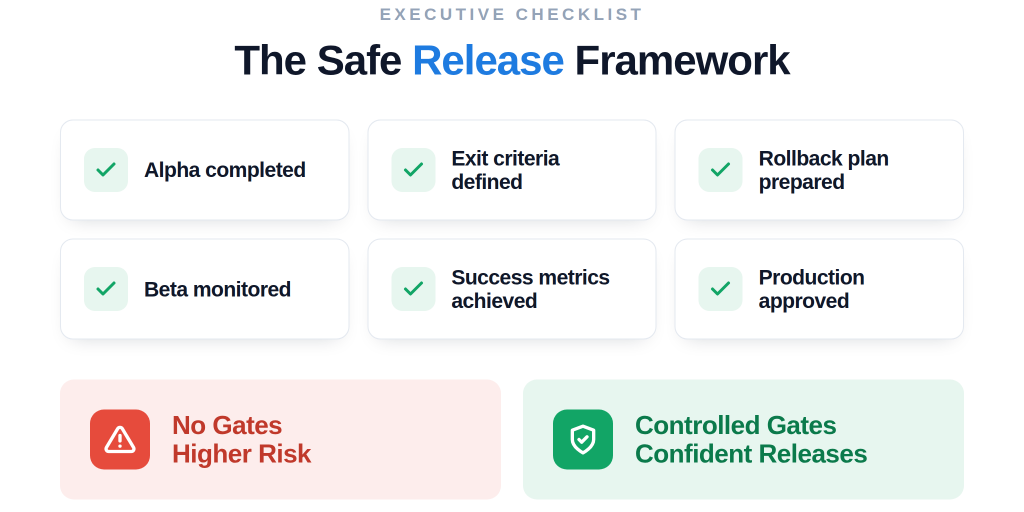
To run a beta phase that reduces risk, enforce these few disciplines:
Even a well-staffed beta fails to deliver safety when it goes wrong in predictable ways:
While tools handle the logistics of distribution and data collection, remember that they do not replace testing discipline. Standard platforms include:
Industry leaders use beta as a structured checkpoint:
These companies succeed because they recognize that the percentages in a staged rollout limit the blast radius, but it is the structured beta gate that actually earns them the confidence to expand.
A formal beta earns its cost on any launch carrying real commercial or regulatory downside. You should enforce a beta testing gate when:
This isn’t a theory about gates. It’s the program that runs them.
Kualitatem has:
Not because a gate said it was ready; that’s the conversation worth having. We’ve built structured release validation for regulated enterprises, the kind where an uncontrolled release isn’t a bug ticket but a compliance event. Your next release cycle is the right time to fix the sequence.
Beta testing validates software in the real world, but only as the second of two gates, never a substitute for the first. Treat both as mandatory, and you release higher-quality software with fewer production incidents, and can prove it when it matters.
Make both gates non-negotiable in your next release. Talk to a Kualitatem expert about building controlled validation into your pipeline.
Releasing a near-final build to real users outside the organization to validate how it performs under real-world conditions before full production release.
To catch environment-specific, usability, and load-related issues that internal validation can’t reproduce, confirm product-market fit, and build evidence-based release confidence.
Real external users, selected to represent the actual target audience, rather than internal QA engineers, who own the controlled alpha gate that runs first.
Alpha is the controlled internal gate that catches functional and structural defects in an environment you own.
Beta is real-world validation by external users under conditions you can’t control.
They run in sequence. Beta relies on alpha running first.
Yes. Beta is a form of User Acceptance Testing. It confirms the product is fit for the people who will actually use it, in their real environment.
It should last long enough to meet your predefined exit criteria across a range of users, not a fixed calendar window.

Nabeesha is a Digital Content Executive at Kualitatem Inc. With a background in communication and extensive knowledge of QA and cybersecurity, she brings a business-first lens to technical content. Her work helps CTOs and engineering leaders cut through the noise and make confident decisions about software quality.
Not sure where your QA stands?
Speak to an Expert







Our experts are all ready. Explain your business needs, and we’ll provide you with the best solutions. With them, you’ll have a success story of your own.
Contact us now and let us know how we can assist.