
7 QA Test Automation Practices That Cut Release Cycles
April 6, 2026



You automated your full testing environment. Coverage looks healthy on the dashboard. But every release still needs a manual regression round before anyone feels confident enough to push to production.
We see this constantly here at Kualitatem. The framework exists and the investment was also real. But the test strategy underneath was designed around “automate everything we used to do manually,” not around release speed.
These aren’t theoretical practices for test automation. They come from real engagements across banking, SaaS, and enterprise platforms. See the results in our case studies.
Those are two very different goals….
QA automation shortens release cycles by automating repetitive checks, enabling faster feedback and reliable deployments without sacrificing quality. These seven proven practices draw from recent research, books, and leader insights, tailored for CTOs focused on business outcomes like speed and cost savings.
Most teams run their test suite as a separate step. Build finishes, someone triggers the tests, and everyone waits. That gap between code commit and test feedback is where releases slow down.
The fix is simple in concept: every time a developer pushes code, tests run automatically
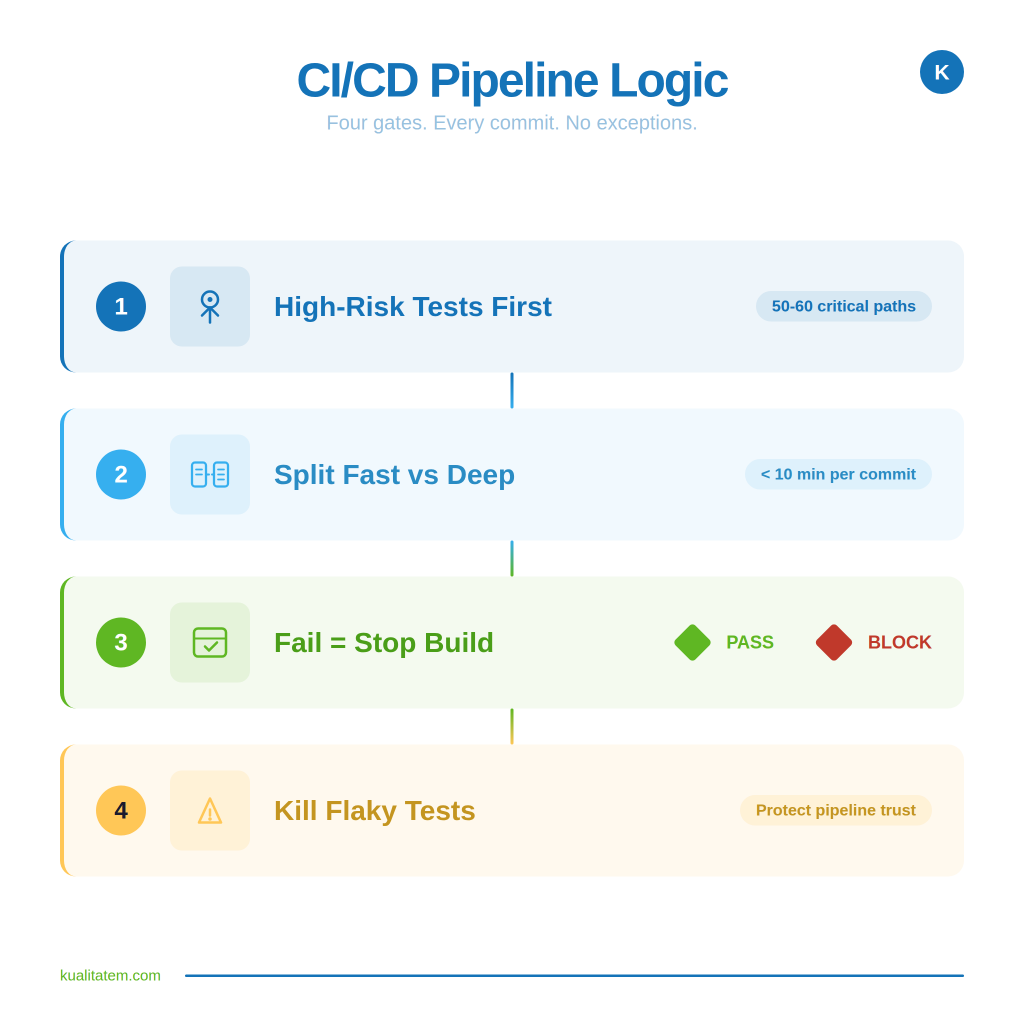
Don’t wire your entire suite into the pipeline on day one. Identify the 50-60 tests that cover your highest-risk flows: payment, login, core transactions.
Fast tests (under 10 minutes) run on every commit. They catch the obvious breaks before code even gets merged. Deep tests, your full regression, run nightly or before a release candidate. This way developers aren’t waiting 4 hours for permission to merge.
If a test fails, the deployment pauses. This sounds aggressive, but it’s the only way the team starts trusting automation over manual checks. When the pipeline enforces quality, the manual regression round starts disappearing.
One unreliable test that fails randomly will train your entire engineering org to ignore test results.
Netflix runs thousands of deployments a day using this model. You don’t need to be Netflix. But moving from “we test before release” to “we test on every commit” is the single fastest way to compress your cycle. Most clients we work with see their release cadence double within the first quarter of making this shift.
The instinct is to automate everything. It feels like progress. But what it actually creates is a bloated suite where most runs validate features nobody changed.
Pull your last 6 months of production incidents. Those modules are your priority list, not a coverage spreadsheet.
Login, checkout, payment, and account creation. These aren’t features. They’re revenue. If your smoke suite covers these journeys, you’ve already caught what matters most.
That settings page hasn’t been touched since Q2 doesn’t need automated runs every cycle. Automating it just adds runtime and noise.
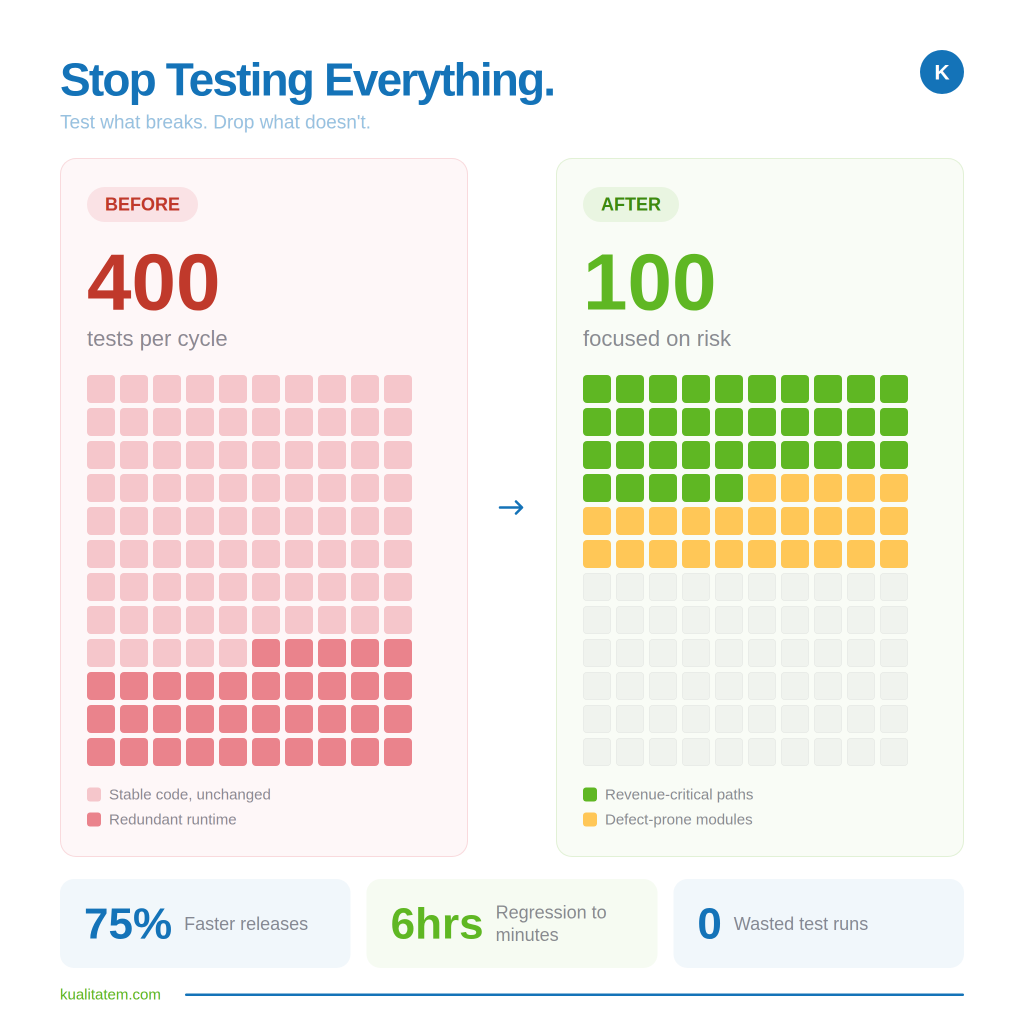
If your core suite takes longer than 20 minutes, it’s doing too much. A fast, focused suite that runs every build beats a comprehensive one that runs once a week because nobody wants to wait.
We helped a client restructure around defect-history prioritization and core journey coverage. Regression dropped from days to hours. Not because they tested less. Because they stopped testing things that didn’t need it.
Here’s what eats your team’s time:
→ the app changes → a button moves → a field gets renamed → 40 tests break overnight.
Because the tests are looking for elements that have shifted. Your engineers spend the next two days fixing tests instead of writing new ones. That’s maintenance, not quality.
Self-healing frameworks detect when a UI element has moved or been renamed and automatically adjust the test to match. Your suite stays green without someone manually updating locators every sprint.
When maintenance drops, your team stops babysitting old tests and starts covering new features. That’s the actual ROI here, not the AI itself, but what your people do with the time it frees up.
If the same tests keep self-correcting every release, that’s a signal. Either the app architecture is unstable or the test was poorly designed. Use healing data as a diagnostic, not just a convenience.
Maintenance typically consumes 60-70% of test automation effort. In banking systems, self-healing has cut release cycles by 43%. We’ve seen similar results: when your engineers stop fixing broken locators and start focusing on actual risk coverage, the whole pipeline accelerates.
Your team writes tests manually from requirements docs. It takes days. And even then, they cover the obvious paths while edge cases slip through because nobody had time to think of them.
AI agents read your user stories and acceptance criteria, then build test cases automatically. Not perfect ones. But with a solid 80% baseline, your team would have spent a week producing.
“Give AI the context before writing your test cases and see the magic it brings in your coverage.”
Agents don’t follow happy paths the way your team does. They explore. Random sequences, unexpected inputs, odd device combinations. The kind of usage patterns that cause production incidents but never show up in a scripted suite.
Coverage reports tell you what’s tested. Agents find what isn’t. They identify paths nobody scripted because nobody thought a user would go there. Users always go there.
One login test. One checkout test. Now multiply that by 50 user roles, 12 regions, and 3 payment methods. If your team is writing a separate script for each combination, they’ll never finish. And you’ll never get to 80% coverage without doubling headcount.
Not sure where your automation program stands today? Our Test Automation Maturity Model helps you benchmark your current setup across five levels so you know exactly which of these practices to prioritize first.
Instead of hardcoding values into every test, the framework pulls inputs from a simple CSV or spreadsheet. Same script runs them all.
Need to test 200 login combinations across roles and permissions? That’s a spreadsheet update. Your QA engineers write the logic once. Business analysts can add new scenarios by editing a file.
When adding a new test variation takes 30 seconds instead of a day, your team actually does it. Edge cases that would never justify a dedicated script get covered because the cost of including them is nearly zero.
Teams running data-driven setups report up to 40-75% faster releases. Not because the automation is smarter. Because one framework does the work that used to require hundreds of individual scripts and the headcount to maintain them.
Most teams treat automation as a post-development activity. Developers build the feature, hand it off, and then QA writes the tests. By the time automated coverage exists, the code has already moved two sprints ahead. Defects pile up because validation is always running behind.
When your developer finishes a user story, the corresponding automated test should land in the same sprint. Not the next one. Not “when QA has bandwidth.” Same sprint, same definition of done.
Unit-level checks catch logic errors the day code is written. Integration checks validate that components talk to each other correctly. End-to-end coverage confirms the journey works. Layering these during the sprint means defects surface when the developer still has context, not three weeks later when they’ve moved on.
The shift happens when automation stops being “QA’s job” and becomes part of what “done” means. If a feature ships without automated coverage, it isn’t done. That one rule changes team behavior faster than any tool or framework.
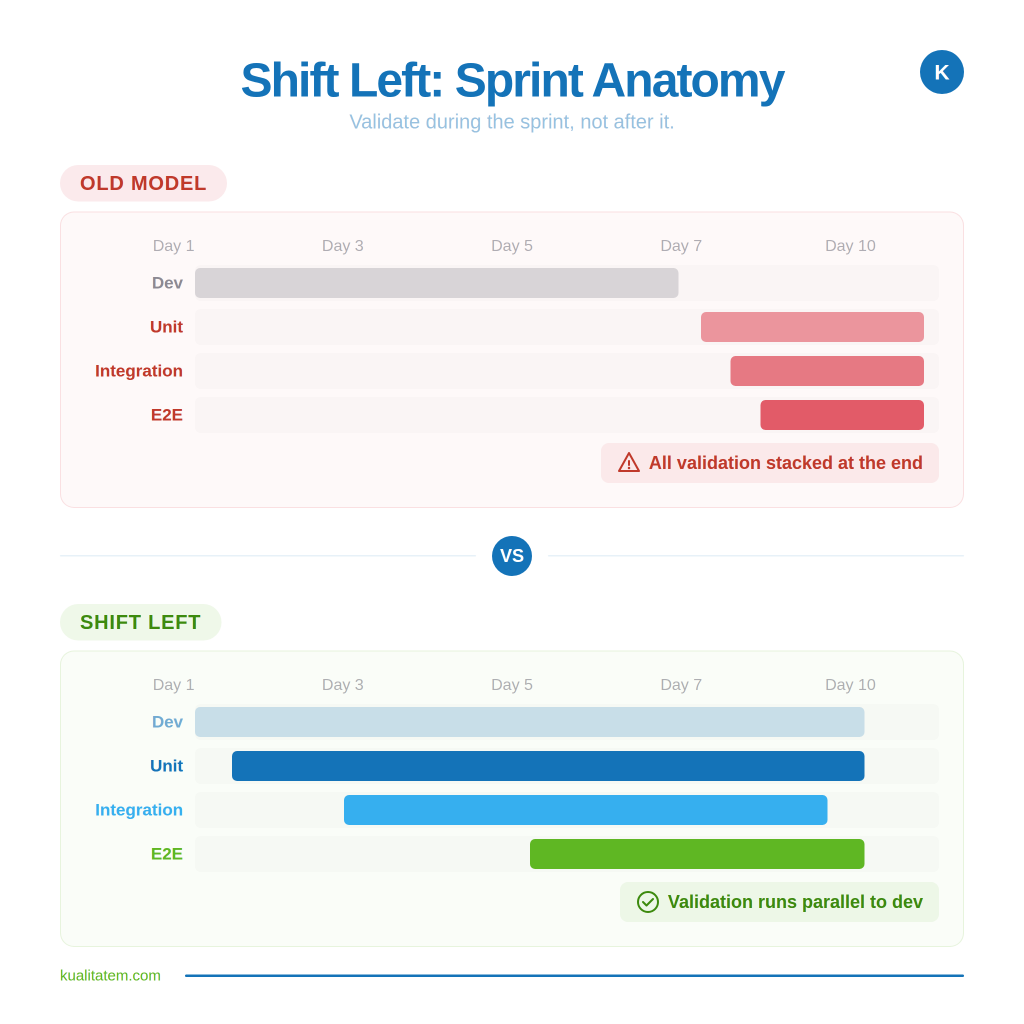
Spotify cut weeks off their release cycles by moving automated regression into the development phase instead of running it as a gate at the end. We’ve seen the same result with our clients. When validation runs parallel to development instead of behind it, defects stop compounding and your cycle shrinks naturally.
Running your full suite every cycle feels safe. But it’s slow, and most of those runs validate code that didn’t change. That’s not thoroughness. That’s wasted compute and wasted time.
Before a test run kicks off, AI analyzes what actually changed and maps it against your defect history. Tests covering affected modules run first. Tests covering untouched code get skipped or deprioritized.
If a payment module was updated and has a history of breaking, it gets full coverage. If a static page nobody touched is stable for six months, it doesn’t need to run every build.
The goal isn’t running fewer tests. It’s running the right ones first, so your team gets a risk verdict in minutes, not hours.
Teams using risk-based test selection see 50% drops in execution time with fewer production escapes, not more. You stop treating every release like it carries equal risk everywhere and start focusing on validation where it actually matters
Release cycles don’t shrink by adding more automation. They shrink when your automation strategy aligns with where risk actually lives. The seven practices here follow the same pattern: stop running everything, start running what matters, and let AI handle the parts that don’t need human judgment.
The gap between “we have automation” and “our automation accelerates releases” is a strategy problem, not a tooling one. Most engineering orgs already have 80% of what they need. The remaining 20% is restructuring how, when, and what gets validated.
If your release cadence hasn’t improved despite years of automation investment, the framework isn’t the issue. The priorities underneath it are.
How do QA automation best practices reduce release cycle time?
They turn testing into a continuous process instead of an end-stage bottleneck. Risk-based automation validates only what changed, giving feedback in minutes instead of days and compressing the cycle.
What’s the first step to scaling automation without adding headcount?
Adopt data-driven, modular frameworks. Write logic once, scale coverage via configurable inputs (e.g., spreadsheets) without adding scripts or people.
How does AI improve enterprise QA testing?
AI auto-generates test cases, self-heals broken tests, and prioritizes execution based on risk. Result: less manual effort, faster runs, better defect detection.
Are cloud QA best practices different from on-prem?
Core principles stay the same. Cloud adds parallel execution, scalable infrastructure, and distributed data handling enabling faster, deeper testing cycles.
What ROI can CTOs expect from QA automation best practices?
Typically 40–75% faster releases, 60–70% less maintenance effort (via self-healing), and ~300% ROI from reduced defects, lower manual effort, and faster delivery.




Our experts are all ready. Explain your business needs, and we’ll provide you with the best solutions. With them, you’ll have a success story of your own.
Contact us now and let us know how we can assist.