
Testing is not a single activity performed at the end of development. It is a continuous process that runs alongside development.
It’s not a discrete activity to carry out at the end of any phase, nor is it a discrete process within the whole process. “Testing phases” actually can mean two related notions: test levels (describe which item gets tested) and the Software Testing Life Cycle (STLC) (describes how testing should be designed and managed).
Both are correct. And they overlap in Agile and DevOps environments.
This guide covers both, how both fit together and explains how testing happens in an Agile team without the neat line. This is the road map for any QA manager dealing with a product that can’t slip through into production.
What are the stages of software testing?
There is two methods of testing; there is two questions asked:
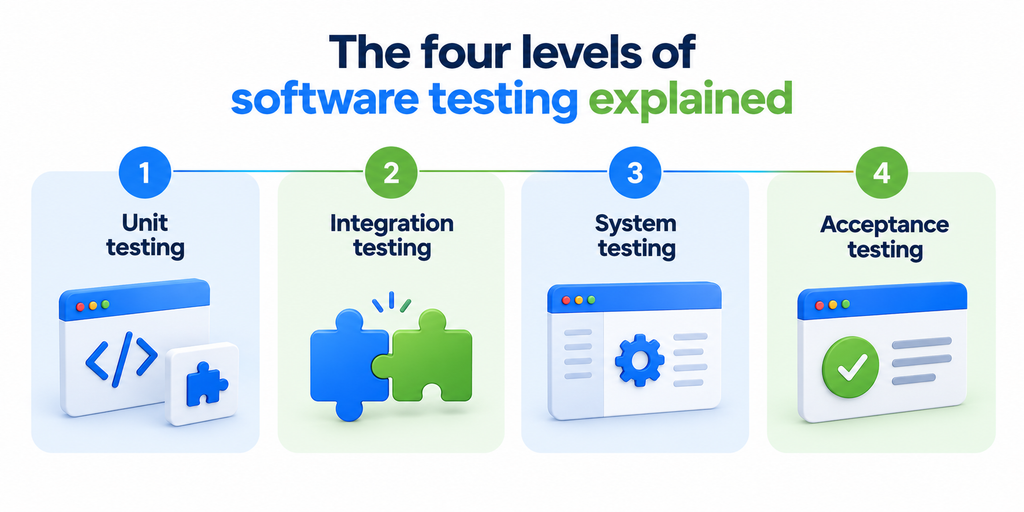
The first one is: the levels of testing. There are 4 levels: Unit test, which verifies very small blocks of code, Integration test that verifies how unit tests work; System test, which tests the whole application; and acceptance test, used to see whether the application satisfies the needs of the business. That focuses on WHAT you are testing.
The second one is STLC, the six stages in STLC (planning, designing, setting up test, testing and reviews, which you may already know). This one focuses on how test work is performed.
| Perspective | Stages | What it describes |
| Testing levels | Unit, integration, system, acceptance | What is being tested |
| STLC | Requirements, planning, design, environment, execution, closure | How testing is managed |
The four levels of software testing explained
The four levels move from small to large. They go from a single function at level 1 and end in the complete product under actual conditions. There is a type of defect on each level that is caught that you otherwise would miss.
1. Unit testing
Unit tests have a specific test to cover small parts of a method, functions and classes. They test small chunks of code like:
These unit tests are always run in parallel with code development, normally: developed at the same time when code is being written by the programmer.
They find defects early when they are typically much cheaper to fix than when found later in testing or production. Say you’ve written a function to compute tax on an order. A unit test can then pass in a price and check to ensure the tax generated is correct, without going through to the database or a checkout page.
Frameworks that are widely used across these technologies are JUnit for Java, pytest for python, Nunit for .NET, Jest for JavaScript. Unit testing has the narrowest scope of these four levels.
When teams want these checks run at scale across browsers and environments, this is usually where QA automation services come in.
2. Integration testing
Integration testing verifies that two or more components work correctly together, even when each component passes its own unit tests.
This level covers the connections between parts of your system, such as:
- APIs calling each other
- Code reading from a database
- Your app talking to a third-party service
- Data moving between microservices
Common failures show up right here:
- One component sends data in the wrong format
- A service times out
- Two systems disagree on what a field means
For example, an e-commerce payment component and order component pass their unit tests but when the confirmation on payment was made is sent to each other, it fails and that is discovered through integration testing.
3. System testing
At this stage, the real product behavior perceived by a user is simulated by carrying out typical workflow tests.
System testing is performed by testing the entire application against functional and non-functional requirements with real end to end workflows. In system testing, instead of components tested in integration testing, the entire application is tested.
System testing is often performed by an independent QA team to provide additional perspective.
4. Acceptance testing
Acceptance testing asks whether the product meets business needs and user expectations.
It may be true that the code is brilliant and has passed acceptance tests but this does not necessarily guarantee that the customer got what they asked for.
This level includes a few types of testing:
- User acceptance testing, or UAT, where real users try the product against real business scenarios
- Alpha testing, done in-house by the team
- Beta testing, done by a limited set of outside users
Key stakeholders and customers can participate. The intended outcome is release-readiness. You are determining whether or not the product is fit to be launched.
Functional vs non-functional testing
Testing levels refer to the scope whereas functional testing and non-functional testing are two categories which refer to what is being tested.
Functional testing verifies functionality- Does the login succeed?
Is the discount correctly applied?
Can I save the order?
The testing is about features, workflows and business rules related to requirements. Non-functional testing refers to characteristics like performance, security, usability, compatibility, and reliability.
| Type | What it checks | Example on an e-commerce app |
| Functional | Features and business rules | Discount code applies correctly at checkout |
| Non-functional | Speed, load, security, usability | Checkout stays fast during a flash sale |
Most products need both. Passing one does not cover the other.
What is the Software Testing Life Cycle (STLC)?
The Software Testing Life Cycle, or STLC, refers to the plan, design, execution, and completion phases of testing. It’s essentially the testing aspect of a software development life cycle.
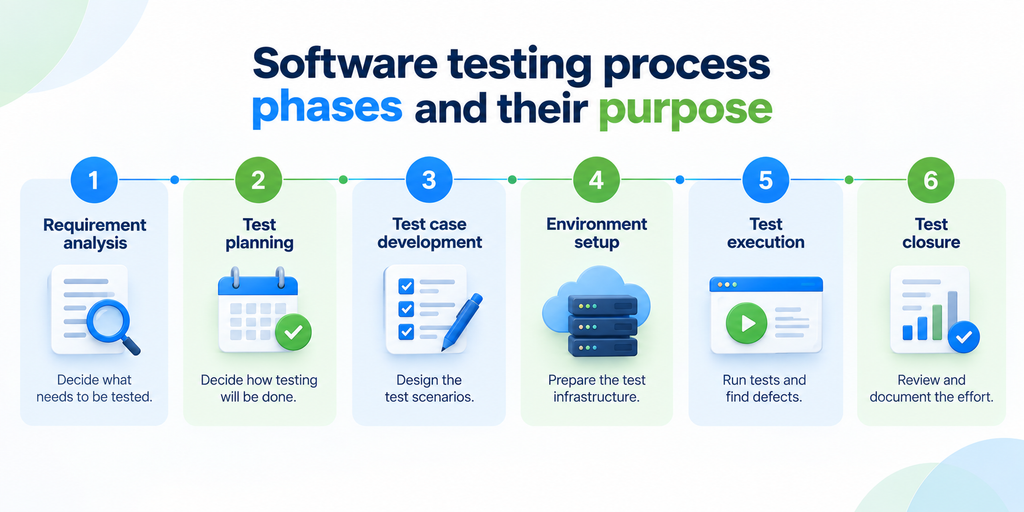
It is not necessary for STLC to run after all the code is written. In Agile & DevOps, the STLC runs concurrently and throughout the coding process. It begins to run from the requirements phase.
The 6 phases of the Software Testing Life Cycle
There are 6 phases to the STLC. Each of them has a defined goal as well as a clear deliverable.
Below is an overview of these.
| Phase | Main objective | Key deliverables |
| Requirement analysis | Decide what needs to be tested | Testable requirements, RTM |
| Test planning | Decide how testing will be done | Test plan, strategy |
| Test case development | Design the test scenarios | Test cases, test data |
| Environment setup | Prepare the test infrastructure | Working test environment |
| Test execution | Run tests and find defects | Test results, defect reports |
| Test closure | Review and document the effort | Test summary report |
Phase 1: Requirement analysis
The first step is knowing what to test. QA engineers read over business and technical requirements and figure out which requirements are testable. They would also be performing other tasks including:
- Look for ambiguity in the requirements
- Flag missing acceptance criteria
- Identify risks early
- Decide the scope of testing
- Note where automation could help later
- Build a Requirement Traceability Matrix, or RTM, to link each requirement to the tests that will check it
This is where QA earns its keep at Kualitatem. Where QA is involved this early, we prevent defects being designed into the requirement at all. That is quality engineering, not bug fixing. Fixing a bad requirement here is much cheaper than fixing its resultant defect 3 months down the line.
Phase 2: Test planning
Test planning defines the testing strategy, scope, resources, risks, and criteria.
A good test plan generally includes:
- The objectives and the scope
- The testing levels and types you will use
- Resources, roles, timeline, and tools
- The risks and how you will handle them
- Entry and exit criteria, the conditions for starting and stopping testing
- The automation strategy
Phase 3: Test case development
Next the team defines test scenarios, breaks them into detailed test cases, and prepares the required test data.
Good test design covers more than the happy path. It usually includes:
- Positive scenarios, where valid input should work
- Negative scenarios, where invalid input should be rejected
- Boundary conditions and edge cases, where a lot of real bugs hide
Test cases are written and approved, relevant test automation is created; all is mapped to the requirement to maintain traceability.
A test scenario specifies what to check; a test case specification describes how to check. For example, passwords can be reset in the user account in the scope of a test scenario which is composed of various test cases.
Phase 4: Test environment setup
The test environment should replicate production as closely as practical, including:
- The right servers, databases, and networks
- The right browsers and devices
- Any APIs and third-party integrations the product depends on
- The correct test data loaded and ready
After the build, the team may even go as far as ‘testing’ the environment to see if the build is even stable enough to be run tests against in the first place (usually a small smoke test). False fails / passes are due to environments so production-like setups help test validity.
Phase 5: Test execution
The team executes their scheduled test cases and notes what is happening versus what they want to happen.
- Log a defect when something fails
- Set each defect’s severity, meaning how bad the impact is, and priority, meaning how soon it needs fixing
- Developers fix the reported issues
- Testers retest to confirm the fix worked
- Run regression testing to make sure the fix did not break something else
- Track test coverage and report progress throughout
Here is the loop:
Test → Fail → Log defect → Developer fixes → Retest → Regression → Pass
That cycle repeats until the important tests pass and the build is stable.
Phase 6: Test closure
The final phase is closure. Here the team wraps up and looks back at the whole effort:
- Review the results, coverage, and defect status
- Check any risks still open
- Look at pass and fail rates
- Write a test summary report and capture lessons learned
- Make a recommendation on whether the product is ready to release
Closure should also review the effectiveness of the testing.
Were you finding defects late or early?
Was coverage adequate?
What could have been done differently?
Those answers will improve future releases.
How testing levels fit into the STLC
As everyone confuses levels with phases and vice versa, here is the clean version. The four levels are not four separate STLC phases. The four levels are planned, built and tested across the STLC phases.
| STLC phase | Testing activities |
| Requirement analysis | Define unit, integration, system, and acceptance requirements |
| Test planning | Decide which levels and types are needed |
| Test case development | Write tests for each level that applies |
| Environment setup | Prepare environments for integration, system, and UAT |
| Test execution | Run unit, integration, system, and acceptance tests |
| Test closure | Review results across every level |
Thus, unit testing is not “phase one”. The levels of testing define what is tested while STLC phases specify when and how the work is managed.
Where smoke testing fits
Smoke testing is an “in-and-out” test, the lowest level of a new build’s crucial paths before extensive testing has commenced. It is, effectively, a gate check – if simple functionalities like login or the primary workflow fail, then the build is rejected.
CI pipelines might have smoke tests that automatically execute after every build.
The following terms often cause confusion:
- Smoke testing: checks whether the critical functionality works at all.
- Sanity testing: verifies that a specific change or fix works.
- Regression testing: checks that new changes have not broken existing functionality.
Manual vs automated testing across the stages
Automation is best for repetitive, predictable checks, while manual testing remains important for exploratory, usability, and judgment-based testing.
| Stage or level | Manual testing | Automated testing |
| Unit | Limited | Highly suitable |
| Integration | Useful | Highly suitable |
| System | Highly useful | Highly useful |
| Acceptance | Highly useful | Depends on the scenario |
| Exploratory | Essential | Limited |
| Regression | Useful | Highly suitable |
| Usability | Essential | Limited |
Example: applying the stages to an e-commerce application
Theory is easier to hold onto with one running example. Take a standard online store. Here is how the four levels play.
Unit testing
Test the small calculations on their own: Price Calculation. Discount Calculation. Tax Calculation. Each function is checked to make sure its calculations work correctly.
Integration testing
Now you’re going to be testing those handoffs.
Does your cart get its inventory updated correctly?
Does checkout gracefully fall through to your payment gateway?
Does a completed order get the order confirmation email?
All of those handoffs are testable.
System testing
Here we are testing the complete journey as a customer. Search for the product. Open it.
Add to basket.
Checkout process. Payment process. Get the confirmation. It’s an end-to-end test in one trip.
Acceptance testing
Finally, the product must be proven against business requirements and customer expectations. Do the business rules of the checkout system adhere to the business request? If a real customer used the product would they successfully be able to purchase a product? This is the sign-off for the release.
Then map it back. The activities performed are determined during test case specification, executed during test execution and documented during test closure. The levels and phases represent just two views of the same action.
Best practices for an effective software testing process
Good testing is less about tools and more about habits. A few practices separate teams that catch problems early from teams that fire in production.
Start testing early
Include the QA team in the requirements stage, not just when coding is done. This is known as shift-left testing and involves sliding the testing into an earlier, ‘leftward’ phase of the project timeline. The sooner any defects are identified, the less expensive they are to fix.
Build traceability
Ensure all the steps are linked up so that there is no room for any gaps. The Requirement leads to a Scenario. Scenario leads to a Test Case.
Test Case leads to Test Execution and Test Execution leads to any defects observed.
If you are able to follow these linked states you know for sure what was and wasn’t tested
Combine manual and automated testing
Use automation for repeat checks and manual testing for judgment calls. Each does what the other doesn’t. Reliance on only one will leave holes.
Prioritize by risk
Not all parts of a product warrant being tested with the same rigor. So don’t attempt to achieve that. Instead, test the most critical workflows or most frequently used or highest priority features first. A checkout issue outweighs a spelling error on a seldom visited configuration page.
Use production-like environments
The closer your test setup is to production, the more confidence you’ll have in your output. Disparity between your test setup and production creates false passes and false fails, and nobody likes wasting everyone’s time.
Automate repetitive regression tests
Regression testing is the perfect automation candidate. It runs often and rarely changes. Automating it frees your testers to focus on exploratory and higher-value work.
Measure how well testing is working
You cannot improve what you do not measure. Track a few numbers that show where the process is strong and where it leaks:
- Test coverage
- Pass and fail rate
- Defect density
- Defect leakage
- Defect severity
- Regression results
- Automation coverage
- Mean time to resolution
Software testing stages vs SDLC stages
STLC and SDLC are not the same although they are related. The scope of SDLC is throughout the whole process of the project. As STLC covers only the testing phase and not otherwise. Below is an approximate mapping of STLC and SDLC.
| SDLC | STLC |
| Requirements | Requirement analysis |
| Design | Test planning |
| Development | Test case development |
| Testing | Environment setup and execution |
| Deployment | Acceptance and release validation |
| Maintenance | Regression and ongoing testing |
Treat this as a guide, not a rule. In Agile teams, these do not necessarily line up one-to-one. Testing is done within the sprint, development is also within the sprint; therefore, they overlap and are not sequential.
How software testing stages work in Agile
All of the above could be seen to be fairly “straight line”: get the requirements, get a plan, get it implemented. For the purpose of agile and DevOps, this is not quite right.
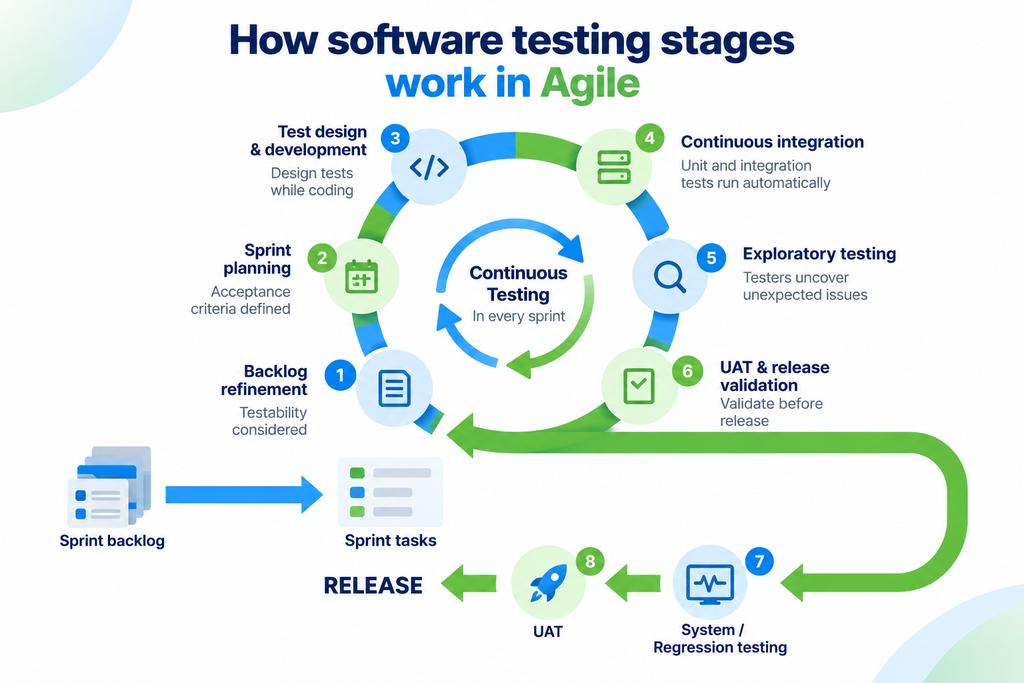
In agile, testing occurs within the sprint. QA participates in sprint planning and backlog refinement sessions. Acceptance tests are written with testability in mind. Design tests while code is being written, not after it is completed.
Continuous Integration then take place where testing occurs automatically within the sprint:
- Every code change triggers automated unit and integration tests
- Regression tests run continuously, so a break gets caught within minutes instead of weeks
- Testers add exploratory testing on top, poking at the product in ways scripts cannot
- UAT and release validation happen near the end of each cycle
The 6 phases of the STLC haven’t gone away-they just cycle and repeat within each sprint rather than each stage being done on its own in sequence at the very end. This is the core principle behind shift-left and continuous testing. Testing is ongoing, rather than being packed at the very last second.
Frequently asked questions
1. What are the stages of software testing?
Generally, there are two types of answers. The four levels of testing are:
- Unit testing
- Integration testing
- System testing
- User acceptance testing
The six phases are:
- Requirement analysis
- Test planning
- Test case development
- Environment setup
- Test execution
- Test closure
The levels explain the testing type while phases explain how testing is planned.
2. What are STLC’s six phases?
Requirement analysis, test planning, test case development, test environment setup, test execution, and test closure.
3. Is STLC the same as SDLC?
Now the SDLC applies to the whole software development project, this includes designing and coding as well. But, the STLC applies just to the testing activities within the whole SDLC.
4. What is acceptance testing?
Acceptance testing is what checks whether the product meets business needs and user expectations. It includes UAT and decides if the product is ready to release.
5. What is smoke testing and when is it done?
A smoke test is a quick check of the critical parts of a build work. It runs early, right after a new build, before deeper testing begins. A sanity test, by contrast, checks one specific fix rather than the whole build.
6. Which testing stages should be automated?
Repetitive, stable checks are best automated, like unit tests and regression suites. Exploratory and usability testing need a human and stay manual.
7. How does software testing work in Agile?
Testing is spread across the sprint. QA joins planning, tests are designed during development, and automated tests run continuously through CI, rather than in one final phase.
8. How does STLC work in DevOps?
The phases still apply but run continuously and automatically inside the pipeline. Tests trigger on every build, so testing and deployment happen together.
Conclusion
Testing is not a stage (there are more than just one) and teams who perceive it in that way get burned out. There are four levels on which tests are made, telling what is being tested, ranging from a single function (unit test) to the whole delivered product (system test). And there are 6 phases in STLC providing instructions on how testing will take place within a development cycle, ranging from the requirements phase to the closure.
High-skilled QA teams work with both perspectives. Nowadays, they not only ensure tests do not constitute an end state in an Agile or DevOps approach, but also test throughout all the development phases during sprints, ensuring defects are caught on time and thus, at an extremely lower cost to fix.
Get the stages right, and the payoff is real. You find defects early. You release with more confidence. You spend far less time fighting fires after launch. That is the difference between QA that protects a release and QA that only signs off on one.
Don’t know about your own testing procedures? Kualitatem’s quality engineering teams will provide support for all the processes outlined in this guide, from initial requirement engineering to automated regression and acceptance testing prior to release. All with TMMi Level 5 certified teams.
Book a Call and we will map your current QA process against the stages that matter most for your release goals.
Prefer to start smaller? Explore our QA automation services to see how the repetitive stages get faster, more reliable, and cheaper to run.