


Summary
Performance testing includes load testing, which evaluates application performance under normal and peak expected workloads; stress testing, which pushes the system beyond normal limits to identify bottlenecks and failure points; spike testing, which examines how the application responds to sudden changes in request volume; and endurance testing, which evaluates long-term performance to identify memory leaks, resource exhaustion, and other issues.
- Stress testing: Tests the system by forcing it to operate outside of normal limits to uncover capacity utilization bottlenecks and failure modes.
- Spike testing: Tests what happens if there is a sudden change in the number of requests by an application.
- Endurance testing: Tests workloads for long periods to identify memory leaks, memory exhaustion, and other issues.
Editorial summary · Read the full guide below
Your application performs well with 10 users. Pages load quickly, and transactions complete without delays.
What if a thousand users come in at the same time, though?
A program that works well on a small number of users can deteriorate into sluggishness or instability when it is accessed by a larger number of users. Database queries are slower, servers use more resources, customers begin to experience delays.
Load and performance testing helps teams realize these issues and troubleshoot them before they impact users. Testing realistic workloads helps teams to pinpoint performance bottlenecks and set measurable expectations.
This guide explains the difference between load and performance testing, helps you select the right level of load, addresses the metrics you should care about, and gives you information on how to create a testing strategy that will yield useful results.
What Is Load and Performance Testing?
Performance Testing is a kind of non-functional software testing where the software application is tested in various workloads. It is used to measure properties like response time, throughput, amount of resources used, stability, etc.
Different performance testing types help teams evaluate expected workloads, sudden traffic spikes, system limits, and long-term stability.
One form of performance testing is referred to as load testing. It determines if an application can meet the anticipated demand from the system including during busy periods.
Imagine you’re a retailer running an ecommerce site and are getting ready for a seasonal sale.
The team must determine if customers can search for products, add items into their shopping carts, and proceed to checkout in the tens of thousands versus hundreds or thousands of customers visiting the site.
There are various types of performance testing that address different questions:
- Load testing: Analyzes application performance under normal and peak expected loads.
- Stress testing: Tests the system by forcing it to operate outside of normal limits to uncover capacity utilization bottlenecks and failure modes.
- Spike testing: Tests what happens if there is a sudden change in the number of requests by an application.
- Endurance testing: Tests workloads for long periods to identify memory leaks, memory exhaustion, and other issues.
It depends which test will be used based on the application requirements.
While functional testing services verify whether application features work as expected, performance testing evaluates how those features behave under different workloads.
For Example:
A banking site that handles payments could have different performance risks as compared to a content site.
Load Testing vs Performance Testing: What’s the Difference?
They are used interchangeably in some instances but they differ from each other.
The umbrella term for performance testing is quite broad. It explores the operation of an application under various circumstances. Load testing is particularly concerned with performance under a specified amount of load.
They differ based on different factors:
| Comparison Factor | Performance Testing | Load Testing |
|---|---|---|
| Scope | General type of performance testing | Specific type of performance test |
| Main Purpose | Evaluates the performance under varying situations | Review activities in terms of demand |
| Workload | Varies as per the selected test | Ranges from normal to peak usage |
| Metrics | Response time, throughput, errors, resource use, stability | Response time, throughput, errors, resource use under load |
| Related Tests | Includes load, stress, spike, and endurance testing | Can be combined with other performance tests |
For instance, a load test can validate an application’s ability to handle its anticipated peak traffic. What occurs if traffic overloads that amount might then be the subject of a stress test.
These tests are complementary.
It is not necessary for teams to decide on a load test or a performance test. Rather, they should select the type of performance test needed and the risk level of the application.
How to Determine the Right Load Levels for Effective Testing
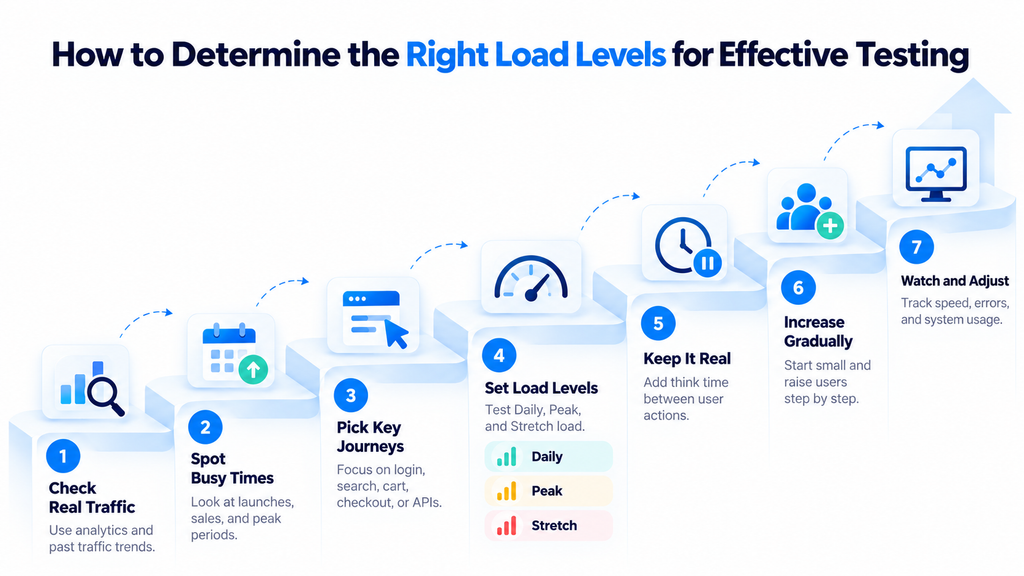
An effective load testing strategy starts with realistic traffic estimates, critical user journeys, and clearly defined performance targets.
One of the most important steps in load testing is selecting the right workload.
If traffic levels are too low, performance issues can be masked. An unrealistic workload may yield results that are not reflective of the actual behavior of customers.
The purpose is to test the application based on the actual demand you’re expecting.
1. Establish Expected User Demand
Use available data on usage.
With website analytics, application monitoring, transaction log, and historical traffic analysis, it is possible to estimate the number of users accessing the application during normal and peak times.
Business forecasts can also be useful in the process of introducing a new product or entering a new market.
If you don’t have historical data, record your assumptions. Discuss them with a product owner, developers and business stakeholders before committing to the workload.
2. Identify Critical User Journeys
A realistic load test should be a reflection of what users do.
For instance, in an eCommerce app, they may want to test:
- Logon to user accounts and access to accounts.
- Product searches and filtering.
- Adding products to the cart.
- Checkout and payment.
- High-volume API requests.
Disperse traffic based on the probability of the activity occurring.
Allow for realistic pauses between actions, the think time. If not, requests made by the test could be much higher than by real users.
3. Define Normal, Peak, and Beyond-Peak Scenarios
Set up different workload profiles:
- Normal load: Daily average application usage.
- Peak load: The amount of traffic expected during the peak periods.
- Beyond-peak load: Extra load to test out capacity or resilience.
A retail site’s traffic could be much higher at a big sale than on a regular weekday.
The number of virtual users depends on the application and cannot be fixed. The targets for workload should be set based on usage evidence, forecasts and business needs.
4. Increase Load Gradually
Start at a manageable level of work and add work gradually.
Track response times, throughput, errors and resource utilization as user/transaction numbers increase.
If the database response times spike, the database may need to be investigated. If the CPU is full, the processing of the applications or infrastructure may be a performance limitation.
Slowly increase so teams can see where degradation starts and what they need to work on.
Which Performance Testing Metrics Should You Monitor?
Selecting realistic load levels is only half the job. Measuring the application’s behavior under those conditions is also required.
The most useful performance testing metrics are:
- Response time/latency: Time taken for requests or transactions to be processed.
- Throughput: Number of requests processed in a unit time (usually requests per second).
- Error rate: Percentage or number of unsuccessful requests or transactions.
- Resource usage: CPU, memory, disk and network during tests.
- Workload (concurrent users and request rate): The load being placed on the system.
- Percentile response times: Times like p95 or p99 that indicate slow requests that are masked by the average.
For instance, if the average response time is good, that doesn’t imply that all customers are served quickly. Even the slowest requests can take a few seconds.
Set limits of acceptability in advance of testing.
A test succeeds if the application is able to fulfill its given performance requirements at its specified workload. Completion without a crash does not prove successful test performance.
Best Practices for Reliable Load and Performance Testing
An incorrect test set-up can yield a flawed result even with a carefully designed workload.
The following load testing best practices help teams gather results that they will make use of.
1. Use a Production-Like Environment
- Test under as close to production conditions as possible.
- Compare critical settings, app versions, DB sizes, and external requirements.
- Note down any differences between test and production environments, if there are fewer resources in test. These impact the interpretation of the results with confidence.
2. Simulate Realistic Workloads
- Use representative customer journeys and volumes of transactions.
- Use realistic pacing of requests, various user activities, and appropriate test data.
- Repeating the same request over and over can result in traffic but not in the way a customer uses an application.
3. Validate the Test Setup Before Scaling
- Test for light traffic first, before heavy traffic.
- Check that scripts work, test accounts have the required permissions, and monitoring captures the necessary information.
- Ensure there is capacity for load generators as well. Otherwise, the testing infrastructure will limit performance instead of the application.
4. Monitor the Entire System
- Check application logs with database activity, infrastructure metrics and third-party dependencies.
- These measurements can then be correlated to determine if the delays are a result of application code, queries, network connections, or external services.
5. Repeat Tests and Compare Results
- Perform critical tests following meaningful application or infrastructure changes.
- Record and compare results with baseline.
- Repeatable performance checks can also be integrated into CI/CD workflows with support from automation testing services.
Common Load and Performance Testing Mistakes to Avoid
Performance testing results can be misleading when the test conditions are unrealistic.
Common mistakes include:
- Arbitrary user counts: Test loads should be based on evidence of usage or documented assumptions.
- Not considering peak periods: Average traffic is not enough to know how the application copes with the busy period.
- Testing unrealistic user journeys: Request volume matters less when it does not reflect actual usage.
- Relying only on Averages: A high p95 or p99 response time could be a sign of your customers being delayed significantly.
- Use of inappropriate environment or data: Large discrepancies may result from using inappropriate environment or data.
- Missing dependencies: Database queries and third-party APIs may cause slowdowns.
- No agreed thresholds: Test results are hard to evaluate without agreed thresholds.
- Testing once: There is a possibility of changes in application behaviour following releases or infrastructure changes.
Realistic workload design and clear performance aims are needed to obtain reliable results. Teams also should seek to understand why things are not going as they think they are, and not just because it is a pass or fail report.
When Should You Perform Load and Performance Testing?
Performance testing should start prior to the end of a release.
Testing occurs early to set baseline measurements and reveal architectural bottlenecks as changes are easier to make early in the testing process.
Load testing should be part of a broader quality strategy that combines performance evaluation with other software testing services throughout the development lifecycle.
Testing points are important to note, such as:
- In development: Test features that affect performance and set initial standards.
- Prior to major releases: Check if application meets agreed performance goals.
- In anticipation of traffic surges: Plan for seasonal campaigns, launches and others.
- Recheck performance after changes: After significant changes, recheck performance after database, infrastructure, application or configuration updates.
- During periodic quality inspections: Run some tests automatically in CI/CD pipelines as possible.
Not all code changes need to be load tested.
Testing frequency depends on system criticality, the type of change, and the risk of performance failures.
How Professional Performance Testing Services Can Help
Creating meaningful performance testing is not all about creating virtual users.
Each team should be familiar with workload patterns, the appropriate tools to be used, setting up the environment, and interpreting the results from various system elements.
If an organization doesn’t have performance engineering resources, they can get assistance from an external partner.
A performance testing provider can assist in the definition of workload models, create test scripts, run scenarios and examine bottlenecks. The results can then be used to inform application and infrastructure enhancements.
Kualitatem offers performance testing services to evaluate application behaviour under various workload, such as load, stress and endurance. It outlines published methods of planning for performance tests, development of scenarios, their execution, analysis of the resulting data and recommendations.
Any organization considering a release or interested in a recurring slowdown phenomenon can consider Kualitatem’s performance testing services to learn about the support they have available.
Conclusion
The first step to effective load and performance testing is to understand how people use your application. Estimating the workload, identifying key user journeys and quantifying goals assists teams in evaluating the capacity of the system to cope with anticipated demand. As workloads increase, bottlenecks can be investigated based upon monitoring.
Select types of performance tests according to the risks associated with the application, and re-perform key tests as the system develops. For help with planning workloads or analyzing performance results, check out Kualitatem’s performance testing services.
Frequently Asked Questions
Is load testing the same as performance testing?
No. Load testing is another type of performance testing. Performance testing looks at application behavior under various situations, load testing is used to measure performance under a set of demands, typically including normal and peak usage.
Which metrics should be monitored during load testing?
Track response time, throughput, error rate, resource utilization, concurrent users, and request rate. Add on p95 and p99 latency to find slower transactions that average response time could mask. Check the results with predetermined acceptance criteria.
How often should load testing be performed?
Test during major releases, during predictable traffic peaks, and major changes in systems. If possible, do smaller periodic tests. The frequency should be based on risk, criticality and the effects of recent changes.
How do you determine the right load for a performance test?
Check out past traffic, application analytics, transaction volumes and business forecasts. Determine the critical user journeys and establish reasonable normal and peak workloads. Make assumptions when data is limited and validate with stakeholders.