


Manual regression tests take three days to complete. However, our CI system currently delivers twice a week. At some point, these two facts become incompatible and a decision must be made.
Automation testing involves using specialized tools to run pre-defined tests prior to production. This idea is often first raised when pain points are encountered with manual testing. However, this is often too late and the cost of implementing automation is not assessed. In the following sections, we will examine when automation testing provides value and when it causes pain.
Let’s examine exactly where automation testing provides value and where it doesn’t. We will also examine practical issues that arise when implementing automation testing and how to implement a testing strategy that can be sustained over time.
Advantages of Automation Testing
Speed and efficiency
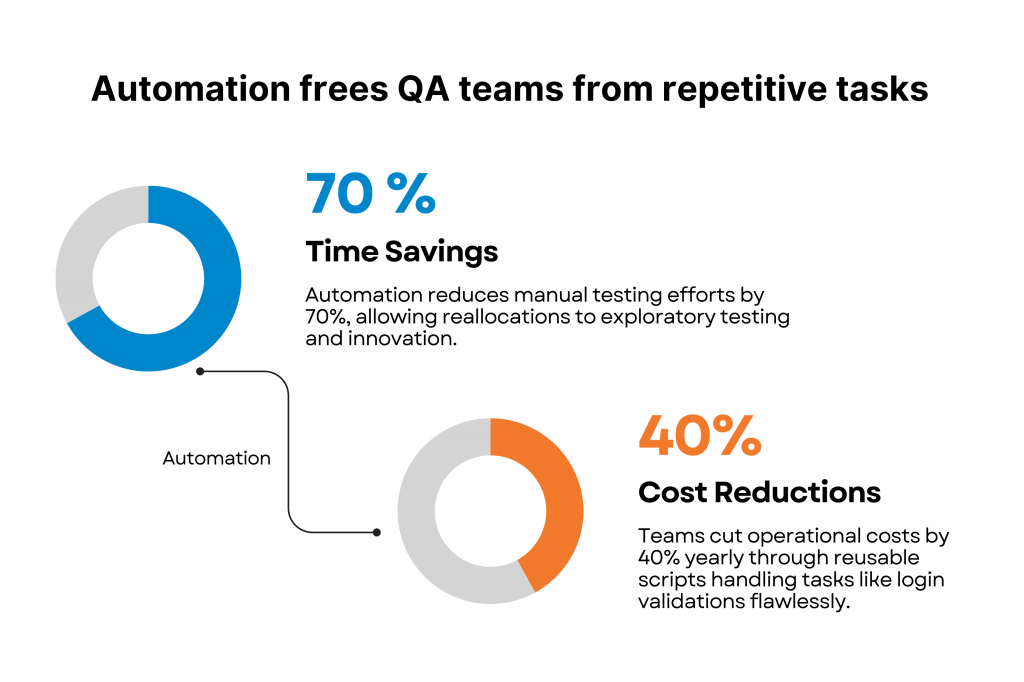
Automation slashes regression cycles from days to hours, preventing release bottlenecks. Key benefits include:
- Time savings: compounds rapidly, especially for teams with weekly release cadences.
- Error Reduction: eliminates human fatigue; tests run identical results at 3 AM or 3 PM.
- Parallel execution: allows workloads that previously took a full week to run simultaneously across dozens of environments.
“With automation tools, you can take the time to refine your tests and make them less brittle.”
– Martin Fowler, software developer and agile author.
Test coverage and software quality
Automation enables a lot more testing to be done. This allows for much greater test coverage than could be achieved by a manual testing team in a single sprint.
- Great scale – thousands of tests can be run across multiple operating systems, browsers and device types with a single trigger to a pipeline
- Early identification of issues – the breadth that can be achieved through automation allows for edge cases and regressions to be caught early in the development cycle where they are relatively cheap to fix
- Massive production Quality – In routine, when you run complete automated tests in your CI/CD pipeline, you see fewer bugs and make it to production on time.
Long-term cost reduction
The price you pay for automation is undeniably less than what you pay for in long term manual testing. Initial costs of automation testing often include paying for tools, framework setup, scripting time (Which is mostly done by AI), and the skilled engineers needed to build and maintain everything.
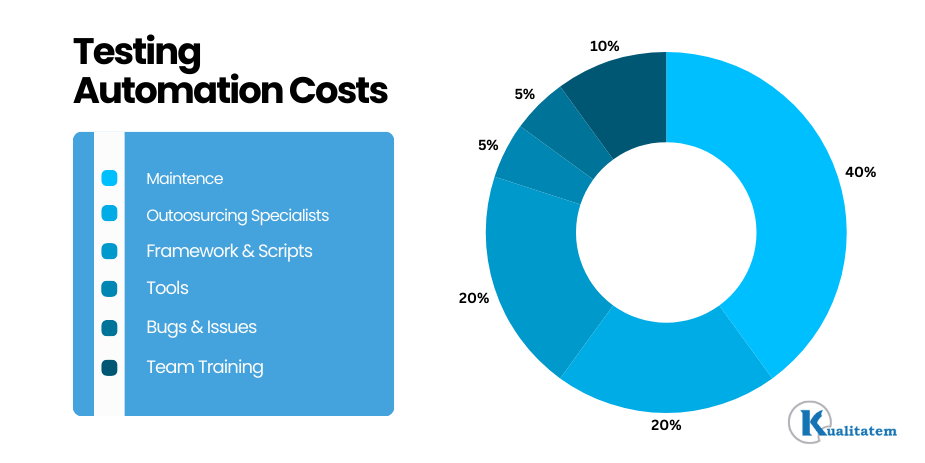
According to industry professional Viney
“The visible cost of test automation, such as tool licences, initial script development, and basic training, typically constitutes 30–40% of the total programme expense… The remaining 60–70% falls into three categories that rarely appear in the original business case.”
These categories are
- Infrastructure such as maintaining environments
- Maintenance due to ongoing updates
- Opportunity cost because your engineers are free with exploratory tests
By doing this, you get measurable ROI benefits over time.
Consistency and repeatability
Repeatability and Reproducibility
Automated tests can’t miss the steps that tired humans can miss. Doing the same tasks again and again naturally leads to a decrease in human attention. Biases also enter into the picture.
Automated scripts, however, run the same steps, in the same way, every single time. That sort of absolute consistency is just what you want in terms of regression coverage.
CI/CD integration
If you are deploying multiple times a week, you cannot rely on a manual test cycle as your primary gatekeeper. Automated suites that fit seamlessly into your pipeline to catch breaking changes before they ever get to staging. That is the difference between fast and safe delivery and foolhardy shipping. “Continuous delivery” is a nice way of saying “continuous risk” without automation.
Scalability across environments
Getting cross-browser and cross-platform coverage manually takes a massive amount of effort. Automation handles it in parallel. It costs you the exact same amount of time whether you are testing one environment or twenty. That build-in scalability is one of automations biggest structural advantages over manual testing.
Disadvantages of Automation Testing
High initial investment
High up-front investment
All of this impacts your budget before the suite provides a single drop of value – the framework setup, the tool licensing, the engineering hours to write stable scripts. Teams new to automation usually take two to four months to see a return on their investment. You need to be honest with yourself about that timeline instead of pretending it’s not there.
Maintenance overhead
Your scripts break when your app changes. A UI update, a renamed element, or a restructured user flow can instantly break a huge batch of tests. If you’re not budgeting time for your team to do ongoing maintenance, you’ll end up with a suite that technically runs, but doesn’t give you clear signals just noise. Honestly, that’s worse than no automation at all.
Limited coverage for human judgment
Automated tests only verify that the software behaves according to the spec. They can’t tell you if the UI is intuitive, if a workflow feels frustrating, or if a button looks visually broken. Usability, accessibility, and exploratory testing absolutely require a human touch. A perfectly green test run does not guarantee a good user experience.
Technical skill requirements
It takes real programming skills to write and maintain scripts that work reliably, and not all QA teams have that know-how available in-house. Jumping into automation without a solid technical foundation will inevitably result in brittle, poorly structured test code. You’ll create more work for maintenance than you’ll prevent.
The danger of over-automation
The mistake of trying to automate everything. The quickest way to rack up test debt is to automate willy-nilly. A green build is when your app does what your tests say it should. If those tests aren’t well designed, your suite gives you a false sense of confidence that becomes painfully obvious the moment a bug slips into production.
False confidence from poor test design
A green build simply means your app does what you expect it to do according to your tests. If those tests are badly written, your suite is giving you false confidence. Just because you have a large number of scripts doesn’t mean you have high quality coverage, and that difference becomes painfully apparent the instant there’s a bug in production.
When should you use automation testing?
Automation is most worthwhile when test cases are repetitive, stable and run often during the software development lifecycle.
It is the preferred way to go instead of manual testing if there are strict demands for speed, scale and exact repeatability.
In these typical scenarios, organizations usually get the best return on investment:
- Regression testing: Every change in the code requires regression coverage and doing this manually at scale is just not practical.
- Repeatable Tests: Any test that you run on a regular cadence is a good candidate for automation.
- Large scale applications: Complex workflows generate test matrices that are just too large to run manually in the normal release windows.
- CI/CD pipelines CI/CD pipelines require automated gates to catch regressions before they propagate to production.
- Cross-browser and cross-platform scenarios: Automation tackles the inherently parallel tasks of running exact verification across multiple browsers and devices simultaneously.
- Performance and load testing: Simulating realistic concurrent user loads manually is impossible, automation is the only viable path.
By implementing scripting in these areas, organizations drastically improve efficiency, ensure absolute consistency across runs, and build release confidence. However, it is crucial to remember that not every test case should be automated. Organizations must prioritize tests based on business value, execution frequency, and overall feature stability.
When should you avoid automation testing?
Automation is not a panacea. Manual approaches simply give better results in the following situations:
- Exploratory testing: You cannot automate a tester who navigates through a product and relies on human intuition to discover unexpected behaviors.
- Fast-changing interfaces: actively redesigned features create an endless treadmill of script maintenance. Don’t rely on automated coverage until the feature is really stable.
- Short term or one-off projects: If a test is only going to run once or twice, it is much cheaper to run it manually.
- Small applications with limited scope: An internal tool doesn’t need to be an all-encompassing automation framework.
Usability and accessibility evaluation: There is no code that can replace the judgment of a human being in deciding if a user flow is really confusing.
Manual testing vs automation testing
It is a common misconception that manual and automated testing are locked in a zero-sum competition; in reality, they are complementary approaches.
The question is simply which testing tasks belong where.
Automation testing is purpose-built and best suited for repetitive verification, regression suites, performance testing and large-scale test execution. Manual testing remains absolutely essential for exploratory testing, usability testing, user experience (UX) evaluation, and reviewing rapidly changing features.
Most modern QA teams use a strategic combination of both approaches to achieve the absolute best testing outcomes.
Best practices for successful automation testing
The difference between automation that compounds value and automation that collapses comes down to a few early structural decisions.
Focus on these practical recommendations to maximise the return on your automation investment:
- Start early (Shift-Left Testing): begin writing scripts in parallel with development early in the software development life cycle to catch defects when they are the cheapest to fix.
- Prioritize the right tests: Focus your efforts on stable, repetitive and high-risk test cases.
- Don’t automate everything: Build the discipline to leave low-frequency, exploratory, and unstable scenarios out of the automated suite.
- Build modular, reusable scripts: Utilise helper functions and page objects to simplify maintenance so that when application changes, updates happen in one place.
- Treat the framework like production code: Regular reviews and update the test scripts as the application evolves to ensure they stay in sync with the product.
- Integrate into CI/CD pipelines: Connect automated tests directly into your CI/CD pipelines to support continuous testing and fast, safer releases.
- Monitor and eliminate flaky tests: Unstable test results erode trust; investigate, fix or remove flaky tests on contact to improve test reliability.
- Regular review and optimise: Conduct audits to remove obsolete or duplicate test cases that no longer justify their maintenance costs.
Organizations that lack the internal expertise or resources to build scalable automation frameworks often partner with providers offering Test automation services to accelerate implementation, improve test coverage, and support continuous delivery.
Common automation testing pain points
Most of the headaches with automation encountered in real-world projects are entirely predictable. The difference between building a sustainable program and accruing test debt is catching them early.
Brittle scripts from UI changes
Frequent UI changes make test scripts extremely brittle and result in a huge increase of maintenance efforts. Define solid, stable locator conventions (e.g., data-testid, ARIA roles) before writing scripts to avoid this pain point.
Flaky tests
It’s hard to trust your automation efforts when the tests pass and fail inconsistently and you haven’t changed any code. Monitor the flaky tests closely and maintain a separate log of them, so that you can fix them as real defects.
Scale and overhead of maintenance
As applications grow, it is very challenging to maintain large automation frameworks. Design for modular tests and parallel execution from the beginning.
Poor test design at scale
Accumulating duplicate test cases and trying to automate everything easily reduces the effectiveness of your suite. It is vital to select the right test cases for automation and regularly prune dead weight through routine test maintenance.
Practical steps to reduce these pain points:
- Establish locator standards (data-testid or ARIA roles) before writing scripts
- Track flaky tests separately and resolve them as defects, not edge cases
- Design for parallel execution from the start; don’t let the suite become a sequential bottleneck
- Audit the suite quarterly; remove scripts that don’t justify their maintenance cost
- Apply the same code review discipline to test scripts as to application code
Wrapping up
Automation testing can provide some of the most effective returns for a software company investing in quality. There are measurable benefits including increased test coverage, faster regression cycles, smooth integration into CI/CD and long term cost savings. However there are also limitations. Maintenance issues, skill gaps and situations where human intuition cannot be replicated all exist.
Companies that get value from automation make thoughtful decisions about what to automate, how to structure their automation and how to keep their test suite up to date as the product changes over time. By partnering with experienced test automation services companies, organizations can create scalable solutions that provide long term value and support for continuous delivery.
Kualitatem’s QA engineers have over a decade of experience building and fixing automation solutions for enterprise SaaS, healthcare, government, FinTech and other industries. If you are looking to implement or have an existing automation solution that isn’t working, we can help.