
A Complete Guide on Multi-Agent Testing
February 24, 2026



Most QA engineers, DevOps, and Test automation teams do not understand the superpowers of LLMs and AI, keeping their use limited to a chat tool used for writing test cases, generating BDD scenarios, and asking basic queries. While AI usage in software testing rose from 7% in 2023 to 16% by mid-2025, a large majority of organizations are still only in the piloting or experimentation phase, not full production.
The other issues and ethical considerations when QA engineers add AI in their testing workflows are
Struggling to move beyond AI testing experiments? At Kulaitatem, we help teams turn ideas into production-ready AI automation testing services with clear processes and measurable outcomes.
According to McKinsey & Company research, 82% of QA professionals believe AI skills will be critical for the future of testing. However, many still underestimate the shift from “human-directed” (AI-assisted) to “human-verified” (AI-autonomous) models of work.
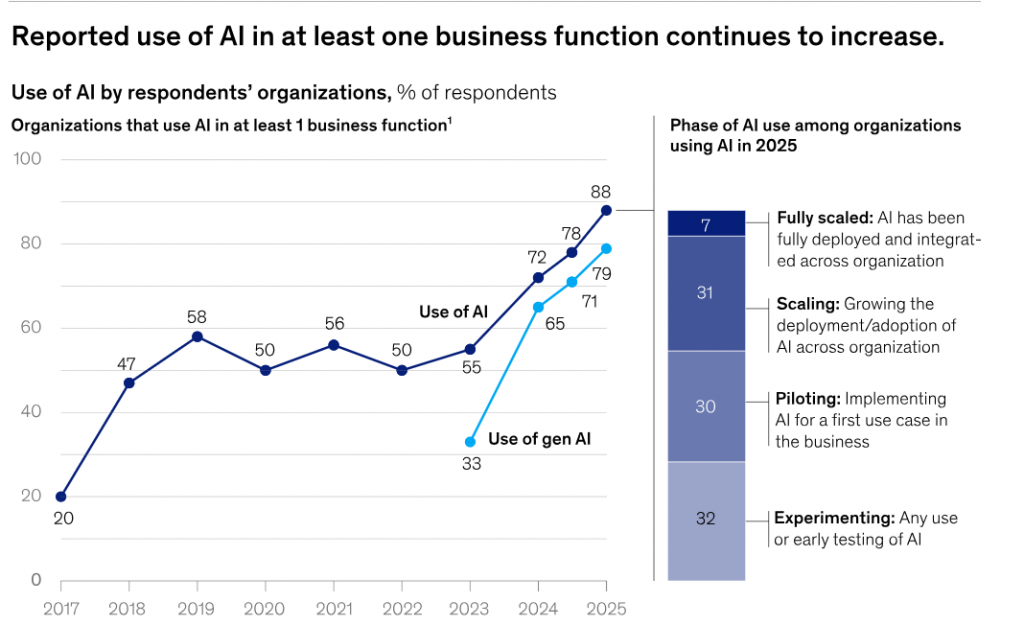
The Mickensy data from the Stat of AI 2026 report shows that 62% of testers are still piloting and experimenting use of AI as a early stage. Even though other industries are adopting AI agents fast, the software testing industry is still at a very early stage.
Most organizations are either not using AI agents at all or are just beginning to experiment. This suggests a large opportunity gap; despite the hype around AI-driven testing, enterprise-level implementation remains limited.
Furthermore, if we look at the opinion of 50% of AI leaders or Automation Experts who have scaled with AI agents, they expect AI to drive transformative change. In contrast, 48% of other companies expect only incremental improvements.
“Successful companies are not using AI as a tool but treat AI as a core part of their strategy and future growth.”
Kualitatem, Inc
If you want to become a leader of engineers who build AI-powered systems to automate QA workflows using local LLMs and multi-agent architectures, then this guide is a goldmine of knowledge for you
Let’s start by understanding the core concepts
Let’s start by understanding the core concepts
In a multi-agent system testing, multiple AI agents work collaboratively or competitively toward a goal. All agents coordinate as a team to accomplish tasks.
Here is how you can understand the concept better
| Single-Agent AI Testing | Multi-Agent AI Testing |
| Automates a single QA task, such as generating test cases or analyzing logs. | Automates multiple QA tasks at the same time, like generating test cases, analyzing logs, and simulating user behavior. |
| Works independently without coordinating with other tools or agents. | Agents work together, passing information and coordinating to complete complex QA workflows. |
| Can catch errors within its specific task only. | Can find system-level issues, integration problems, and unexpected errors caused by interactions between agents. |
| Testing and QA improvements are limited to the agent’s individual capability. | Testing and QA improvements cover the whole process, providing smarter, more comprehensive automation. |
| Easier to implement but offers limited scalability. | More complex to implement but scales to handle large, multi-step QA workflows. |
| Best for simple, repetitive QA tasks. | Best for complex testing scenarios that require collaboration and orchestration. |
AI Testing Agents make traditional automation much smarter. They can do things that normal automation can’t. Here’s what they can do
They learn from past test runs and feedback. If something fails or a UI changes, they adjust automatically.
Agents can run tests at the same time (e.g., one for web, one for API), covering more ground faster.
Agents can focus on different tasks (UI, API, database) and coordinate via a lead agent
You can give them plain-English instructions like “Test login functionality,” and they’ll turn it into test steps.
If a test breaks because an element moved or an ID changed, they figure out a way to continue instead of just failing.
They look at code changes and risks to decide which tests are most important to run first.
In a multi-agent setup, agents can work together like a team one handles data, another handles test logic, and so on.
They can simulate many user actions or run tests in parallel, covering more in less time.
LangChain is a Python framework that helps you connect large language models (LLMs) to tools, data, and custom logic. It’s like a bridge between AI and real-world testing tasks.
LangChain integrates with tools like Playwright, letting QA engineers script browsers programmatically. For example, NavigateTool moves to a page, and ClickTool clicks buttons or links. Agents can also extract text or page elements.
LangChain is great for building step by step workflows. This makes it ideal for predictable QA tasks where actions need to happen in order. It provides ready-made “agents” that can carry out tasks automatically. The new create_agent API (1.0) makes it easier to set up these agents.
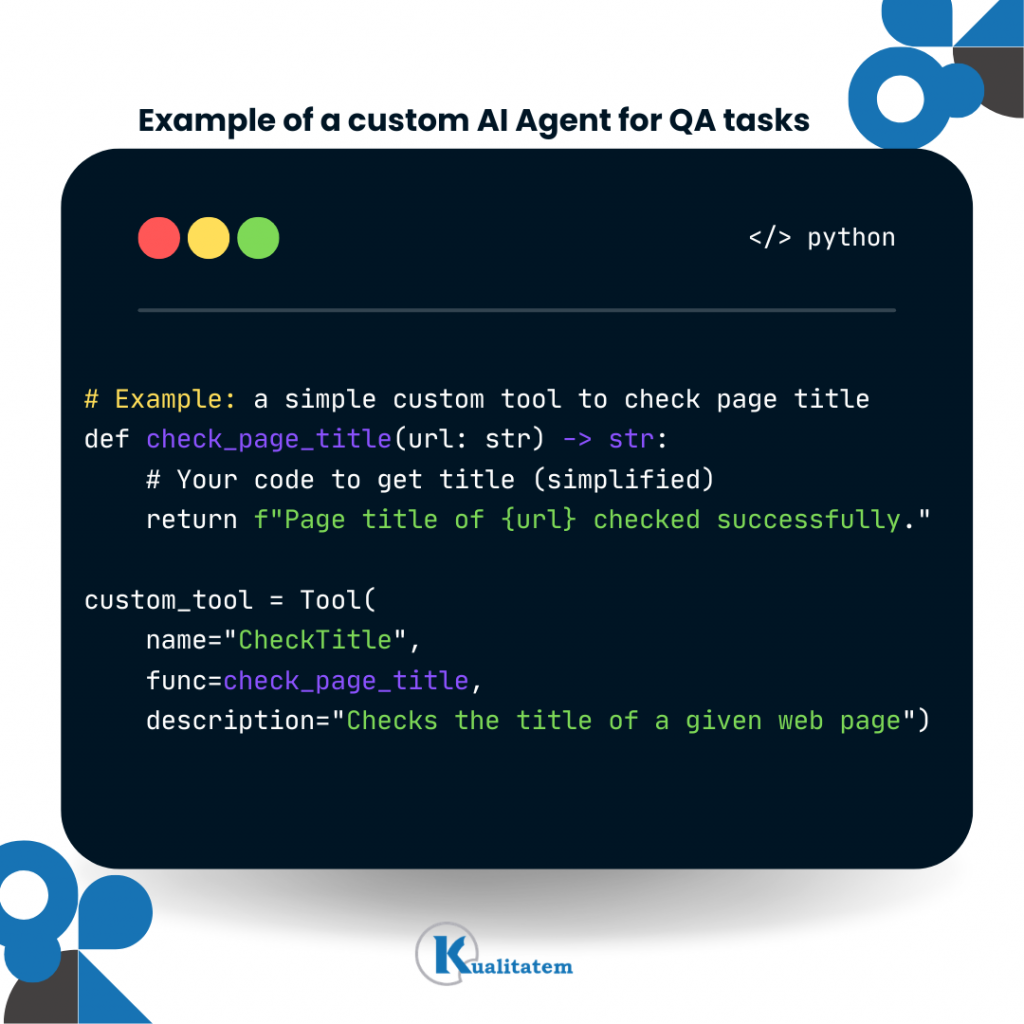
For complex flows that need to remember state or context, LangGraph helps manage and coordinate the sequence of tasks. LangChain can do things like web searches or query knowledge graphs (like Wikipedia) and easily connects to common LLM providers.
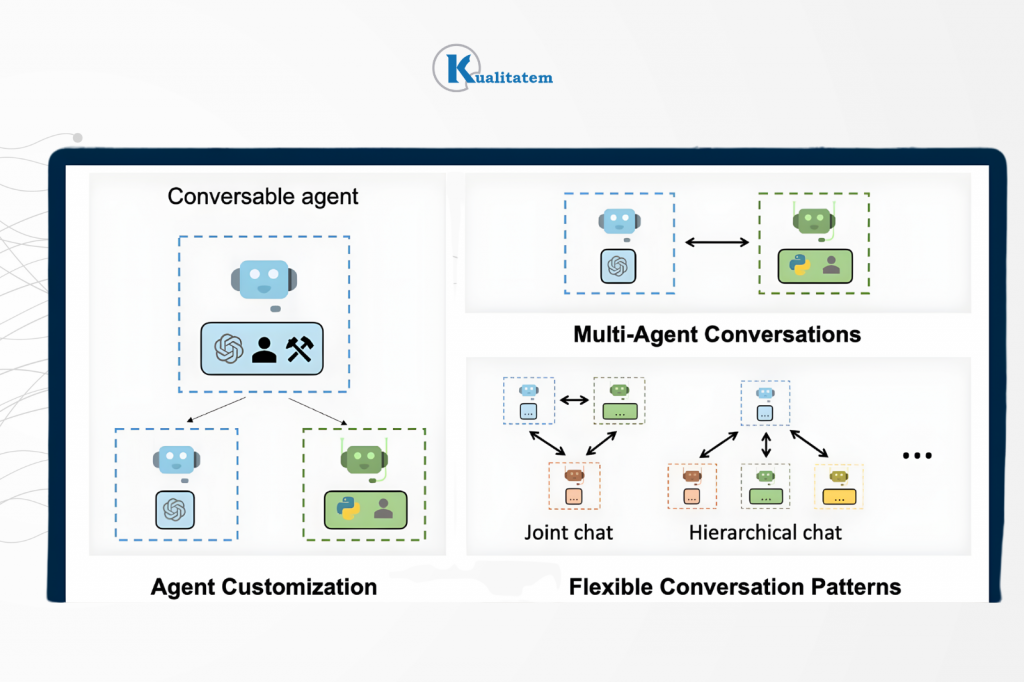
AutoGen is a framework from Microsoft designed specifically for multi-agent workflows. Imagine instead of building one smart AI, you build a team of AI agents that talk to each other like coworkers.
With AutoGen, you can:
You could create agents like:
These agents automatically pass messages to each other just like testers sharing updates.
AutoGen provides AgentChat APIs, which allow agents to send messages,
This is helpful for QA teams that want control over decisions. Great for experimentation and debugging. AutoGen is less strict compared to some workflow frameworks.
Instead of forcing a fixed step-by-step flow, it gives agents a role and lets them collaborate naturally. This makes it ideal for complex workflows, research tasks, exploratory QA scenarios, and multi-step problem solving.
The OpenAI Agents SDK (formerly called Swarm) is a lightweight Python framework for building multi-agent systems.
Imagine AutoGen is a full team management system and the OpenAI Agents SDK is a lightweight toolkit to quickly build small AI teams. It gives you just the essential building blocks, nothing much heavy.
The SDK mainly provides three things:
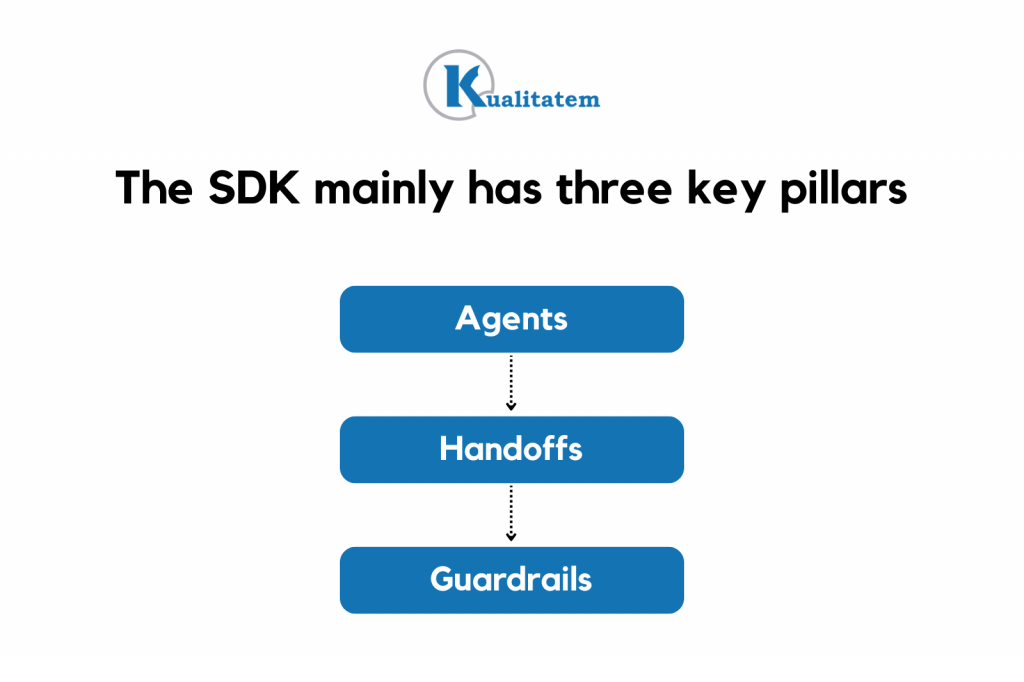
The OpenAI Agents SDK is great when you want to quickly prototype agent workflows, create controlled agent loops, and build simple multi-step GPT pipelines. Furthermore, if you want to add validation checks between steps
For example:
→ Agent 1 generates test cases.
→ Guardrail checks formatting.
→ Agent 2 validates completeness.
→ Agent 3 summarizes output.
Features of OpenAI Agents SDK
It mainly works with OpenAI models. It’s not as flexible for non-OpenAI model ecosystems. In contrast, it is different from other frameworks because it is lighter than AutoGen, it is way more structured than pure LangChain flows, and less orchestration-heavy for faster prototyping. If AutoGen feels like building a company, this SDK feels like building a small efficient team with clear task delegation.
Ollama (Running Models Locally)
Ollama helps you run open-source large language models (LLMs) on your own machine. Simply, instead of calling OpenAI or another cloud API, you run the AI model locally. This is mostly useful for Data privacy (no external API calls) at a lower cost, working offline and avoiding token limits.

For example:
This allows QA teams to use models like Gemma, Claude (if supported locally), Other quantized open-source models. All without sending data outside the organization.
Playwright is used for browser automation. It allows AI agents to click buttons, fill forms, navigate pages and validate UI elements.
When integrated with:
It enables AI agents to act like real users in the browser. So your AI agent doesn’t just “think” it actually interacts with the UI.
You can also wrap traditional QA tools and expose them to agents, such as:
This means your AI agent can call these tools just like a function. So, agents can run API tests, trigger mobile automation, query databases and validate backend responses.
When selecting a framework, QA teams should think about:
Look at the matrix comparison table at the end of this blog to understand your scenario and best framework.
Think of multi-agent QA architecture as a way of designing your QA system, not a product. Imagine a software QA system as a city. Each agent is like a specialized worker, but they don’t act in isolation, they’re coordinated, remember context, use specialized tools and feed results into a central CI/CD pipeline. Here’s how it’s structured:
The first layer acts as the “city planner,” deciding which agent does what and in what order. It includes a scheduler for automated test runs. Task distributor to specialized agents (e.g., API tester, UI tester, security tester). Monitors progress and dynamically reallocates tasks.
For Example: Instead of one monolithic test suite, orchestration dynamically spins up agents for critical paths or high-risk areas.
The memory layer provides context and persistence for agents. Moreover, this stores previous test results, bug reports, or learned patterns. Allows agents to reason based on history (e.g., “This API has failed in the past under X conditions”). Through these layers, most companies can reduce duplicate work, enables intelligent regression testing, and allow agents to adapt over time.
Building multi-agent QA architecture can feel complex. Kulaitatem’s TMMI Level 5 experts help you design scalable AI testing services for your custom frameworks while keeping governance and quality intact. We integrate modern AI tools into your pipelines so you can reduce time-to-market, improve coverage, and ship with confidence.
Tool as discussed above, are a catalyst for agents’ access to specialized AI test automation tools they need to execute their work.
Examples:
This is the “factory floor” where the actual tests are executed. Significantly faster and more adaptive than scripted sequential automation.
In order to connect the multi-agent system to your delivery pipeline. You need to execute this layer.
Through this QA teams becomes a continuous, intelligent feedback loop, not just a gate.
Here are some recommendations for CTOs’ Project Managers before deploying multi-agent testing in their Dev/Ops.
Approve pilot projects in low-risk areas, like regression smoke tests or small feature modules.
Tell QA engineers to implement a single-agent workflow first (e.g., LangChain for automated test generation). Once it works reliably, add more agents for parallel tasks like log analysis or UI automation.
Use Prebuilt Agent Tools
Encourage teams to leverage existing agent tools instead of building everything from scratch. Let team use use agents for common QA tasks, such as:
This saves development time and accelerates pipeline setup.
Embrace Continuous Learning
Support periodic retraining and updates for AI agents. Allocate resources for monitoring and improving AI workflows. Let QA automation engineers feed multi-agentic AI recent test results, failures, and requirement changes. Ensure agents adapt to new information automatically to reduce repeated errors.
Prioritize High-Value Tests
Guide teams to focus on critical scenarios rather than automating everything at once. Use agent intelligence to identify risk areas, scan code changes, and determine which tests to re-run or generate next.
Measure & Monitor Performance
Track overall ROI of agentic QA. Compare metrics like cycle time, coverage, and defect detection rates against previous manual processes. Log multi-agent agent activities, test coverage, failures caught and maintenance effort. Adjust workflows based on performance data.
Ensure critical decisions, exploratory testing, and high-risk paths always have human approval. Use agents to to augment your work, not replace testers. Include humans in the loop for verification and decision-making in edge cases.
Want to adopt multi-agent testing without long trial-and-error cycles? Kulaitatem helps you implement intelligent automation that fits your product, team, and delivery goals.
| Scenario | Use LangChain | Use AutoGen | Local LLM (Ollama) | Use Cloud LLM |
| Step-by-step test workflows (API chains, ETL validation, regression flows) | ✅ Best choice Designed for structured pipelines | ❌ Not ideal – Overkill for linear flows | Optional | Optional |
| Multi-role collaboration (Tester ↔ Dev ↔ Reviewer agents) | ⚠ Possible but limited | ✅ Best choice – Built for agent conversations | Optional | Recommended for better reasoning |
| RAG-based test case generation | ✅ Strong support for RAG pipelines | ⚠ Possible but less structured | Good for cost control | Better for complex reasoning |
| UI automation with browser control | ✅ Works well with Playwright tools | ✅ Can coordinate UI + reasoning agents | Good for secure environments | Useful if UI logic is complex |
| Cost-sensitive projects | ✅ Efficient | ⚠ Depends on agent count | ✅ Best option – No API cost | ❌ Higher ongoing cost |
| High-security / On-prem data | ✅Great | ✅Excellent | ✅ Best option (Data stays internal) | ❌ May violate data policies |
| Complex reasoning / Ambiguous requirements | ⚠ Limited by workflow structure | ✅ Strong collaboration capability | ⚠ Depends on model quality | ✅ Best reasoning performance |
| Scaling to many interacting agents | ⚠ More manual coordination needed | ✅ Designed for scaling multi-agent systems | Optional | Recommended |
| CI/CD integration | ✅ Strong pipeline fit | ⚠ Requires more setup | Optional | Optional |
| Rapid prototyping agent loops | ✅ Simple setup (1.0 agents API) | ✅ Good for conversational prototypes | Good | Good |
Let an agent read requirement docs (PDFs, Word, Jira tickets) and generate structured test cases automatically (BDD/Gherkin).
Use a LogAnalyzer agent to scan runtime logs or test reports for errors and performance issues. Pair it with a TestCaseGenerator agent to suggest new checks automatically.
Assign agents to browser tasks via Playwright or Selenium (login, checkout, search). Use multiple agents for parallel flows, coordinated by a lead agent.
Create small “agent groups” that mimic team collaboration:
Automate regression or exploratory testing using these loops.
Run tests on local + cloud models in parallel to find more unique issues (~45% more).
Use local models for speed, cloud models for complex reasoning.
About us:
Kualitatem has set a long-standing benchmark for excellence in providing test automation as a service. We provide a triple-layer of trust through our internationally recognized certifications, including ISO 27001 for data security, ISO 9001 for process integrity, and TMMi Level 5 for world-class testing maturity.


Our experts are all ready. Explain your business needs, and we’ll provide you with the best solutions. With them, you’ll have a success story of your own.
Contact us now and let us know how we can assist.